Loading
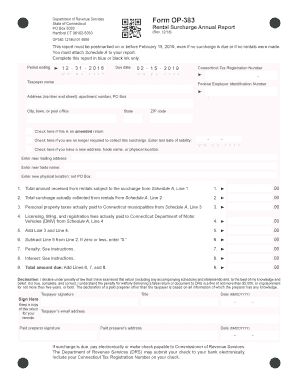
Get Ct Op-383 2018
How it works
-

Open form follow the instructions
-

Easily sign the form with your finger
-

Send filled & signed form or save
How to fill out the CT OP-383 online
This guide provides a comprehensive overview of how to complete the CT OP-383, the Rental Surcharge Annual Report. By following these step-by-step instructions, users can navigate the online form with ease, ensuring accuracy and compliance with the State of Connecticut's requirements.
Follow the steps to successfully complete the CT OP-383 online.
- Press the ‘Get Form’ button to access the online version of the CT OP-383 form.
- In the section labeled 'Period ending,' enter the date for which you are reporting. For example, if you are reporting for the year 2018, input '12/31/2018'.
- In the 'Taxpayer name' field, provide the full legal name of the entity or individual completing the form.
- Fill in the address section with the complete street address, including any apartment number or PO box.
- For the 'City, town, or post office' field, enter the appropriate municipality to which your address corresponds.
- Input your Connecticut Tax Registration Number and Federal Employer Identification Number in their respective fields.
- If applicable, check the boxes for an amended return, if you no longer need to collect the surcharge, or if there has been a change of address or other relevant information.
- Complete Schedule A first, which involves reporting the rental amounts and surcharges collected. Then input the total figures from Schedule A into the corresponding lines on the CT OP-383 form.
- For lines 1 through 9, systematically document the amounts as follows: total rental income, surcharge collected, personal property taxes, DMV fees, and any penalties or interest.
- In the declaration section, verify that the information is accurate and sign and date the form in the designated fields.
- Once completed, users can save changes, download, or print the form for their records.
Complete the CT OP-383 online today to ensure timely submission and compliance with Connecticut regulations.
Get form
Experience a faster way to fill out and sign forms on the web. Access the most extensive library of templates available.
You can verify a CT resale certificate by checking with the Connecticut Department of Revenue Services, which maintains records of valid sellers. Ensure you request confirmation directly for accuracy. To simplify the verification process, CT OP-383 provides tools and insights that can streamline your search.
Get This Form Now!
Use professional pre-built templates to fill in and sign documents online faster. Get access to thousands of forms.