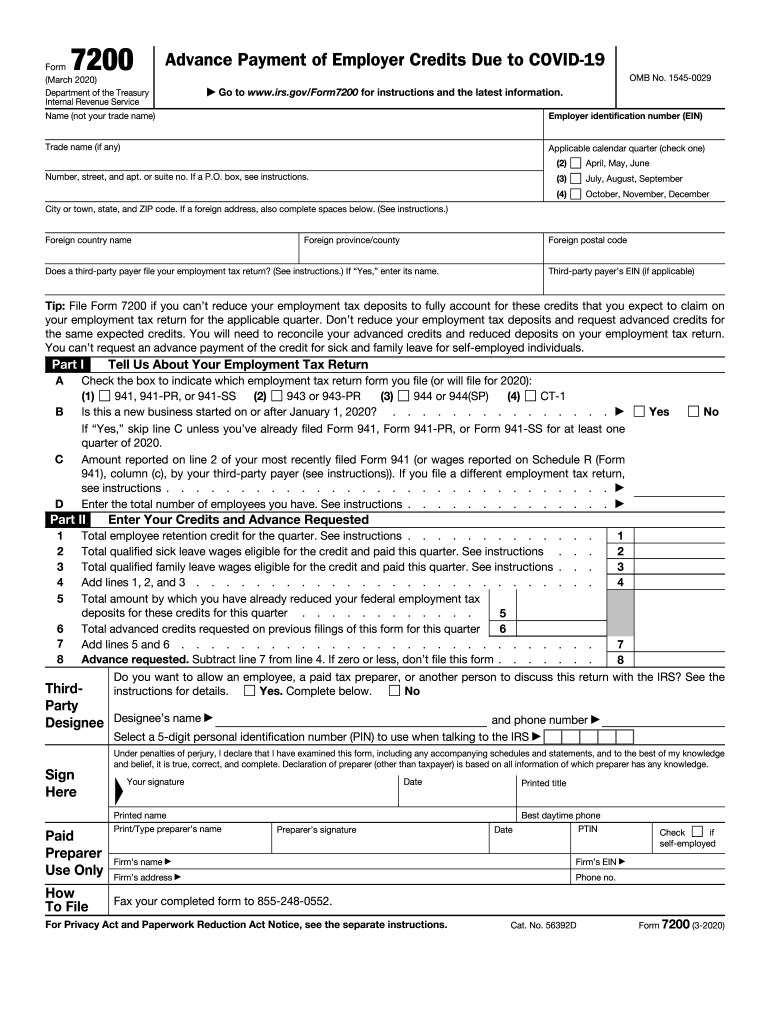
The latest information. Name (not your trade name) Employer identification number (EIN) Trade name (if any) Applicable calendar quarter (check one) Number, street, and apt. or suite no. If a P.O. box, see instructions. (2) April, May, June (3) July, August, September (4) October, November, December City or town, state, and ZIP code. If a foreign address, also complete spaces below. (See instructions.) Foreign country name Foreign province/county Foreign postal code Does a third-pa.
Loading

Open form follow the instructions

Easily sign the form with your finger

Send filled & signed form or save
How to fill out the IRS 7200 online
This guide provides clear and concise instructions for filling out the IRS Form 7200 online. Users will find step-by-step guidance tailored to their needs, ensuring a smooth experience.
Follow the steps to successfully complete the IRS 7200 form online.
- Press the ‘Get Form’ button to obtain the form and open it in your editor.
- Complete the name field with the legal name of the entity submitting the form, not the trade name.
- Enter the employer identification number (EIN) in the designated field.
- If applicable, fill in the trade name of the entity.
- Select the applicable calendar quarter by checking one of the provided options.
- Provide your business address, including number, street, apartment or suite number, and city, state, and ZIP code.
- Indicate if a third-party payer files your employment tax return by selecting 'Yes' or 'No' and entering the third-party payer’s name and EIN if you selected 'Yes'.
- In Part I, indicate which employment tax return form you file by checking the appropriate box.
- If applicable, state whether your business is new (started after January 1, 2020) and provide the requested preliminary information.
- Input the total amount reported on line 2 of your most recently filed employment tax return or relevant wages.
- Enter the total number of employees on the next line.
- In Part II, complete the section regarding your credits and advance requested, detailing the employee retention credit and qualified sick and family leave wages.
- Perform the necessary calculations as directed to determine the advance requested.
- Decide whether to allow another person to discuss this return with the IRS, and if so, complete the provided fields for the designee.
- Sign and date the form, making sure to include printed names and titles as appropriate.
- Finally, review your entries for accuracy, then save your changes, download, print, or share the completed form as needed.
Complete and submit your IRS 7200 form online today for the advance payment of employer credits.
Experience a faster way to fill out and sign forms on the web. Access the most extensive library of templates available.
Related content
The last day to file Form 7200, Advance Payment of Employer Credits Due to COVID-19, was...
IRS EMPLOYEE RETENTION CREDIT. The Employee Retention Credit is a fully refundable tax...
Apr 15, 1976 — Increased section 179 deduction dollar limits. The maximum amount you can...
Get answers to your most pressing questions about US Legal Forms API.
Como saber quanto devo ao IRS?
You can determine your IRS obligations by reviewing your tax returns, income statements, and any applicable credits. Online tools provided by the IRS make this easier, including calculators that account for the IRS 7200 eligibility. Additionally, consulting tax professionals can offer tailored guidance based on your situation. Keeping records organized simplifies the evaluation process.
O que significa IRS nos Estados Unidos?
In the United States, IRS stands for Internal Revenue Service. This agency executes tax laws, collects taxes, and oversees tax-exempt organizations. The IRS also administers programs related to business benefits, including the IRS 7200. A clear grasp of the IRS's function can empower you as a taxpayer.
O que é IRS em português?
IRS translates to 'Serviço de Receita Interna' in Portuguese. It represents the U.S. government agency responsible for tax collection. The IRS oversees various tax programs, including those related to the IRS 7200 for tax credits. Understanding its role in taxation can help you better manage your financial responsibilities.
Como funciona o IRS nos EUA?
The IRS, or Internal Revenue Service, manages tax collection in the United States. It ensures compliance with federal tax laws, including those related to the IRS 7200, which pertains to the Employee Retention Credit. By handling tax returns and payments, the IRS plays a vital role in the economy. Understanding its functions can help taxpayers navigate their obligations effectively.
Use professional pre-built templates to fill in and sign documents online faster. Get access to thousands of forms.
If you believe that this page should be taken down, please follow our DMCA take down process here.
This form is available in several versions. Select the version you need from the drop-down list below.