Loading
Get Ct Drs Schedule Ct K-1 2015
How it works
-

Open form follow the instructions
-

Easily sign the form with your finger
-

Send filled & signed form or save
How to fill out the CT DRS Schedule CT K-1 online
This guide provides clear and comprehensive instructions for filling out the CT DRS Schedule CT K-1 online. Whether you have experience or are new to digital document management, these steps will help you complete the form accurately and efficiently.
Follow the steps to successfully complete your Schedule CT K-1
- Click ‘Get Form’ button to access the Schedule CT K-1 and open it in your preferred online editor.
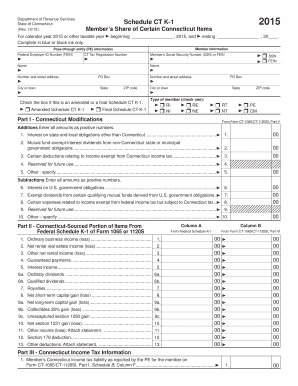
- Begin by filling in the member information section at the top of the form. Provide the pass-through entity (PE) information, including the Federal Employer Identification Number (FEIN) and the Connecticut Tax Registration Number. Fill in the name, address, and city or town details.
- Indicate if this is an amended or a final Schedule CT K-1 by checking the correct box. Include the member’s Social Security Number (SSN) or FEIN as applicable.
- Specify the type of member by checking one of the options provided (e.g., final schedule, resident individual, non-resident individual, etc.).
- Move to Part I, which addresses Connecticut modifications. Enter all amounts in the appropriate fields, ensuring they are listed as positive numbers.
- In Part II, complete the Connecticut-sourced portion of items from the Federal Schedule K-1. Enter the relevant amounts for ordinary business income, rental income, interest income, and any other applicable fields.
- For Part III, record the member’s Connecticut income tax liability as reported by the PE. Look at the relevant parts of Form CT-1065/CT-1120SI to obtain accurate figures.
- Proceed to Part IV to summarize the Connecticut income tax credits. Enter the total credits earned and amounts allowed on behalf of the member on the composite return.
- Once all sections are completed, review the information for accuracy. You can then save changes, download a copy, print for your records, or share the completed form as necessary.
Start filling out your Schedule CT K-1 online today for accuracy and convenience!
Get form
Experience a faster way to fill out and sign forms on the web. Access the most extensive library of templates available.
Related links form
The filing threshold for Connecticut varies across different tax forms and statuses. For instance, income thresholds may change based on whether you are filing as single, married, or head of household. A detailed look at the CT DRS Schedule CT K-1 can provide the specifics you need for filing requirements. Platforms like uslegalforms offer relevant information to guide you through the requirements efficiently.
Get This Form Now!
Use professional pre-built templates to fill in and sign documents online faster. Get access to thousands of forms.