Loading
Form preview
  • US Legal Forms
  • Other Templates
  • Tax Forms
  • Connecticut Tax Forms
  • Ct Drs Ct-w4 2018

Get Ct Drs Ct-w4 2018

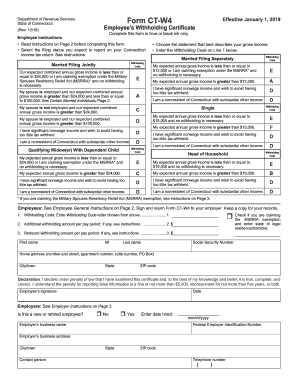
Nk only. Read instructions on Page 2 before completing this form. Select the filing status you expect to report on your Connecticut income tax return. See instructions. Married Filing Jointly Withholding Code Our expected combined annual gross income is less than or equal to $24,000 or I am claiming exemption under the Military Spouses Residency Relief Act (MSRRA)* and no withholding is necessary. E My spouse is employed and our expected combined annual gross income is greater t.

How it works

  1. Open form

    Open form follow the instructions

  2. Easily sign form

    Easily sign the form with your finger

  3. Share form

    Send filled & signed form or save

How to fill out the CT DRS CT-W4 online

The CT DRS CT-W4 is an important document for employees in Connecticut, providing their employers with the necessary information for accurate tax withholding. This guide will walk you through the process of filling out the CT-W4 online, ensuring you complete each section correctly.

Follow the steps to fill out the CT DRS CT-W4 accurately

  1. Click ‘Get Form’ button to obtain the form and open it in the editor.
  2. Begin by reading the instructions on Page 2, as this will help you understand the requirements for completing the form.
  3. Select your expected filing status from the options provided, such as 'Married Filing Jointly' or 'Single'.
  4. Based on your filing status, choose the appropriate withholding code that best fits your expected gross income.
  5. Enter the withholding code you selected into Line 1 of the form.
  6. If applicable, specify any additional withholding amount per pay period on Line 2. If you wish to reduce your withholding, indicate any reduced withholding amount on Line 3.
  7. Complete the personal information section by filling in your first name, middle initial, last name, social security number, home address, city/town, state, and ZIP code.
  8. Read and understand the declaration statement. Sign and date the form to confirm the information is true and complete.
  9. Lastly, save the changes you made to the form, and you can choose to download, print, or share it with your employer.

Complete your forms online today to ensure accurate tax withholding and stay compliant.

Get form

Experience a faster way to fill out and sign forms on the web. Access the most extensive library of templates available.

Related content

Form CT-W4
Form CT-W4, Employee's Withholding Certificate, provides your employer with the necessary...
Learn more
Form CT-W4
Form CT-W4, Employee's Withholding Certificate, provides your employer with the necessary...
Learn more
MT3DMS-A-Modular-Three-Dimensional-Multispecies...
by C Zheng · 1999 · Cited by 2113 — Zheng, Chunmiao, 1962-. MT3DMS: a modular...
Learn more

Related links form

OH Form IR - Mason 2017 OH Form IR - Mason 2016 OH Form IR - Mason 2014 OH Form IR - Mason 2012

Questions & Answers

Get answers to your most pressing questions about US Legal Forms API.

Contact support

The amount of CT state tax that should be withheld from your paycheck depends on your income level, filing status, and the number of allowances you claim. You can utilize the tables provided in the CT DRS CT-W4 documentation to determine your correct withholding amount. Regularly reviewing your tax situation can help ensure that you are not under- or over-withholding, which may lead to complications during tax season. By planning ahead, you can manage your tax liabilities effectively.

Your choice of withholding code in CT should depend on your individual tax situation, such as your expected income and household composition. Refer to the CT DRS CT-W4 guidelines for detailed examples of each code. This helps ensure that you are withholding the correct amount from your paycheck. If you're unsure which code applies to you, consider consulting with a tax professional for personalized advice.

Filling out the CTW4 follows similar steps to the standard W4 but includes tax specifics for Connecticut residents. You need to enter your personal details, specify your filing status, and accurately indicate your number of allowances. Following the CT DRS CT-W4 instructions can help clarify any uncertainties you might have. Once you've filled out the CTW4, submit it to your employer promptly so they can adjust your withholding accordingly.

CT payroll taxes include income taxes that are withheld from employee wages as well as other mandatory contributions such as unemployment insurance. Employers must comply with regulations set by the CT DRS CT-W4 to calculate the appropriate amount of state income tax to withhold. Understanding these taxes helps you plan your finances better and ensure you meet your tax obligations. It's essential to stay informed about any changes in tax rates that may affect your payroll obligations.

Choosing the correct withholding code in CT depends on your personal circumstances. You can find a list of withholding codes on the CT DRS CT-W4 instructions. Consider factors such as your filing status and any additional adjustments you may need. Picking the right code helps ensure that your state tax withholding aligns with your overall tax obligations.

Completing the CT W4 requires you to enter your personal information, choose your filing status, and decide on the number of allowances you need. You can refer to the CT DRS CT-W4 instructions for specific details catered to Connecticut tax laws. Make sure to provide accurate estimates of your income and deductions to avoid under- or over-withholding. Once completed, submit the form to your employer for them to process your earnings.

The correct way to fill out a W4 involves providing accurate personal details and determining your withholding needs. Make sure you read the instructions carefully to ensure you correctly calculate the right number of allowances based on your financial status. It’s also important to review your W4 regularly, especially after major life changes, to keep your withholdings aligned. If you have questions, the CT DRS CT-W4 form offers specific guidance for Connecticut residents.

To fill out your W4 form, start by entering your personal information, such as your name and address. Next, you will need to indicate your filing status, which can be single, married, or head of household. After that, you can specify the number of allowances you want to claim, considering your income and family situation. Finally, remember to sign and date the form before submitting it to your employer for processing.

To get your W4 form, you can download it directly from the IRS website or your state tax authority’s website. If you need the CT version, access the CT DRS CT-W4 for Connecticut-specific guidelines. Alternatively, your employer may provide you with a blank form to fill out, ensuring your withholdings align correctly.

Completing the CT-W4 involves filling out the form with your personal information, indicating your filing status, and determining the number of allowances you want to claim. Ensure that you provide accurate information since this affects your tax withholding throughout the year. For comprehensive guidance, consider utilizing resources available online, including those provided by uslegalforms.

Get This Form Now!

Use professional pre-built templates to fill in and sign documents online faster. Get access to thousands of forms.
If you believe that this page should be taken down, please follow our DMCA take down processhere.
Get CT DRS CT-W4
  • Adoption
  • Bankruptcy
  • Contractors
  • Divorce
  • Home Sales
  • Employment
  • Identity Theft
  • Incorporation
  • Landlord Tenant
  • Living Trust
  • Name Change
  • Personal Planning
  • Small Business
  • Wills & Estates
  • Packages A-Z
  • Affidavits
  • Bankruptcy
  • Bill of Sale
  • Corporate - LLC
  • Divorce
  • Employment
  • Identity Theft
  • Internet Technology
  • Landlord Tenant
  • Living Wills
  • Name Change
  • Power of Attorney
  • Real Estate
  • Small Estates
  • Wills
  • All Forms
  • Forms A-Z
  • Other Templates
  • Legal Hub
  • About Us
  • Help Portal
  • Legal Resources
  • Blog
  • Affiliates
  • Contact Us
  • Delete My Account
  • Site Map
  • Industries
  • Forms in Spanish
  • Localized Forms
  • State-specific Forms
  • Forms Kit
  • Real Estate Handbook
  • All Guides
  • Notarize
  • Incorporation services
  • For Consumers
  • For Small Business
  • For Attorneys
  • USLegal
  • FormsPass
  • pdfFiller
  • signNow
  • altaFlow
  • DocHub
  • Instapage
Form Packages
  • Adoption
  • Bankruptcy
  • Contractors
  • Divorce
  • Home Sales
  • Employment
  • Identity Theft
  • Incorporation
  • Landlord Tenant
  • Living Trust
  • Name Change
  • Personal Planning
  • Small Business
  • Wills & Estates
  • Packages A-Z
Form Categories
  • Affidavits
  • Bankruptcy
  • Bill of Sale
  • Corporate - LLC
  • Divorce
  • Employment
  • Identity Theft
  • Internet Technology
  • Landlord Tenant
  • Living Wills
  • Name Change
  • Power of Attorney
  • Real Estate
  • Small Estates
  • Wills
  • All Forms
  • Forms A-Z
  • Other Templates
Customer Service
  • Legal Hub
  • About Us
  • Help Portal
  • Legal Resources
  • Blog
  • Affiliates
  • Contact Us
  • Delete My Account
  • Site Map
  • Industries
  • Forms in Spanish
  • Localized Forms
  • State-specific Forms
  • Forms Kit
Legal Guides
  • Real Estate Handbook
  • All Guides
Prepared for you
  • Notarize
  • Incorporation services
Our Customers
  • For Consumers
  • For Small Business
  • For Attorneys
Our Sites
  • USLegal
  • FormsPass
  • pdfFiller
  • signNow
  • altaFlow
  • DocHub
  • Instapage
Social Media
Call us now toll free:
+1 833 426 79 33
As seen in:
© Copyright 1999-2026 airSlate Legal Forms, Inc. 17 Station Street, Suite 303, Brookline, MA 02445
  • Your Privacy Choices
  • Terms of Service
  • Privacy Notice
  • Content Takedown Policy
  • Bug Bounty Program
CT DRS CT-W4
This form is available in several versions.
Select the version you need from the drop-down list below.
2022 CT DRS CT-W4
Select form
  • 2022 CT DRS CT-W4
  • 2021 CT DRS CT-W4
  • 2020 CT DRS CT-W4
  • 2019 CT DRS CT-W4
  • 2018 CT DRS CT-W4
  • 2017 CT DRS CT-W4
  • 2016 CT DRS CT-W4
  • 2015 CT DRS CT-W4
  • 2013 CT DRS CT-W4
  • 2012 CT DRS CT-W4
  • 2010 CT DRS CT-W4
  • Ct W4 Fillable Form
Select form