Loading
Form preview
  • US Legal Forms
  • Other Templates
  • Tax Forms
  • Connecticut Tax Forms
  • Ct Drs Ct-w3 2012

Get Ct Drs Ct-w3 2012

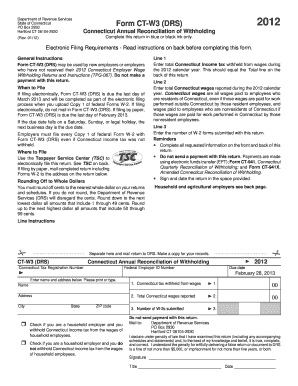
Ding Complete this return in blue or black ink only. (Rev. 01/12) Electronic Filing Requirements - Read instructions on back before completing this form. General Instructions Form CT-W3 (DRS) may be used by new employers or employers who have not received their 2012 Connecticut Employer Wage Withholding Returns and Instructions (TPG-067). Do not make a payment with this return. When to File If ling electronically, Form CT-W3 (DRS) is due the last day of March 2013 and will be completed as.

How it works

  1. Open form

    Open form follow the instructions

  2. Easily sign form

    Easily sign the form with your finger

  3. Share form

    Send filled & signed form or save

How to fill out the CT DRS CT-W3 online

Filling out the CT DRS CT-W3 form is an essential task for employers in Connecticut to report tax withholdings accurately. This guide provides clear and detailed steps to assist users in completing the form online, ensuring compliance with state regulations.

Follow the steps to complete the CT DRS CT-W3 online

  1. Press the ‘Get Form’ button to access the form and open it for editing.
  2. Provide your Connecticut tax registration number and federal employer ID number at the top of the form.
  3. Enter your name, address, city, state, and ZIP code in the designated fields.
  4. In Line 1, input the total Connecticut income tax withheld from wages during the 2012 calendar year. This amount should match the total listed on the back of the form.
  5. In Line 2, enter the total Connecticut wages reported for the same year. This includes all wages for residents working inside and outside of Connecticut.
  6. In Line 3, indicate the number of W-2 forms submitted with your return.
  7. Complete all required information on both the front and back of the form, ensuring accuracy.
  8. Check the appropriate box regarding household employment tax withholding if applicable.
  9. Sign and date the return in the designated area.
  10. Once all sections are filled out correctly, save your changes, then download, print, or share the completed form as needed.

Start completing your CT DRS CT-W3 online now!

Get form

Experience a faster way to fill out and sign forms on the web. Access the most extensive library of templates available.

Related content

Form CT-W3
Jan 31, 2025 — Household employers should not use this form to file their annual...
Learn more
2023-2024 Withholding Forms
Connecticut State Department of Revenue Services ; CT-W3, 2024 Connecticut Annual...
Learn more
MT3DMS-A-Modular-Three-Dimensional-Multispecies...
by C Zheng · 1999 · Cited by 2113 — Zheng, Chunmiao, 1962-. MT3DMS: a modular...
Learn more

Related links form

OH DTE 100EX 2016 OH DTE 100EX 2014 OH DTE 105A 2009 OH DTE 122N 2011

Questions & Answers

Get answers to your most pressing questions about US Legal Forms API.

Contact support

To register for Connecticut withholding, you need to complete the Form REG-1, which is the Connecticut Business Registration Application. This registration will enable you to obtain a tax ID number, allowing you to withhold state income tax from employee wages. You can navigate the registration process seamlessly with the help of the US Legal Forms platform, which offers user-friendly resources to guide you through each step of the CT DRS CT-W3 registration. Make sure to gather necessary documentation beforehand to expedite your registration.

A CT W3 is an important form used in Connecticut for reporting annual withholding tax information to the Department of Revenue Services (DRS). This form summarizes the total amount of Connecticut income tax withheld from employees throughout the year. Understanding the CT DRS CT-W3 is crucial for employers to ensure compliance and accurate tax reporting. You can easily find the CT W3 form on the US Legal Forms platform, where we provide comprehensive guidance to help you complete it correctly.

The 7.35% tax in Connecticut generally applies to certain types of income, including income taxes for higher earners. This rate can significantly impact your financial planning and tax liability. To ensure compliance and understand how this tax affects you, it may be helpful to consult the CT DRS or resources offered by uslegalforms.

CT W3 is a summary form that employers in Connecticut must submit to report annual wages, tips, and withholding information. This form helps the CT DRS track employee earnings and ensure proper tax payments. Accurate completion of the CT W3 is vital for compliance with state tax regulations.

The 183 day rule is a guideline that determines your residency status for tax purposes in Connecticut. If you spend 183 days or more in the state within a year, you are generally considered a resident. This status impacts how you file your taxes and your obligations to the CT DRS.

The CT registration number format typically consists of a series of numbers and may include letters, assigned to businesses and entities in Connecticut. This number is essential for taxation and compliance purposes. If you are unsure about obtaining your CT registration number, uslegalforms can assist you in the process seamlessly.

Currently, Connecticut does tax pensions, but the legislature often discusses changes to tax policies. It’s crucial to stay informed, as decisions can affect your financial planning. You can check for updates on the CT DRS website or consult resources like uslegalforms for guidance about specific tax implications.

The CT E withholding code is a specific designation used by employers to identify the type of income subject to Connecticut withholding tax. This code must be accurately reported on the CT DRS CT-W3 form to ensure proper tax remittance. Understanding this code helps employers maintain correct tax records and fulfill their reporting obligations.

The CT withholding tax form is a crucial document used by employers in Connecticut to report state income tax withheld from employees' wages. This form helps ensure that your payroll taxes are accurately tracked and submitted to the Connecticut Department of Revenue Services (CT DRS). If you are responsible for payroll, understanding this form's details is essential to avoid compliance issues.

To obtain a CT sales tax number, you must register your business with the Connecticut Department of Revenue Services. This process can be completed online through the CT DRS website. You'll need to provide business information and may be required to submit additional documentation. With a valid CT DRS CT-W3, you can seamlessly manage your sales tax obligations.

Get This Form Now!

Use professional pre-built templates to fill in and sign documents online faster. Get access to thousands of forms.
If you believe that this page should be taken down, please follow our DMCA take down processhere.
Get CT DRS CT-W3
  • Adoption
  • Bankruptcy
  • Contractors
  • Divorce
  • Home Sales
  • Employment
  • Identity Theft
  • Incorporation
  • Landlord Tenant
  • Living Trust
  • Name Change
  • Personal Planning
  • Small Business
  • Wills & Estates
  • Packages A-Z
  • Affidavits
  • Bankruptcy
  • Bill of Sale
  • Corporate - LLC
  • Divorce
  • Employment
  • Identity Theft
  • Internet Technology
  • Landlord Tenant
  • Living Wills
  • Name Change
  • Power of Attorney
  • Real Estate
  • Small Estates
  • Wills
  • All Forms
  • Forms A-Z
  • Other Templates
  • Legal Hub
  • About Us
  • Help Portal
  • Legal Resources
  • Blog
  • Affiliates
  • Contact Us
  • Delete My Account
  • Site Map
  • Industries
  • Forms in Spanish
  • Localized Forms
  • State-specific Forms
  • Forms Kit
  • Real Estate Handbook
  • All Guides
  • Notarize
  • Incorporation services
  • For Consumers
  • For Small Business
  • For Attorneys
  • USLegal
  • FormsPass
  • pdfFiller
  • signNow
  • altaFlow
  • DocHub
  • Instapage
Form Packages
  • Adoption
  • Bankruptcy
  • Contractors
  • Divorce
  • Home Sales
  • Employment
  • Identity Theft
  • Incorporation
  • Landlord Tenant
  • Living Trust
  • Name Change
  • Personal Planning
  • Small Business
  • Wills & Estates
  • Packages A-Z
Form Categories
  • Affidavits
  • Bankruptcy
  • Bill of Sale
  • Corporate - LLC
  • Divorce
  • Employment
  • Identity Theft
  • Internet Technology
  • Landlord Tenant
  • Living Wills
  • Name Change
  • Power of Attorney
  • Real Estate
  • Small Estates
  • Wills
  • All Forms
  • Forms A-Z
  • Other Templates
Customer Service
  • Legal Hub
  • About Us
  • Help Portal
  • Legal Resources
  • Blog
  • Affiliates
  • Contact Us
  • Delete My Account
  • Site Map
  • Industries
  • Forms in Spanish
  • Localized Forms
  • State-specific Forms
  • Forms Kit
Legal Guides
  • Real Estate Handbook
  • All Guides
Prepared for you
  • Notarize
  • Incorporation services
Our Customers
  • For Consumers
  • For Small Business
  • For Attorneys
Our Sites
  • USLegal
  • FormsPass
  • pdfFiller
  • signNow
  • altaFlow
  • DocHub
  • Instapage
Social Media
Call us now toll free:
+1 833 426 79 33
As seen in:
© Copyright 1999-2026 airSlate Legal Forms, Inc. 17 Station Street, Ste. 203, Brookline, MA 02445
  • Your Privacy Choices
  • Terms of Service
  • Privacy Notice
  • Content Takedown Policy
  • Bug Bounty Program
CT DRS CT-W3
This form is available in several versions.
Select the version you need from the drop-down list below.
2022 CT DRS CT-W3
Select form
  • 2022 CT DRS CT-W3
  • 2021 CT DRS CT-W3
  • 2020 CT DRS CT-W3
  • 2019 CT DRS CT-W3
  • 2018 CT DRS CT-W3
  • 2017 CT DRS CT-W3
  • 2015 CT DRS CT-W3
  • 2014 CT DRS CT-W3
  • 2013 CT DRS CT-W3
  • 2012 CT DRS CT-W3
  • 2011 CT DRS CT-W3
Select form