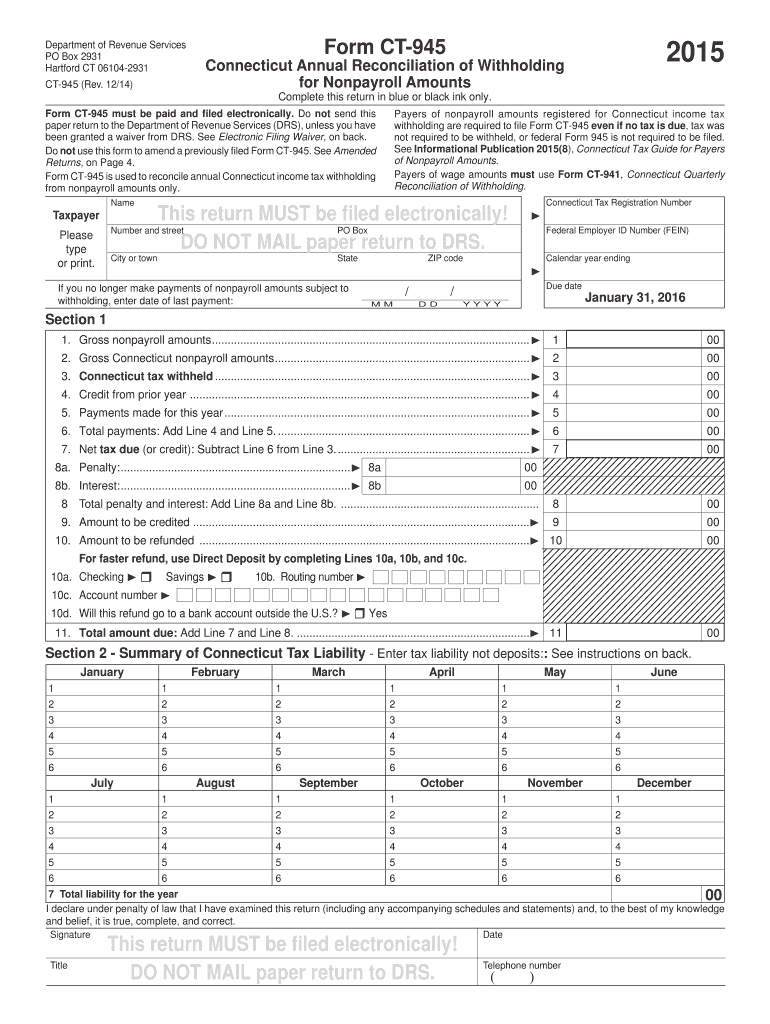
10 00 For faster refund, use Direct Deposit by completing Lines 10a, 10b, and 10c. 10a. Checking Savings 10b. Routing number 10c. Account number 10d. Will this refund go to a bank account outside the U.S.? Yes 11. Total amount due: Add Line 7 and Line 8. .......................................................................... 11 00 Section 2 - Summary of Connecticut Tax Liability - Enter tax liability not deposits:: See instr.
Loading

Open form follow the instructions

Easily sign the form with your finger

Send filled & signed form or save
How to fill out the CT DRS CT-945 online
Filling out the Connecticut Annual Reconciliation of Withholding for Nonpayroll Amounts, known as Form CT-945, can be straightforward with the right guidance. This form is essential for reconciling annual Connecticut income tax withholding and must be filed electronically.
Follow the steps to complete the CT-945 online.
- Press the ‘Get Form’ button to access the form and open it in the online editor.
- Begin by entering your Connecticut Tax Registration Number, your name, and your business information in the designated fields. Ensure that all entries are complete and accurate.
- Input your Federal Employer ID Number (FEIN) in the provided field.
- For Line 4, enter any credit from the prior year. Line 5 should reflect all payments made for the year.
- Determine the net tax due by subtracting the total payments (Line 6) from the Connecticut tax withheld (Line 3) and enter this amount in Line 7.
- If applicable, enter any penalties or interest on Lines 8a and 8b, respectively, and calculate the total on Line 8.
- Complete Lines 9 and 10 for any amounts you wish to credit or refund.
- For faster refunds, consider completing Lines 10a to 10c to use Direct Deposit, ensuring to enter your bank details correctly.
- Finally, review all entries, ensure that the declaration statement is checked, and provide your signature, title, date, and contact number.
- After confirming the accuracy of your form, save your changes, and proceed to submit it electronically. You can also download, print, or share the completed form as needed.
Complete your CT DRS CT-945 form online for a streamlined tax filing experience.
Experience a faster way to fill out and sign forms on the web. Access the most extensive library of templates available.
Related content
Jan 31, 2024 — Form CT-945 is for the annual reconciliation of nonpayroll withholding...
CT-8109, 2024 Connecticut Withholding Tax Payment Form for Nonpayroll Amounts, 12/2024 ;...
The operating instructions are an integral part of the product and contain important in...
Get answers to your most pressing questions about US Legal Forms API.
Where would I get a 1040 form?
You can acquire a 1040 form from the CT DRS website by downloading the appropriate version. Physical copies are also available in various locations such as tax preparation offices, libraries, and some government offices. For convenience, using US Legal Forms can help simplify your search for state-specific forms and ensure you have the latest versions.
How do I get a CT tax registration number?
To obtain a CT tax registration number, complete the registration process on the CT DRS website. You'll need to provide specific information about your business, including its structure and activities. If you are looking for a streamlined process, US Legal Forms offers helpful resources to make your registration straightforward.
Who needs to file CT 945?
CT 945 is necessary for employers who withheld more than a certain amount of federal income taxes from employees' wages during the year. Specifically, if your company withheld taxes and needs to report them, CT 945 is the form to submit. If you are unsure about your requirement to file, you can refer to your tax professional or connect with US Legal Forms for clarity and assistance.
How do I find my 1040 online?
To find your 1040 online, visit the CT DRS website, where you can access various tax forms and publications. You may also utilize an online tax software to retrieve previous filings if you've used such services before. For simplicity and peace of mind, consider tools provided by US Legal Forms, which can help you manage and locate essential tax documents.
How do I register for CT withholding tax?
To register for CT withholding tax, you'll need to complete the application process on the CT DRS website. This typically involves filling out the necessary forms and submitting them online. Ensure you have your business details ready, as you will need them for accurate registration. If you require any assistance, US Legal Forms offers resources to guide you through the process smoothly.
Where can I get my CT 1040?
You can obtain your CT 1040 form from the CT DRS website, or you might visit your local tax office for physical copies. Additionally, the form is often available at public libraries and some financial institutions. If you are looking for a more efficient approach, consider using US Legal Forms, which streamlines access to CT tax forms and more.
Where can I find my CT 1040 form?
You can find your CT 1040 form on the official Connecticut Department of Revenue Services (CT DRS) website. Simply navigate to the forms section, where you’ll discover a downloadable version that you can print. For a smooth experience, ensure you have the latest version that aligns with the current tax year. If you need guidance, US Legal Forms can help you locate the required documents efficiently.
Who do I write my CT state tax check to?
For your Connecticut state taxes, ensure that you write your check to 'Connecticut Department of Revenue Services'. This action directs your payment to the correct governmental department. As always, double-check your forms or payment instructions for any updates or changes.
Which withholding code should I choose in CT?
Choosing the correct withholding code in Connecticut is crucial for accurate tax deductions from your payroll. The CT DRS provides guidelines on various codes based on your employment status and exemptions. Always review the most recent regulations or consult a tax professional for help.
Where do I send my CT tax payment?
Your CT tax payment should be mailed to the address specified on your tax form, usually to the Connecticut Department of Revenue Services. Be sure to check the CT DRS website for the latest mailing address. This prevents any issues with your payment being received late.
Use professional pre-built templates to fill in and sign documents online faster. Get access to thousands of forms.
If you believe that this page should be taken down, please follow our DMCA take down process here.
This form is available in several versions. Select the version you need from the drop-down list below.