Loading
Form preview
  • US Legal Forms
  • Other Templates
  • Tax Forms
  • Connecticut Tax Forms
  • Ct Drs Ct-941x 2013

Get Ct Drs Ct-941x 2013

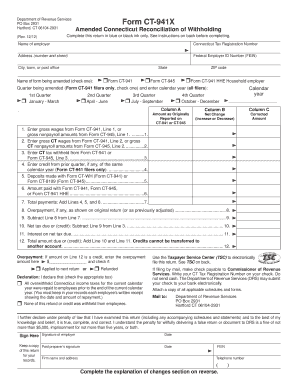
On back before completing. (Rev. 12/12) Name of employer Connecticut Tax Registration Number Address (number and street) Federal Employer ID Number (FEIN) City, town, or post office State Name of form being amended (check one): Form CT-941 ZIP code Form CT-945 Form CT-941 HHE Household employer Quarter being amended (Form CT-941 filers only, check one) and enter calendar year (all filers): 1st Quarter January - March 2nd Quarter.

How it works

  1. Open form

    Open form follow the instructions

  2. Easily sign form

    Easily sign the form with your finger

  3. Share form

    Send filled & signed form or save

How to fill out the CT DRS CT-941X online

Filling out the CT DRS CT-941X form is essential for amending your Connecticut reconciliation of withholding. This guide provides comprehensive, step-by-step instructions to help you complete the form accurately and effectively.

Follow the steps to successfully fill out the CT-941X online.

  1. Click ‘Get Form’ button to obtain the form and open it in the editor.
  2. Enter the employer's name in the designated field at the top of the form.
  3. Provide your Connecticut Tax Registration Number in the next field.
  4. Fill out the employer's address including the street number, city, state, and ZIP code.
  5. Input the Federal Employer ID Number (FEIN) in the relevant box.
  6. Indicate the name of the form you are amending by checking the appropriate box.
  7. Select the quarter being amended by checking the box for the appropriate quarter and entering the calendar year.
  8. Complete Columns A, B, and C by entering the amounts as originally reported, the net change, and the corrected amount respectively for each line item.
  9. Fill in the amount paid with earlier forms, if applicable, in the designated line.
  10. Calculate the total payments and record your calculation in the corresponding box.
  11. If there is an overpayment, enter it in the designated line and specify whether it will be applied to the next return or refunded.
  12. Complete the declaration section by checking the appropriate box and ensure all information is true and accurate.
  13. Sign and date the form where indicated. If a paid preparer filled out the form, ensure they also sign it and enter their information.
  14. Review the form for completeness and accuracy. Once satisfied, you can save, download, or print the form as needed.

Complete your CT DRS CT-941X online and ensure your tax information is accurate and up-to-date.

Get form

Experience a faster way to fill out and sign forms on the web. Access the most extensive library of templates available.

Related content

Form CT-941X
Do not use Form CT-941X to correct payments you made using the wrong Connecticut Tax...
Learn more
2023-2024 Withholding Forms
WEBINAR: DRS will be holding a webinar on Wednesday, August 6, 2025, at ... CT-941X...
Learn more

Related links form

NY TC309 2018 NY TC309 2015 NY TC600 2019 NY TC600 2018

Questions & Answers

Get answers to your most pressing questions about US Legal Forms API.

Contact support

When selecting a withholding code in Connecticut, it’s important to choose based on your payroll setup and employee status. Each code relates to specific tax implications and requirements. The CT DRS CT-941X helps users navigate withholding codes, ensuring that they select the appropriate options for compliance.

Yes, you can e-file 941X through QuickBooks Desktop with the correct setup and software version. This integration helps streamline your payroll management and ensures that forms are submitted accurately. Using the CT DRS CT-941X feature in QuickBooks adds further efficiency to your payroll processes.

To file a 941X ERC, you need to complete the form with specific details about your payroll adjustments. Make sure to include accurate financial and employee data related to the employee retention credit. The CT DRS CT-941X platform provides guidance and resources to simplify this filing process.

Yes, the 941X can indeed be filed electronically, which simplifies the correction process. Using e-filing means quicker processing and reduces the chances of errors from manual entry. Be sure to utilize the CT DRS CT-941X for a straightforward approach to correcting your payroll filings.

To fill out the 941X ERC, start by gathering your payroll records and identifying any necessary corrections. Incrementally complete each section, ensuring accurate calculations. Using the CT DRS CT-941X helps to streamline this process, making it easier to report eligible employee retention credits.

Certain IRS forms, such as 1040X and some complex multi-part forms, cannot be filed electronically. While many returns are eligible for e-filing, verifying the status of specific forms is essential. The CT DRS CT-941X can be filed electronically, offering a seamless experience for employers.

Yes, you can electronically file a 941X through authorized e-filing platforms. This method is efficient and often results in faster processing times. By using the CT DRS CT-941X, businesses can ensure that their corrections to payroll are submitted accurately and promptly.

CT 941 Reconciliation of Withholding is a critical process for employers in Connecticut. This form helps reconcile withheld federal income taxes and other deductions against reported wages. By completing the CT DRS CT-941X, employers ensure compliance with state tax regulations and maintain accurate payroll records.

CT tax forms must be sent to the Connecticut Department of Revenue Services. The specific mailing address can vary based on the type of tax form you are submitting, so refer to the guidelines on the CT DRS website. Always include any relevant forms like the CT-941X to ensure complete and accurate processing of your tax documents.

You should send your CT 1065 extension request to the Connecticut Department of Revenue Services. Check the official form for the precise mailing address and any additional instructions. Proper submission of this document is crucial to avoid penalties, and accessing resources from the CT DRS can guide you through the process.

Get This Form Now!

Use professional pre-built templates to fill in and sign documents online faster. Get access to thousands of forms.
If you believe that this page should be taken down, please follow our DMCA take down processhere.
Get CT DRS CT-941X
  • Adoption
  • Bankruptcy
  • Contractors
  • Divorce
  • Home Sales
  • Employment
  • Identity Theft
  • Incorporation
  • Landlord Tenant
  • Living Trust
  • Name Change
  • Personal Planning
  • Small Business
  • Wills & Estates
  • Packages A-Z
  • Affidavits
  • Bankruptcy
  • Bill of Sale
  • Corporate - LLC
  • Divorce
  • Employment
  • Identity Theft
  • Internet Technology
  • Landlord Tenant
  • Living Wills
  • Name Change
  • Power of Attorney
  • Real Estate
  • Small Estates
  • Wills
  • All Forms
  • Forms A-Z
  • Other Templates
  • Legal Hub
  • About Us
  • Help Portal
  • Legal Resources
  • Blog
  • Affiliates
  • Contact Us
  • Delete My Account
  • Site Map
  • Industries
  • Forms in Spanish
  • Localized Forms
  • State-specific Forms
  • Forms Kit
  • Real Estate Handbook
  • All Guides
  • Notarize
  • Incorporation services
  • For Consumers
  • For Small Business
  • For Attorneys
  • USLegal
  • FormsPass
  • pdfFiller
  • signNow
  • altaFlow
  • DocHub
  • Instapage
Form Packages
  • Adoption
  • Bankruptcy
  • Contractors
  • Divorce
  • Home Sales
  • Employment
  • Identity Theft
  • Incorporation
  • Landlord Tenant
  • Living Trust
  • Name Change
  • Personal Planning
  • Small Business
  • Wills & Estates
  • Packages A-Z
Form Categories
  • Affidavits
  • Bankruptcy
  • Bill of Sale
  • Corporate - LLC
  • Divorce
  • Employment
  • Identity Theft
  • Internet Technology
  • Landlord Tenant
  • Living Wills
  • Name Change
  • Power of Attorney
  • Real Estate
  • Small Estates
  • Wills
  • All Forms
  • Forms A-Z
  • Other Templates
Customer Service
  • Legal Hub
  • About Us
  • Help Portal
  • Legal Resources
  • Blog
  • Affiliates
  • Contact Us
  • Delete My Account
  • Site Map
  • Industries
  • Forms in Spanish
  • Localized Forms
  • State-specific Forms
  • Forms Kit
Legal Guides
  • Real Estate Handbook
  • All Guides
Prepared for you
  • Notarize
  • Incorporation services
Our Customers
  • For Consumers
  • For Small Business
  • For Attorneys
Our Sites
  • USLegal
  • FormsPass
  • pdfFiller
  • signNow
  • altaFlow
  • DocHub
  • Instapage
Social Media
Call us now toll free:
+1 833 426 79 33
As seen in:
© Copyright 1999-2026 airSlate Legal Forms, Inc. 17 Station Street, Suite 303, Brookline, MA 02445
  • Your Privacy Choices
  • Terms of Service
  • Privacy Notice
  • Content Takedown Policy
  • Bug Bounty Program
CT DRS CT-941X
This form is available in several versions.
Select the version you need from the drop-down list below.
2021 CT DRS CT-941X
Select form
  • 2021 CT DRS CT-941X
  • 2020 CT DRS CT-941X
  • 2017 CT DRS CT-941X
  • 2016 CT DRS CT-941X
  • 2015 CT DRS CT-941X
  • 2013 CT DRS CT-941X
  • 2012 CT DRS CT-941X
  • 2009 CT DRS CT-941X
  • Ct 941x Form
Select form