10. 11. Interest on net tax due................................................................................................................................................... 11. 12. Total amount due or (credit): Add Line 10 and Line 11. Credits cannot be transferred to another account. ........... 12. Overpayment: If amount on Line 12 is a credit, enter the overpayment amount here $ and check if: Applied t.
Loading

Open form follow the instructions

Easily sign the form with your finger

Send filled & signed form or save
How to fill out the CT DRS CT-941X online
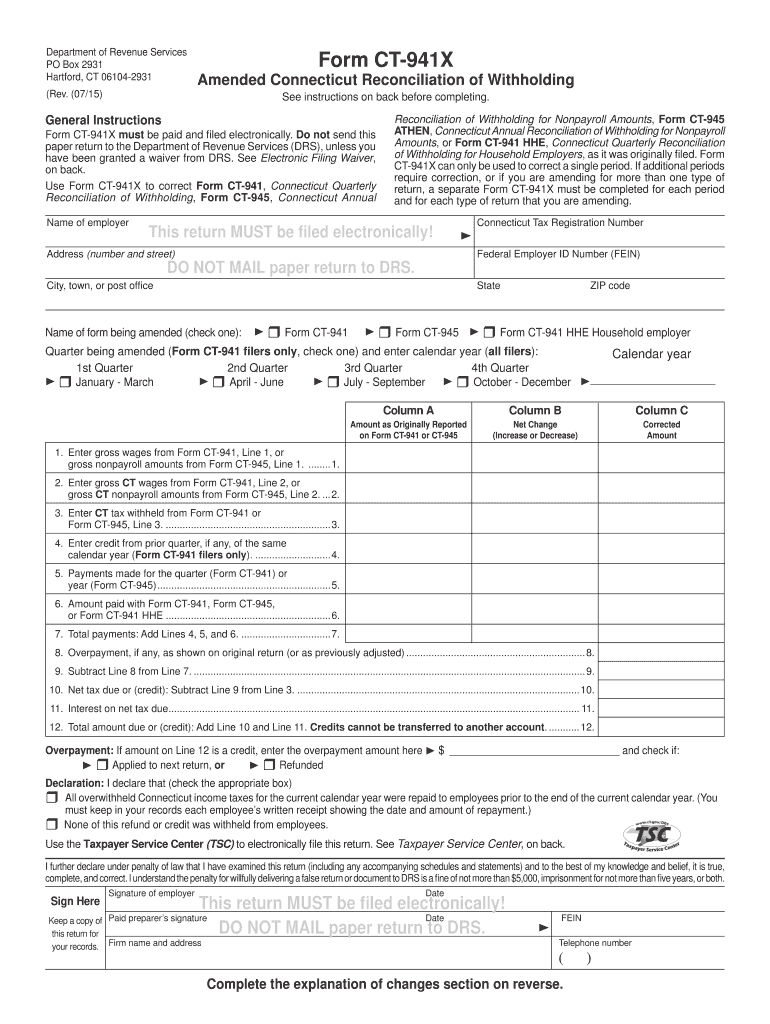
Filing the CT DRS CT-941X online is essential for correcting errors in Connecticut withholding tax returns. This guide provides clear, step-by-step instructions to help users successfully navigate the form and ensure accurate submission.
Follow the steps to accurately complete the CT-941X form online.
- Click the ‘Get Form’ button to access the CT-941X and display it in your online editor.
- Begin by entering your employer name and address, along with your Connecticut Tax Registration Number and Federal Employer Identification Number (FEIN) in the designated fields. Ensure that all information is accurate and up-to-date.
- Select the form type you are amending by checking the appropriate box (CT-941, CT-945, or CT-941 HHE).
- Specify the quarter you are amending if you are a CT-941 filer. Check the corresponding quarter box and provide the calendar year.
- In Column A, input the amounts as originally reported from your initial filing of either Form CT-941 or Form CT-945.
- In Column B, indicate the net change (increase or decrease) for each line. Use parentheses to denote any decreases.
- In Column C, enter the corrected amounts that should have been reported on the original forms.
- Calculate Line 7 by adding Lines 4, 5, and 6 to determine total payments made.
- Determine the net tax due or credit by utilizing the provided calculations for Lines 8 through 12.
- Fill in the overpayment section if applicable, checking the relevant box for either applying the credit to the next return or requesting a refund.
- Complete the declaration section by checking the appropriate box to declare overwithheld Connecticut income taxes or any other relevant statements.
- Finally, sign the form electronically. Ensure both the employer's signature and paid preparer's information are included if applicable.
- After completing the form, save your changes and ensure you download or print a copy for your records. Submit the form electronically to the Taxpayer Service Center.
Start filing your CT DRS CT-941X form online today for a smooth and efficient process.
Experience a faster way to fill out and sign forms on the web. Access the most extensive library of templates available.
Related content
Do not use Form CT-941X to correct payments you made using the wrong Connecticut Tax...
WEBINAR: DRS will be holding a webinar on Wednesday, August 6, 2025, at ... CT-941X...
Get answers to your most pressing questions about US Legal Forms API.
How do I cancel my tax withholding?
To cancel your tax withholding, you need to provide written notice to your employer, including the reasons for cancellation. Your employer must then adjust your payroll records accordingly. Additionally, ensure to notify CT DRS by completing the appropriate form. This step protects you from any unforeseen tax liabilities.
Where to mail form CT 1065 CT 1120SI Ext?
To mail forms CT 1065 or CT 1120SI Ext, send them to the address provided on the Connecticut DRS website specifically for business tax returns. Make sure you verify the mailing address as it can vary depending on whether you're filing electronically or on paper. Accurate submission ensures that your tax filings are received and processed in a timely manner.
How do I contact CT DRS?
You can contact the Connecticut Department of Revenue Services (CT DRS) by visiting their official website, where you will find various contact options. They provide phone numbers, emails, and online chat services for your convenience. Additionally, for urgent inquiries, you may consider calling during business hours. This way, you'll receive timely assistance regarding your tax needs.
Where do I file my CT amended return?
To file your CT amended return, you need to submit Form CT-941X to the Connecticut Department of Revenue Services (CT DRS). Make sure that you include all necessary documentation along with the form. You can file your amended return either online or by mailing it directly to the CT DRS. This process ensures that your tax records are accurate and up to date.
Does CT accept amended returns electronically?
Yes, Connecticut allows electronic filing of amended returns. This process is especially convenient for correcting forms like the CT-941X. Using the e-filing option saves time and ensures your amended return reaches the CT DRS efficiently. Be sure to check their guidelines for any specific requirements related to electronic amendments.
How do I get my CT tax form?
To obtain your CT tax forms, visit the CT DRS website where you can download various tax forms, including the CT-941X. You might also find printed forms available in local libraries or government offices. If you have trouble locating a specific form, consider using the resources on the USLegalForms platform for easy access to the necessary documentation.
How do I contact the CT Drs?
Contacting the CT DRS is straightforward. You can call their customer service for immediate assistance, or use the contact form available on their website. This service is convenient for questions about tax forms and regulations. By reaching out to CT DRS, you can quickly get the support needed for issues like the CT-941X.
How do I file my CT 941 online?
To file your CT-941 online, visit the Connecticut Department of Revenue Services website. They offer an e-filing option that simplifies the submission process for employers. Make sure you have all necessary information and documents before starting the online form. Using platforms like USLegalForms can also help streamline your filing process for the CT-941X.
How do I speak to someone at ct DMV?
To speak with someone at the CT DMV, you can call their main phone number, which is listed on their official website. Ensure you have your questions ready, as they can assist you with various concerns regarding vehicle registration, licenses, and other DMV services. Alternatively, visiting a local DMV office can provide in-person assistance. Remember, check the website for customer service hours before your visit.
How do I know what tax withholding should I choose?
Determining the right tax withholding requires understanding your income, tax situation, and personal financial goals. Start by evaluating your estimated tax liability for the year and comparing it to your expected income. The CT DRS CT-941X is a useful resource that can help guide you through the process of selecting the appropriate withholding rate to suit your needs, ensuring you stay on track with your tax payments.
Use professional pre-built templates to fill in and sign documents online faster. Get access to thousands of forms.
If you believe that this page should be taken down, please follow our DMCA take down process here.
This form is available in several versions. Select the version you need from the drop-down list below.