Loading
Form preview
  • US Legal Forms
  • Form Library
  • Tax Forms
  • Connecticut Tax Forms
  • Ct Drs Ct-941 2016

Get Ct Drs Ct-941 2016

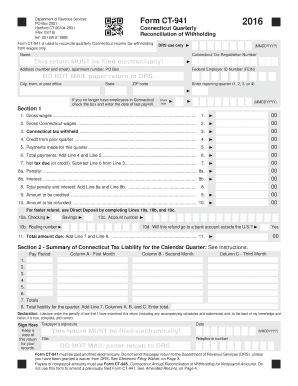
8. Total liability for the quarter: Add Line 7, Columns A, B, and C. Enter total. Declaration: I declare under the penalty of law that I have examined this return (including any accompanying schedules and statements) and, to the best of my knowledge and belief, it is true, complete, and correct. Sign Here Taxpayer s signature Keep a copy of this return for your records. Date This return MUST be filed electronically! Title (MMDDYYYY) Telephone number DO NOT MAIL paper return to DRS. Form.

How it works

  1. Open form

    Open form follow the instructions

  2. Easily sign form

    Easily sign the form with your finger

  3. Share form

    Send filled & signed form or save

How to fill out the CT DRS CT-941 online

The CT DRS CT-941 is an important form used for the quarterly reconciliation of Connecticut income tax withholding from wages. This guide will provide you with clear and user-friendly steps to successfully complete this form online, ensuring that you fulfill your tax obligations accurately and efficiently.

Follow the steps to accurately complete the CT DRS CT-941 online.

  1. Click the ‘Get Form’ button to access the CT-941 form and open it in the online editor.
  2. Enter your name and Connecticut Tax Registration Number in the designated fields. Ensure that all information is accurate and matches your records.
  3. Fill in your address, including apartment number or PO Box, and provide your Federal Employer ID Number (FEIN). This information is crucial for identification purposes.
  4. Indicate the reporting quarter by selecting 1, 2, 3, or 4, and check the box if you no longer have employees in Connecticut, entering the date of the last payroll if applicable.
  5. In Section 1, enter the gross wages paid to employees during the quarter in Line 1, followed by gross Connecticut wages in Line 2. Both amounts are important for determining tax withholdings.
  6. Complete Line 3 by entering the total Connecticut tax withheld on wages. This should match Section 2, Line 8.
  7. If applicable, fill in Lines 8a and 8b for any penalties or interest owed, then sum them in Line 8.
  8. Decide whether to credit any amount to next quarter (Line 9) or request a refund (Line 10). If a refund is preferred, provide banking details for direct deposit in Lines 10a to 10c.
  9. Conclude by calculating the total amount due in Line 11 by adding the net tax due and any penalties and interests.
  10. Finally, ensure you sign and date the form accurately before submitting. Remember to keep a copy for your records.

Complete your CT DRS CT-941 online today to meet your tax obligations effortlessly.

Get form

Experience a faster way to fill out and sign forms on the web. Access the most extensive library of templates available.

Related content

Form CT-941
Form CT-941, and any amount due, must be filed and paid electronically. Do not send this...
Learn more
2023-2024 Withholding Forms
CT-W4, 2025 Employee's Withholding Certificate -FILLABLE, 12/2024. CT-941, 2025...
Learn more
Operating Instructions – MOVIDRIVE® MDX60B/61B
The operating instructions are an integral part of the product and contain important in...
Learn more

Related links form

NY RP-6704-A1 2017 NY RP-6704-A1 2016 NY RP-6704-A1 2013 NY Saratoga HT-4

Questions & Answers

Get answers to your most pressing questions about US Legal Forms API.

Contact support

No, the CT tax registration number is not the same as your Employer Identification Number (EIN). The CT tax registration number is specific to state tax obligations, while the EIN is a federal identifier assigned by the IRS. It is important to keep both numbers handy when handling various tax forms, such as the CT DRS CT-941.

You can locate your CT employer account number by checking any correspondence you have received from the Connecticut Department of Revenue Services (CT DRS). This number is usually displayed prominently in the paperwork they send you. If you cannot find it, visiting the CT DRS website or contacting them directly can help you retrieve this important information.

To find your employer ID number online, start by logging into your account with the IRS or your state tax agency. If you do not have an online account, you might need to request this information directly from them or your payroll department. This number is essential when completing forms like the CT DRS CT-941, so make sure you have it readily available.

You can obtain CT tax forms through the Connecticut Department of Revenue Services (CT DRS) website. They provide a comprehensive list of available forms for various tax types, including individual and business taxes. Additionally, you can use online platforms like USLegalForms to find and download the specific forms you need efficiently.

To find your CT employer registration number, you can check official state records or contact the Connecticut Department of Revenue Services (CT DRS). Alternatively, if you have your business tax documents on hand, the registration number is often included there. Remember, having this number handy is crucial when filing forms like the CT-941.

You can locate your employer registration number directly on your W-2 form. Look for the section that lists your employer's information, which typically appears at the top of the document. The employer registration number is generally found near the employer's name and address. If you are still unsure, consider reaching out to your payroll department for assistance.

To file for workers' compensation in Connecticut, you must complete the appropriate forms and submit them to the Connecticut Workers' Compensation Commission. It is crucial to follow the correct procedures for your specific case. Additionally, platforms like USLegalForms can help you navigate through the necessary forms and requirements effectively.

Filing your CT-941 involves several steps. Firstly, gather all required information, such as employee wages and tax deductions. Next, complete the CT-941 form accurately and ensure you include necessary documentation. You can file manually or opt for electronic submission via the CT DRS website for convenience.

While it is not mandatory, filing your CT-941 electronically is highly encouraged by the Connecticut Department of Revenue Services. E-filing promotes efficiency and reduces the chances of errors compared to paper filing. Moreover, electronic submissions speed up the processing time, allowing for quicker confirmations and updates on your account.

Filing CT 941 online is straightforward and convenient. You can utilize the CT DRS website for direct access to online filing options. Platforms like USLegalForms can guide you through the filing process, ensuring that you adhere to all necessary requirements. With online filing, you can manage your paperwork efficiently and securely.

Get This Form Now!

Use professional pre-built templates to fill in and sign documents online faster. Get access to thousands of forms.
If you believe that this page should be taken down, please follow our DMCA take down processhere.
Get CT DRS CT-941
  • Adoption
  • Bankruptcy
  • Contractors
  • Divorce
  • Home Sales
  • Employment
  • Identity Theft
  • Incorporation
  • Landlord Tenant
  • Living Trust
  • Name Change
  • Personal Planning
  • Small Business
  • Wills & Estates
  • Packages A-Z
  • Affidavits
  • Bankruptcy
  • Bill of Sale
  • Corporate - LLC
  • Divorce
  • Employment
  • Identity Theft
  • Internet Technology
  • Landlord Tenant
  • Living Wills
  • Name Change
  • Power of Attorney
  • Real Estate
  • Small Estates
  • Wills
  • All Forms
  • Forms A-Z
  • Form Library
  • Legal Hub
  • About Us
  • Help Portal
  • Legal Resources
  • Blog
  • Affiliates
  • Contact Us
  • Delete My Account
  • Site Map
  • Industries
  • Forms in Spanish
  • Localized Forms
  • State-specific Forms
  • Forms Kit
  • Real Estate Handbook
  • All Guides
  • Notarize
  • Incorporation services
  • For Consumers
  • For Small Business
  • For Attorneys
  • USLegal
  • FormsPass
  • pdfFiller
  • signNow
  • altaFlow
  • DocHub
  • Instapage
Form Packages
  • Adoption
  • Bankruptcy
  • Contractors
  • Divorce
  • Home Sales
  • Employment
  • Identity Theft
  • Incorporation
  • Landlord Tenant
  • Living Trust
  • Name Change
  • Personal Planning
  • Small Business
  • Wills & Estates
  • Packages A-Z
Form Categories
  • Affidavits
  • Bankruptcy
  • Bill of Sale
  • Corporate - LLC
  • Divorce
  • Employment
  • Identity Theft
  • Internet Technology
  • Landlord Tenant
  • Living Wills
  • Name Change
  • Power of Attorney
  • Real Estate
  • Small Estates
  • Wills
  • All Forms
  • Forms A-Z
  • Form Library
Customer Service
  • Legal Hub
  • About Us
  • Help Portal
  • Legal Resources
  • Blog
  • Affiliates
  • Contact Us
  • Delete My Account
  • Site Map
  • Industries
  • Forms in Spanish
  • Localized Forms
  • State-specific Forms
  • Forms Kit
Legal Guides
  • Real Estate Handbook
  • All Guides
Prepared for you
  • Notarize
  • Incorporation services
Our Customers
  • For Consumers
  • For Small Business
  • For Attorneys
Our Sites
  • USLegal
  • FormsPass
  • pdfFiller
  • signNow
  • altaFlow
  • DocHub
  • Instapage
Social Media
Call us now toll free:
+1 833 426 79 33
As seen in:
© Copyright 1999-2026 airSlate Legal Forms, Inc. 17 Station Street, Suite 303, Brookline, MA 02445
  • Your Privacy Choices
  • Terms of Service
  • Privacy Notice
  • Content Takedown Policy
  • Bug Bounty Program
CT DRS CT-941
This form is available in several versions.
Select the version you need from the drop-down list below.
2021 CT DRS CT-941
Select form
  • 2021 CT DRS CT-941
  • 2020 CT DRS CT-941
  • 2019 CT DRS CT-941
  • 2018 CT DRS CT-941
  • 2017 CT DRS CT-941
  • 2016 CT DRS CT-941
  • 2015 CT DRS CT-941
  • 2014 CT DRS CT-941
  • 2013 CT DRS CT-941
  • 2012 CT DRS CT-941
  • 2011 CT DRS CT-941
Select form