Loading
Form preview
  • US Legal Forms
  • Other Templates
  • Tax Forms
  • Connecticut Tax Forms
  • Ct Drs Ct-1065/ct-1120si Ext 2016

Get Ct Drs Ct-1065/ct-1120si Ext 2016

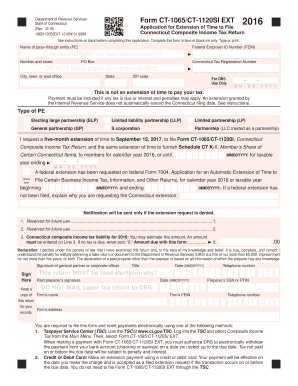
Ne number This return MUST be filed electronically! Paid preparer s signature DO NOT Keep a copy of Firm s name this return for your Firm s address records. Date (MMDDYYYY) Preparer s SSN or PTIN MAIL paper tax return to DRS. Firm s FEIN Telephone number You are required to le this form and remit payments electronically using one of the following methods: 1. Taxpayer Service Center (TSC): Use the TSC at www.ct.gov/TSC. Log into the TSC and select Composite Income Tax from the.

How it works

  1. Open form

    Open form follow the instructions

  2. Easily sign form

    Easily sign the form with your finger

  3. Share form

    Send filled & signed form or save

How to fill out the CT DRS CT-1065/CT-1120SI EXT online

This guide provides a comprehensive overview of how to complete the CT DRS CT-1065/CT-1120SI EXT application for extension of time to file Connecticut Composite Income Tax Returns online. It offers step-by-step instructions tailored to users with varying levels of experience.

Follow the steps to complete the form accurately.

  1. Press the ‘Get Form’ button to access the application and open it for editing.
  2. Enter the name of the pass-through entity in the designated field. Ensure that the entity name matches the information on official documents.
  3. Provide the Federal Employer ID Number (FEIN) in the appropriate section.
  4. Fill in the number and street address of the pass-through entity. If applicable, include the PO Box information.
  5. Enter the Connecticut Tax Registration Number in the required space.
  6. Complete the city, town, or post office, state, and ZIP code sections accurately.
  7. Indicate the type of pass-through entity by checking the relevant box. Options include Electing large partnership, Limited liability partnership, Limited partnership, General partnership, S corporation, and Partnership.
  8. Request the five-month extension by confirming the deadline which is September 15, 2017, or a different date for taxable year ending if applicable.
  9. If a federal extension has been requested, check the appropriate box and enter the required dates.
  10. Complete Line 3 by estimating your Connecticut composite income tax liability for 2016. Enter zero if no tax is due.
  11. Sign the form where indicated, including the title, date, and telephone number.
  12. If using a paid preparer, ensure they complete their section regarding signature and details.
  13. Review all information for accuracy, save your changes, and prepare to submit the document electronically.

Complete your CT DRS CT-1065/CT-1120SI EXT application online to ensure timely filing and compliance.

Get form

Experience a faster way to fill out and sign forms on the web. Access the most extensive library of templates available.

Related content

Form CT-1065/CT-1120SI EXT This return MUST be...
Form CT-1065/CT-1120SI EXT is an application for a six-month extension to file the CT...
Learn more
Self-Employment Taxes 411 I CT Small Business ...
Jun 1, 2023 — ... Connecticut sources must file Form CT-1065/CT-1120SI. A partner of a...
Learn more

Related links form

NY DTF ST-100 2016 NY DTF ST-100 2015 NY DTF ST-100 2014 NY DTF ST-100 2013

Questions & Answers

Get answers to your most pressing questions about US Legal Forms API.

Contact support

CT 1065 and CT 1120SI are tax forms used by partnerships and S corporations in Connecticut. They report income, deductions, and credits to the state. Understanding these forms is vital for compliance, and resources like uslegalforms can help clarify their requirements.

The CT 1065 CT 1120SI Ext should be mailed to the Connecticut Department of Revenue Services. You can find the correct mailing address on the form or on the CT DRS website. Always double-check that you have the right address to ensure timely delivery.

To elect the CT pass-through entity tax, you must file the appropriate forms with the Connecticut Department of Revenue Services. It's important to follow all guidelines outlined on the state’s official website. Using resources like uslegalforms can simplify this process, ensuring all required paperwork is correctly submitted.

You should mail your CT extension to the Connecticut Department of Revenue Services. The specific mailing address is usually printed on the extension form itself. Make sure to follow all instructions carefully to prevent any delays.

Yes, Connecticut recognizes federal partnership extensions. If you file a federal extension for your partnership, you can also apply this to your CT DRS CT-1065/CT-1120SI EXT. Ensure you meet all state-specific requirements to maintain compliance.

CT tax forms should be sent to the Connecticut Department of Revenue Services. Check the specific form instructions for the exact mailing address. Using the correct address is crucial for timely processing and to avoid any complications.

To mail the CT 1065 Ext, send it to the Connecticut Department of Revenue Services. Refer to the mailing instructions provided with the extension form. Ensuring accuracy in your mailing details can help facilitate a smooth processing experience.

You can mail the CT DRS CT-1065 form to the Connecticut Department of Revenue Services. Make sure to send it to the address specified on the form instructions. Properly include any required documentation to avoid processing delays.

Obtaining a CT sales tax number involves registering your business with the Connecticut Department of Revenue Services. You can do this online through the CT DRS Taxpayer Services portal, which streamlines the registration process. Be prepared with your business information, and after completing your registration, you'll receive your sales tax number. UsLegalForms offers additional support if you need further clarification or assistance.

To file for an extension on your CT 1040, you would typically submit form CT-1040 EXT to the Connecticut Department of Revenue Services. This helps you gain additional time to file your taxes without incurring penalties. Ensure you include any pertinent payment, if applicable, to keep your account in good standing. Consulting UsLegalForms can provide you with resources to simplify the process.

Get This Form Now!

Use professional pre-built templates to fill in and sign documents online faster. Get access to thousands of forms.
If you believe that this page should be taken down, please follow our DMCA take down processhere.
Get CT DRS CT-1065/CT-1120SI EXT
  • Adoption
  • Bankruptcy
  • Contractors
  • Divorce
  • Home Sales
  • Employment
  • Identity Theft
  • Incorporation
  • Landlord Tenant
  • Living Trust
  • Name Change
  • Personal Planning
  • Small Business
  • Wills & Estates
  • Packages A-Z
  • Affidavits
  • Bankruptcy
  • Bill of Sale
  • Corporate - LLC
  • Divorce
  • Employment
  • Identity Theft
  • Internet Technology
  • Landlord Tenant
  • Living Wills
  • Name Change
  • Power of Attorney
  • Real Estate
  • Small Estates
  • Wills
  • All Forms
  • Forms A-Z
  • Other Templates
  • Legal Hub
  • About Us
  • Help Portal
  • Legal Resources
  • Blog
  • Affiliates
  • Contact Us
  • Delete My Account
  • Site Map
  • Industries
  • Forms in Spanish
  • Localized Forms
  • State-specific Forms
  • Forms Kit
  • Real Estate Handbook
  • All Guides
  • Notarize
  • Incorporation services
  • For Consumers
  • For Small Business
  • For Attorneys
  • USLegal
  • FormsPass
  • pdfFiller
  • signNow
  • altaFlow
  • DocHub
  • Instapage
Form Packages
  • Adoption
  • Bankruptcy
  • Contractors
  • Divorce
  • Home Sales
  • Employment
  • Identity Theft
  • Incorporation
  • Landlord Tenant
  • Living Trust
  • Name Change
  • Personal Planning
  • Small Business
  • Wills & Estates
  • Packages A-Z
Form Categories
  • Affidavits
  • Bankruptcy
  • Bill of Sale
  • Corporate - LLC
  • Divorce
  • Employment
  • Identity Theft
  • Internet Technology
  • Landlord Tenant
  • Living Wills
  • Name Change
  • Power of Attorney
  • Real Estate
  • Small Estates
  • Wills
  • All Forms
  • Forms A-Z
  • Other Templates
Customer Service
  • Legal Hub
  • About Us
  • Help Portal
  • Legal Resources
  • Blog
  • Affiliates
  • Contact Us
  • Delete My Account
  • Site Map
  • Industries
  • Forms in Spanish
  • Localized Forms
  • State-specific Forms
  • Forms Kit
Legal Guides
  • Real Estate Handbook
  • All Guides
Prepared for you
  • Notarize
  • Incorporation services
Our Customers
  • For Consumers
  • For Small Business
  • For Attorneys
Our Sites
  • USLegal
  • FormsPass
  • pdfFiller
  • signNow
  • altaFlow
  • DocHub
  • Instapage
Social Media
Call us now toll free:
+1 833 426 79 33
As seen in:
© Copyright 1999-2026 airSlate Legal Forms, Inc. 17 Station Street, Ste. 203, Brookline, MA 02445
  • Your Privacy Choices
  • Terms of Service
  • Privacy Notice
  • Content Takedown Policy
  • Bug Bounty Program
CT DRS CT-1065/CT-1120SI EXT
This form is available in several versions.
Select the version you need from the drop-down list below.
2020 CT DRS CT-1065/CT-1120SI EXT
Select form
  • 2020 CT DRS CT-1065/CT-1120SI EXT
  • 2019 CT DRS CT-1065/CT-1120SI EXT
  • 2018 CT DRS CT-1065/CT-1120SI EXT
  • 2017 CT DRS CT-1065/CT-1120SI EXT
  • 2016 CT DRS CT-1065/CT-1120SI EXT
  • 2015 CT DRS CT-1065/CT-1120SI EXT
  • 2014 CT DRS CT-1065/CT-1120SI EXT
  • 2013 CT DRS CT-1065/CT-1120SI EXT
  • 2012 CT DRS CT-1065/CT-1120SI EXT
Select form