Orm CT-1041, Page 2 of 3 CT Tax Registration Number 1041 1217W 02 9999 Full-Year Resident Only Nonresident Part-Year Computation of Tax Payments Refund or Amount Due Connecticut Income Tax Calculation 1. Connecticut taxable income from Schedule CT-1041C, Line 14, or to Quick-File, see federal Form 1041, Line 22. 1. .00 2. .00 3. .00 4. .00 5. .00 6. Connecticut alternative minimum tax from Form CT-1041, Schedule I, Part I, Line 23. 6. .00 7.
Loading

Open form follow the instructions

Easily sign the form with your finger

Send filled & signed form or save
How to use or fill out the CT DRS CT-1041 online
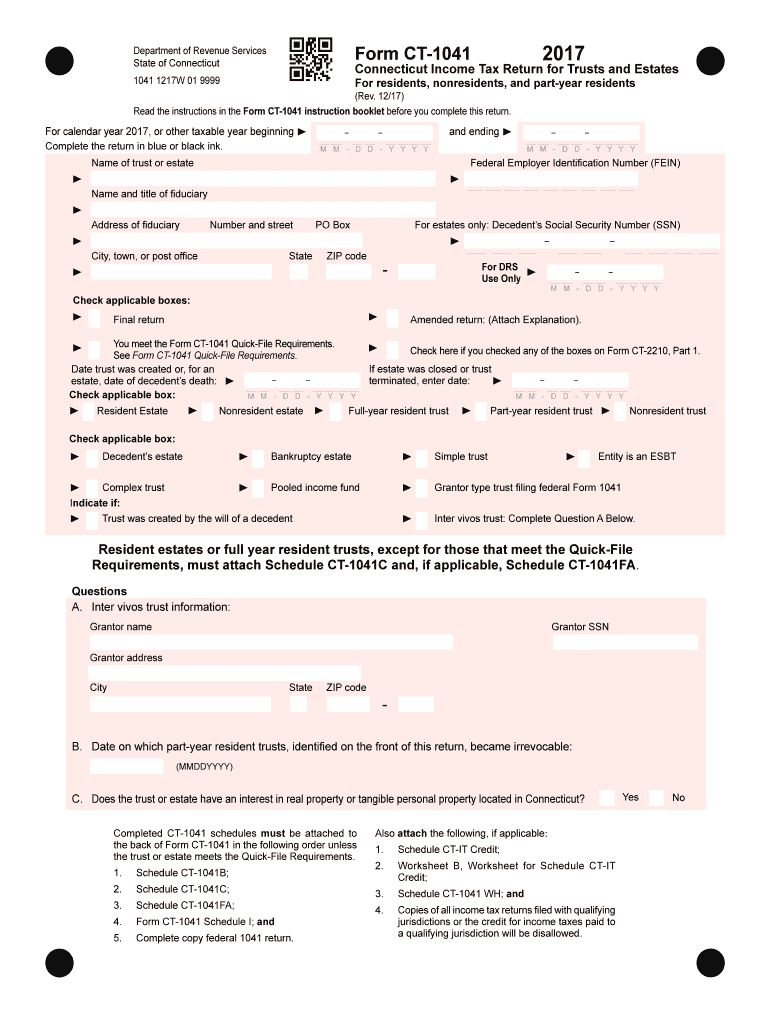
The CT DRS CT-1041 is an important document for reporting income tax for trusts and estates in Connecticut. This guide provides a clear step-by-step approach to help users fill out the form accurately and efficiently, ensuring compliance with tax regulations.
Follow the steps to complete your CT-1041 online.
- Click ‘Get Form’ button to obtain the form and open it in the editor.
- Enter the calendar year for which you are filing the return. Make sure to clearly indicate both the start and end dates of the taxable year.
- Complete the fields for the name of the trust or estate, and its Federal Employer Identification Number (FEIN). This information is essential for identification purposes.
- Fill in the name and title of the fiduciary, along with their address, including city, state, and ZIP code. Ensure accuracy as it will be used for communication regarding the return.
- For estates, provide the decedent's Social Security Number (SSN) as needed.
- Check the applicable boxes to indicate whether this is the final return, if the trust qualifies for Quick-File, or if it is an amended return. Also, indicate the date on which the trust was created or the date of the decedent's death.
- Choose the type of estate or trust by checking the appropriate boxes—indicating if it is a resident, nonresident, or part-year resident trust.
- Respond to any questions about whether the trust or estate has an interest in real property located in Connecticut, and provide additional information as requested in the sections for inter vivos trusts.
- Refer to the required schedules and ensure they are attached in the correct order based on the instructions that pertain to your filing situation.
- Complete the computation of tax section using the provided tax calculation lines. If applicable, enter credits and payments made.
- Review all entered information for accuracy. Make sure to include your declaration, signature, and date before final submission.
- Once all sections are complete, save your changes. You can download, print, or share your finished form as needed.
Start completing your CT DRS CT-1041 online today to ensure timely and accurate tax reporting.
Experience a faster way to fill out and sign forms on the web. Access the most extensive library of templates available.
Related content
CT-1041, 2024 Connecticut Income Tax Return for Trusts and Estates -INSTRUCTIONS, 12/2024...
Apr 15, 2019 — Connecticut taxpayers may obtain help filing Schedule CT-EITC by visiting...
Together with new Retention Time Locking databases, DRS extracts accurate qualitative and...
Get answers to your most pressing questions about US Legal Forms API.
Can CT 1040X be filed electronically?
Yes, you can file the CT 1040X electronically, which helps expedite the amendment process for your state tax return. Using the online filing options streamlines your interaction with the tax authorities, making it easier to correct any previous filings. Always refer to the CT DRS CT-1041 guidelines to ensure you meet all requirements.
Can I file my CT tax return online?
You can file your CT tax return online, which greatly enhances accessibility and convenience. Online filing options offered by the state allow you to submit various forms, including the CT DRS CT-1041, seamlessly. Take advantage of this option to simplify your tax processes.
Can CT 1041 be filed electronically?
Yes, the CT 1041 can be filed electronically with the Connecticut Department of Revenue Services. This option simplifies your filing process, helping you avoid delays and potential issues. Ensure that you follow the CT DRS CT-1041 electronic filing procedures to make the most of this efficient option.
Can a 1041 be filed electronically?
A 1041 can be filed electronically, offering an efficient way to complete your tax obligations. The e-filing process ensures that your Form 1041 reaches the tax authority promptly. Familiarizing yourself with the CT DRS CT-1041 e-filing guidelines will help you navigate this option effectively.
Can I file an estate tax return electronically?
Yes, you can file an estate tax return electronically, which streamlines the entire process. The CT DRS CT-1041 allows electronic submissions, making it more convenient for you. If you're unsure of the steps, platforms like USLegalForms provide resources to guide you through electronic filing.
Who do I write my CT state tax check to?
You should write your CT state tax check to the Connecticut Department of Revenue Services. Make sure to include any necessary information, such as your Social Security number or business ID, on the check. When dealing with payment related to the CT DRS CT-1041, double-check the instructions provided to ensure accuracy.
Do I have to file a 1041 for an estate with no income?
If the estate has no income, you may not need to file Form 1041. However, it is essential to check with the CT DRS CT-1041 guidelines to ensure compliance with state laws. Filing requirements can depend on various factors, so consulting with a tax professional or using resources from USLegalForms can help clarify your obligations.
How to determine the residency of a trust?
To determine the residency of a trust, look at the location of the trustee and the jurisdiction of the trust agreement. Generally, if a trustee resides in Connecticut, the trust is considered a resident trust. Understanding residency is crucial for compliance with the CT DRS CT-1041 requirements, as it impacts taxation and filing obligations.
Who must file a CT 1041?
The CT DRS CT-1041 must be filed by an estate if it generated enough income or if the estate is classified as a separate entity for tax purposes. Executors or administrators of estates are responsible for this filing. Ensuring you meet these requirements is crucial for legal compliance and to prevent penalties.
What is the most you can inherit without paying taxes?
In Connecticut, as mentioned earlier, an individual can inherit up to $12.92 million without facing estate taxes. This threshold applies to the entire estate rather than individual inheritances. To navigate this information effectively, consider utilizing the CT DRS CT-1041 for your tax documentation and planning.
Use professional pre-built templates to fill in and sign documents online faster. Get access to thousands of forms.
If you believe that this page should be taken down, please follow our DMCA take down process here.
This form is available in several versions. Select the version you need from the drop-down list below.