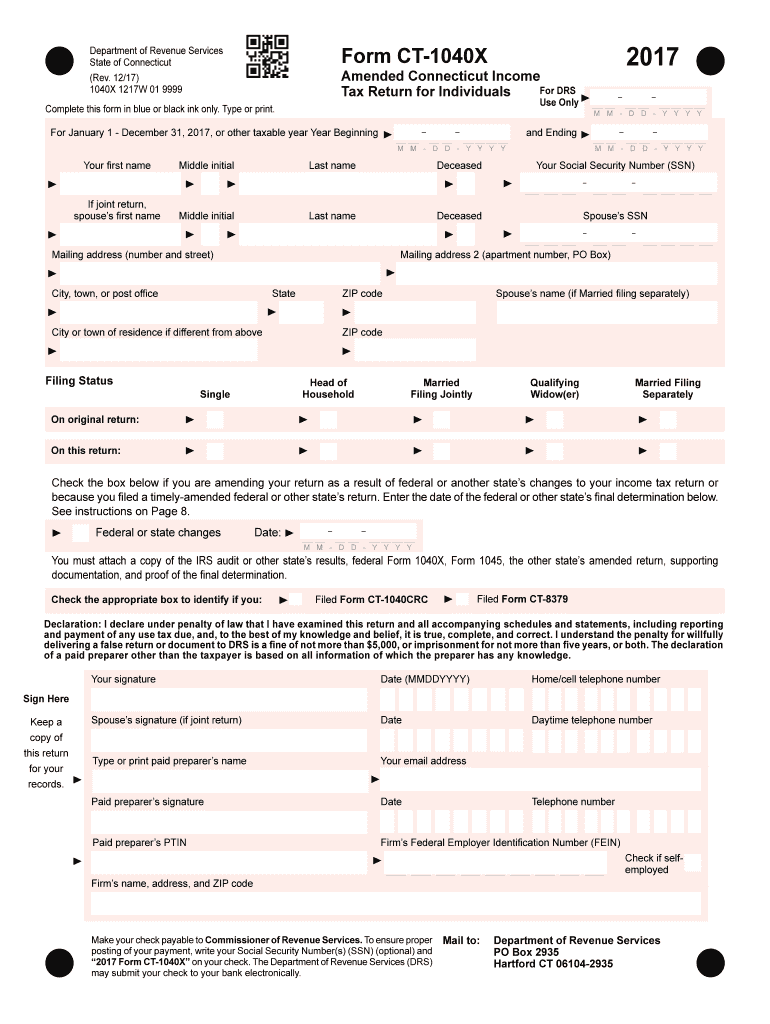
Ginning Your first name Middle initial If joint return, spouse s first name Last name Deceased Last name Deceased Mailing address (number and street) M M - D D - Y Y Y Y Your Social Security Number (SSN) Middle initial M M - D D - Y Y Y Y and Ending M M - D D - Y Y Y Y 2017 Form CT-1040X Department of Revenue Services State of Connecticut (Rev. 12/17) 1040X 1217W 01 9999 Spouse s SSN Mailing.
Loading

Open form follow the instructions

Easily sign the form with your finger

Send filled & signed form or save
How to fill out the CT DRS CT-1040X online
Filling out the CT DRS CT-1040X online can seem daunting, but this guide will walk you through each step of the process. By following these clear instructions, you can ensure that your amended Connecticut income tax return is completed accurately and efficiently.
Follow the steps to successfully complete your CT-1040X online.
- Press the ‘Get Form’ button to download the CT DRS CT-1040X form and open it in your preferred editing tool.
- Begin by selecting your tax year at the top of the form. Make sure to enter the correct year, which should be January 1 to December 31 of 2017 or the relevant taxable year.
- Fill in your personal information including your first name, middle initial, last name, and your Social Security number. If you are filing jointly, include your spouse's information as well.
- Indicate your mailing address accurately. This is where the DRS will send any correspondence regarding your return. Include your street address, apartment number (if applicable), city or town, state, and ZIP code.
- Clearly mark your filing status. Choose from the options provided: Single, Married Filing Jointly, Married Filing Separately, Head of Household, or Qualifying Widow(er).
- If you are amending your return due to federal or state changes, check the appropriate box and provide the date of the final determination.
- Ensure you attach any necessary documentation required by the Connecticut DRS, such as a copy of the IRS audit or the amended return from another state, prior to submission.
- Complete the income tax sections, ensuring that all necessary calculations and modifications to your federal adjusted gross income are detailed on the corresponding lines.
- After finalizing all fields, review your entries for accuracy. Pay close attention to calculations and any supporting documentation that must be attached.
- Save your changes to the completed form. From here, you can download a copy for your records, print it for submission, or share it as needed.
Start filling out your CT DRS CT-1040X online now to ensure timely and accurate submission!
Experience a faster way to fill out and sign forms on the web. Access the most extensive library of templates available.
Related content
Jan 15, 2022 — Using the TSC enables you to file your return and pay your Connecticut...
Get answers to your most pressing questions about US Legal Forms API.
What address to use for a tax return?
The address for mailing your tax return depends on the type of return and whether you are including a payment. For both federal and state returns, always refer to the latest instructions from the IRS or the Connecticut Department of Revenue Services. For accurate guidance, uslegalforms can provide you with the necessary addresses based on your specific filing situation.
How to file CT 1120 online?
Filing the CT 1120 online can be done through approved e-file software or the Connecticut Department of Revenue Services website. Make sure to follow the specific guidelines for corporate income tax returns to ensure compliance. By utilizing uslegalforms, you can access detailed instructions and resources for a smooth online filing experience.
Where to mail a CT 1040 tax return?
When mailing your CT 1040 tax return, it's important to use the address designated by the Connecticut Department of Revenue Services. This address varies based on your situation, such as whether you are including a payment. Always verify the current mailing addresses to ensure your return arrives without issues. Platforms like uslegalforms provide up-to-date mailing information and resources.
Do you mail a federal tax return with a state return?
You typically do not mail your federal and state tax returns together. Each should be sent separately to its respective agency. For Connecticut, your state return may require specific handling. Using platforms like uslegalforms can help clarify submission rules for both federal and state returns.
Where to send form CT 1040 Ext?
When you complete the CT 1040 Extension form, be sure to send it to the address specified on the form itself. There are different addresses for mailing based on whether you are enclosing a payment or not. To avoid delays, consult the Connecticut Department of Revenue Services for the most current address information. Tools offered by uslegalforms can assist you in locating and submitting the CT 1040 Ext properly.
Can you e-file an amended CT return?
Yes, you can e-file an amended CT tax return using the CT DRS CT-1040X form through approved tax preparation software. This method provides a faster way to submit your amendments. Ensure that your software is capable of handling amended returns. Services like uslegalforms can help you find the right tools for e-filing.
Where do I send my federal tax return from CT?
If you're filing your federal tax return from Connecticut, you should send it to the designated IRS processing center based on your filing method. Typically, the address for mailed returns is different from e-filed ones. Make sure to check the latest information from the IRS to ensure accurate submission. Additionally, uslegalforms offers resources for determining the correct mailing address.
How to file an amended tax return?
To file an amended tax return, you'll need to complete the CT DRS CT-1040X form. This form allows you to make corrections to your original return. After filling it out, send the completed form to the appropriate address provided by the Connecticut Department of Revenue Services. Utilizing a service like uslegalforms can simplify this process by providing guidance and easy access to the necessary forms.
Who do I write my CT state tax check to?
When sending a tax payment, you should write your Connecticut state tax check to 'Connecticut Department of Revenue Services' or 'CT DRS.' If you're making a payment related to an amended return using the CT DRS CT-1040X form, ensure your payment is correctly noted and enclosed. Following the guidelines for payments can help avoid potential delays in processing your tax return. Always double-check your payment details for accuracy.
When can a company amend its CT return?
A company can amend its CT return at any time after its original filing if there are any errors or changes that need to be made. It is advisable to use the CT DRS CT-1040X form to ensure that the amendment is properly documented and submitted. Keeping a track of any changes, whether due to new deductions, corrections, or additional income, is important for maintaining accurate tax records. Regularly review your filings to ensure compliance.
Use professional pre-built templates to fill in and sign documents online faster. Get access to thousands of forms.
If you believe that this page should be taken down, please follow our DMCA take down process here.
This form is available in several versions. Select the version you need from the drop-down list below.