Loading
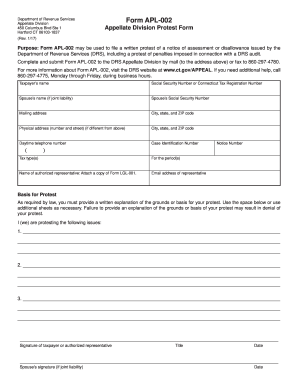
Get Ct Drs Apl-002 2017
How it works
-

Open form follow the instructions
-

Easily sign the form with your finger
-

Send filled & signed form or save
How to fill out the CT DRS APL-002 online
Filing a protest with the Connecticut Department of Revenue Services (DRS) can be a straightforward process when you have the right guidance. This guide will walk you through each section of the CT DRS APL-002 form, helping you complete it correctly and efficiently.
Follow the steps to successfully complete the form.
- Press the ‘Get Form’ button to access the CT DRS APL-002 online and open the form for editing.
- Begin by entering the taxpayer’s name in the designated field. Ensure the name matches the name on the tax records to avoid any discrepancies.
- Input either the Social Security Number or the Connecticut Tax Registration Number in the provided field. This information is essential for identity verification.
- If applicable, include the spouse’s name, followed by their Social Security Number. This is necessary if filing jointly.
- Fill in the mailing address, including the city, state, and ZIP code. This is where any correspondence regarding your protest will be sent.
- If the physical address differs from the mailing address, provide the physical address along with the city, state, and ZIP code.
- Enter your daytime telephone number to ensure the DRS can contact you if needed.
- Enter the Case Identification Number and Notice Number. These numbers are typically found on the notice of assessment you received from the DRS.
- Select the tax type(s) related to your protest and indicate the period(s) for which you are filing.
- If you have an authorized representative, include their name and attach a copy of Form LGL-001. Provide the representative’s email address for communication.
- In the ‘Basis for Protest’ section, provide a detailed written explanation of the grounds for your protest. Be as thorough as possible, and attach additional sheets if necessary.
- Sign and date the form in the designated sections. If filing jointly, your spouse must also sign and date the form.
- Once all fields are completed, proceed to save your changes. You can then download, print, or share the completed form as needed.
Start completing your CT DRS APL-002 form online today!
Get form
Experience a faster way to fill out and sign forms on the web. Access the most extensive library of templates available.
Related links form
To get in touch with the CT DRS, you have several options. Visit their website for contact details or send an inquiry via their designated email address. For immediate assistance regarding CT DRS APL-002, use the phone number listed online to talk with a representative who can help address your concerns.
Get This Form Now!
Use professional pre-built templates to fill in and sign documents online faster. Get access to thousands of forms.