Loading
Form preview
  • US Legal Forms
  • Other Templates
  • Tax Forms
  • Connecticut Tax Forms
  • Ct Ct-3911 2013

Get Ct Ct-3911 2013

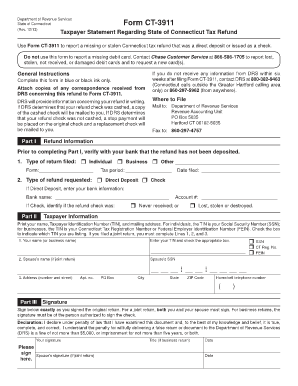
1 to report a missing or stolen Connecticut tax refund that was a direct deposit or issued as a check. Do not use this form to report a missing debit card. Contact Chase Customer Service at 866-586-1705 to report lost, stolen, not received, or damaged debit cards and to request a new card(s). General Instructions Complete this form in blue or black ink only. Attach copies of any correspondence received from DRS concerning this refund to Form CT-3911. DRS will provide information concerning your.

How it works

  1. Open form

    Open form follow the instructions

  2. Easily sign form

    Easily sign the form with your finger

  3. Share form

    Send filled & signed form or save

How to fill out the CT CT-3911 online

Filling out the CT CT-3911 is an essential step for reporting a missing or stolen Connecticut tax refund. This guide provides clear, detailed instructions on how to complete the form online, ensuring you provide all necessary information correctly.

Follow the steps to complete the CT CT-3911 form efficiently.

  1. Click the 'Get Form' button to access the CT CT-3911 form and open it for editing.
  2. In Part I, verify your refund status with your bank before proceeding. Indicate the type of return you filed by selecting one of the options: Individual, Business, or Other. Fill in the form type and tax period, along with the date you filed your return.
  3. Next, specify the type of refund you are requesting: Direct Deposit or Check. If you select Direct Deposit, enter your bank name and account number. If you choose Check, indicate whether the refund check was never received or if it was lost, stolen, or destroyed.
  4. In the Taxpayer Information section, print your name, provide your Taxpayer Identification Number (TIN), and enter your mailing address. If you are filing a joint return, include your spouse’s name and Social Security Number as well.
  5. In Part III, sign the form exactly as you signed your original return. If it is a joint return, both you and your spouse must sign it. For a business return, ensure that the person authorized to sign the check adds their signature.
  6. Finally, review the entire form for accuracy. Once all information is filled in correctly, you can save changes, download, print, or share the completed form.

Complete your CT CT-3911 form online today to get your tax refund issues resolved quickly.

Get form

Experience a faster way to fill out and sign forms on the web. Access the most extensive library of templates available.

Related content

Form CT-3911
Purpose: Use Form CT-3911 to report a missing or stolen Connecticut tax ... Attach copies...
Learn more
3911 Dunsmuir Ct House
Available July 3rd - Fantastic single family home on a corner lot in an established...
Learn more
C593/C639 PARTS CATALOG
C229 3911 Gear:Hale:Z25Z51. 31 - 4. C229 3961 Drive Pulley. 41 - 26. C229 4373 Adjust...
Learn more

Related links form

NY DTF CT-4 2010 NY DTF CT-4 2006 NY DTF CT-4 1995 NY DTF CT-5.1 2018

Questions & Answers

Get answers to your most pressing questions about US Legal Forms API.

Contact support

Yes, Connecticut allows for some amended returns to be filed electronically. Check the Connecticut Department of Revenue Services website for the most current information on e-filing options for the CT-3911 form. By utilizing e-filing, you can often enjoy faster processing times and confirm that your CT amendment is submitted without delay.

You can find your CT refund tracker on the official Connecticut Department of Revenue Services website. This tool allows you to check the status of your refund, saving you time and hassle. Make sure to have your tax information handy, as this will help you access your CT-3911-related details quickly.

To fill out the CT-3911 for a missing refund check, start with your identification information, including your tax year and ID number. Next, specify the details surrounding the refund you did not receive. Submitting a clear and accurate CT-3911 form helps expedite the process of tracking down your missing funds.

You can file your CT amended return, including form CT-3911, at your local Connecticut Department of Revenue Services office. Be sure to check for any specific filing instructions as they can vary based on your tax circumstances. Properly filing your amendment helps ensure that your tax records are up-to-date and accurate.

To request the IRS to reissue a refund check, begin by ensuring that you have requested a duplicate through the proper channels. You may need to submit Form CT-3911 if your refund relates to an amended return. Additionally, consider contacting the IRS directly to discuss your specific situation for a quicker resolution.

Filing the CT-3911 form is straightforward. First, complete the form with accurate details about your tax situation. Then, submit it to the appropriate Connecticut state tax office, either by mail or electronically if allowed. Check the official CT website for any updates on how to file and confirm the best method for your needs.

To fill out the CT-3911 for a lost stimulus check, you must provide your personal information, including your Social Security number, and details about the lost check. Make sure to include information such as the amount of the stimulus and the date you expected to receive it. By using the CT-3911 form, you can streamline the process of claiming your lost funds effectively.

The CT-3911 form is used to amend your tax return in Connecticut. This form allows you to correct any errors or omissions on your original return. By submitting CT-3911, you ensure that your amended information is processed properly by the state.

If the IRS sends your refund to a closed bank account, the bank will typically reject the transaction and return the funds to the IRS. This process can delay your refund while they reassess your payment method. By using form 3911, you can initiate a trace to track your funds, and uslegalforms provides necessary tools to help you file this claim correctly.

Unfortunately, you cannot submit form 3911 online at this time. The IRS requires that you mail the completed form. To streamline your filling process, consider using uslegalforms, which can provide straightforward templates to ease the task of preparing your form for submission.

Get This Form Now!

Use professional pre-built templates to fill in and sign documents online faster. Get access to thousands of forms.
If you believe that this page should be taken down, please follow our DMCA take down processhere.
Get CT CT-3911
  • Adoption
  • Bankruptcy
  • Contractors
  • Divorce
  • Home Sales
  • Employment
  • Identity Theft
  • Incorporation
  • Landlord Tenant
  • Living Trust
  • Name Change
  • Personal Planning
  • Small Business
  • Wills & Estates
  • Packages A-Z
  • Affidavits
  • Bankruptcy
  • Bill of Sale
  • Corporate - LLC
  • Divorce
  • Employment
  • Identity Theft
  • Internet Technology
  • Landlord Tenant
  • Living Wills
  • Name Change
  • Power of Attorney
  • Real Estate
  • Small Estates
  • Wills
  • All Forms
  • Forms A-Z
  • Other Templates
  • Legal Hub
  • About Us
  • Help Portal
  • Legal Resources
  • Blog
  • Affiliates
  • Contact Us
  • Delete My Account
  • Site Map
  • Industries
  • Forms in Spanish
  • Localized Forms
  • State-specific Forms
  • Forms Kit
  • Real Estate Handbook
  • All Guides
  • Notarize
  • Incorporation services
  • For Consumers
  • For Small Business
  • For Attorneys
  • USLegal
  • FormsPass
  • pdfFiller
  • signNow
  • altaFlow
  • DocHub
  • Instapage
Form Packages
  • Adoption
  • Bankruptcy
  • Contractors
  • Divorce
  • Home Sales
  • Employment
  • Identity Theft
  • Incorporation
  • Landlord Tenant
  • Living Trust
  • Name Change
  • Personal Planning
  • Small Business
  • Wills & Estates
  • Packages A-Z
Form Categories
  • Affidavits
  • Bankruptcy
  • Bill of Sale
  • Corporate - LLC
  • Divorce
  • Employment
  • Identity Theft
  • Internet Technology
  • Landlord Tenant
  • Living Wills
  • Name Change
  • Power of Attorney
  • Real Estate
  • Small Estates
  • Wills
  • All Forms
  • Forms A-Z
  • Other Templates
Customer Service
  • Legal Hub
  • About Us
  • Help Portal
  • Legal Resources
  • Blog
  • Affiliates
  • Contact Us
  • Delete My Account
  • Site Map
  • Industries
  • Forms in Spanish
  • Localized Forms
  • State-specific Forms
  • Forms Kit
Legal Guides
  • Real Estate Handbook
  • All Guides
Prepared for you
  • Notarize
  • Incorporation services
Our Customers
  • For Consumers
  • For Small Business
  • For Attorneys
Our Sites
  • USLegal
  • FormsPass
  • pdfFiller
  • signNow
  • altaFlow
  • DocHub
  • Instapage
Social Media
Call us now toll free:
+1 833 426 79 33
As seen in:
© Copyright 1999-2026 airSlate Legal Forms, Inc. 17 Station Street, Suite 303, Brookline, MA 02445
  • Your Privacy Choices
  • Terms of Service
  • Privacy Notice
  • Content Takedown Policy
  • Bug Bounty Program
CT CT-3911
This form is available in several versions.
Select the version you need from the drop-down list below.
2016 CT CT-3911
Select form
  • 2016 CT CT-3911
  • 2013 CT CT-3911
  • 2006 CT CT-3911
Select form