Get Co Dr 0442 2015
How it works
-

Open form follow the instructions
-

Easily sign the form with your finger
-

Send filled & signed form or save
How to fill out the CO DR 0442 online
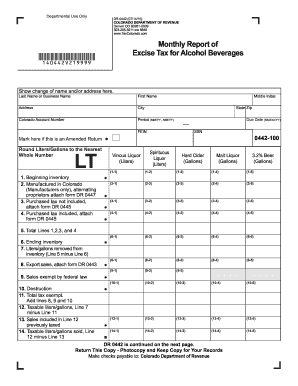
Filling out the CO DR 0442 form for reporting excise tax on alcohol beverages can be straightforward when you understand each section of the document. This guide provides clear and supportive instructions for users to successfully complete the form online.
Follow the steps to complete the CO DR 0442 online.
- Press the ‘Get Form’ button to access the CO DR 0442 form and open it in your preferred editor.
- Begin by filling out the information at the top of the form. This includes your last name or business name, first name, address, city, state, zip code, Colorado account number, and federal employer identification number (FEIN). Be sure to indicate the period of reporting and check the box if this is an amended return.
- Proceed to enter your ending inventory from the prior month's return in line 1. This value should be reported in liters or gallons.
- For line 2, if you are a Colorado manufacturer, report all products manufactured in Colorado that are bottled and ready for sale. If you are an alternating proprietor, remember to attach Schedule DR 0447.
- In line 3, state all products purchased during the month for which the Colorado excise tax has not been paid, ensuring to attach supporting schedule DR 0445.
- Line 4 should include products purchased during the month for which the Colorado excise tax has already been paid, also requiring attachment of supporting schedule DR 0445.
- Calculate the total inventory available for sale in Colorado by summing lines 1, 2, 3, and 4. Enter this total in line 5.
- In line 6, report the ending inventory of products at the end of the month.
- For line 7, state the total liters or gallons removed from inventory during the month by subtracting line 6 from line 5.
- Continue through the form, completing lines 8 through 23 as instructed, ensuring to account for exempt sales, destruction or damage, total tax due, penalties, and interest where applicable.
- Once all sections are completed, review your entries for accuracy, then save your changes. You may also download, print, or share the completed form as necessary.
Complete your CO DR 0442 form online today for a smooth filing experience.
Get form
Related links form
To complete the Employee's Withholding Allowance Certificate, provide personal information including your name, address, and Social Security number. Next, fill out the number of allowances you wish to claim based on your tax situation. This certificate determines the amount of tax withheld from your paycheck, which can help you avoid owing taxes or receiving a large refund at the end of the year. Consider using CO DR 0442 as a resource to streamline this process.