Unemployment insurance account number and must be transferred to another account. No Wage Report Needed Check this box if completing this form does not affect worker wages previously reported. 10. Reason for Adjustment List the reasons the original report is being changed. If you have any questions, please call Unemployment Insurance Employer Services at 303-318-9100 (Denver-metro area) or 1-800-480-8299 (outside the Denver-metro area). UITR-3 Reverse (R 02/2014).
Loading

Open form follow the instructions

Easily sign the form with your finger

Send filled & signed form or save
How to fill out the CO DoR UITR-3 online
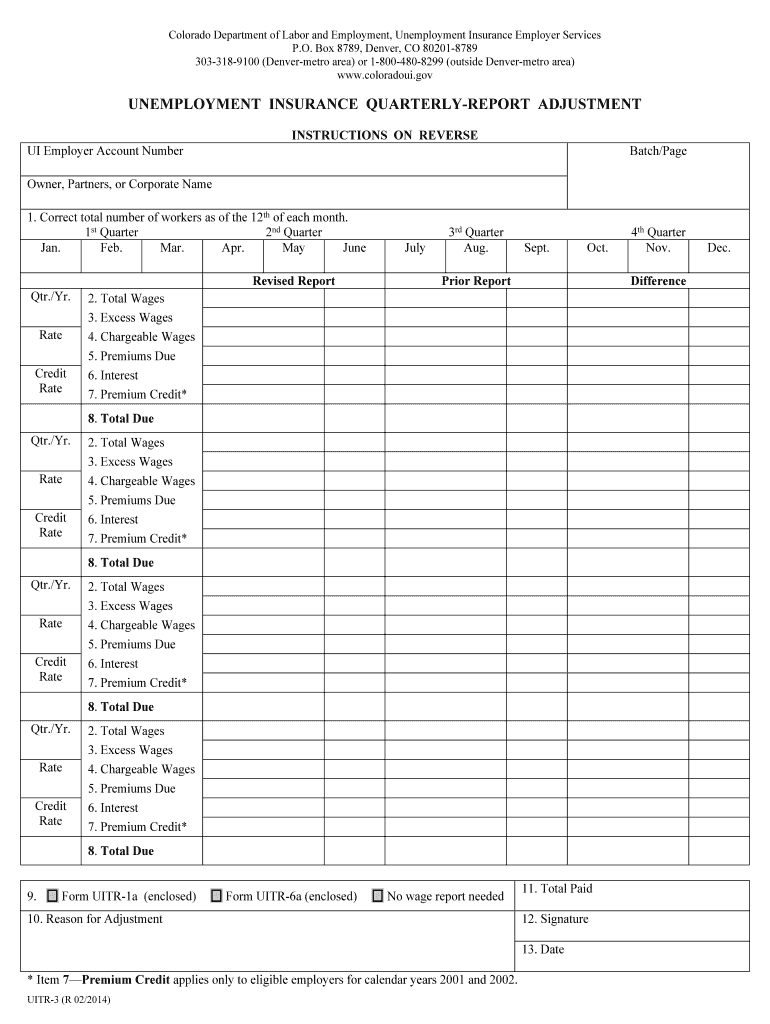
Filling out the CO DoR UITR-3 form is an essential step for reporting adjustments to unemployment insurance quarterly reports. This guide aims to provide clear, step-by-step instructions to help users accurately complete the form online, ensuring compliance and smooth processing.
Follow the steps to accurately complete the UITR-3 form.
- Click ‘Get Form’ button to obtain the UITR-3 form and open it in the editor.
- Complete the UI employer account number section by entering your unique account identifier.
- In the 'Batch/Page' section, input the appropriate batch or page number related to this report.
- Enter the owner, partners, or corporate name as it appears in official records.
- Correctly record the total number of workers as of the 12th of each month for the quarters listed (1st, 2nd, 3rd, and 4th). Ensure accuracy to avoid discrepancies.
- Fill in the total wages for each quarter. This figure should include all gross wages that were paid or are payable, including any accrued but unpaid wages.
- Record excess wages, which are defined as wages paid during the quarter that exceed $11,700 in chargeable wages.
- Calculate the chargeable wages, confirming that they do not exceed the $11,700 threshold per worker for the calendar year.
- Determine the premiums due by multiplying the employer’s rate by the chargeable wages.
- Enter the amount of interest due for any late premium payments, calculated at 1.5% per month on overdue balances.
- If eligible, input the premium credit amount, noting this applies only to certain calendar years.
- Calculate and enter the total due by summing the premiums due and the interest.
- Indicate whether you are including additional forms by checking the appropriate box, such as UITR-1a or UITR-6a, or marking that no wage report is needed.
- Provide a clear reason for the adjustment in the designated section.
- Finally, sign and date the form to validate the information provided.
- Once completed, users can save changes, download, print, or share the form as needed to finalize submission.
Take action now by filling out the CO DoR UITR-3 form online to ensure all adjustments are reported accurately.
Experience a faster way to fill out and sign forms on the web. Access the most extensive library of templates available.
Related content
Jul 1, 2024 — The state sales/use tax rate is 2.9% with exemptions. Retail marijuana tax...
A forward-thinking leader delivering mobility, enabling economic opportunity, and...
Botões de nível. Ajusta o balanço do volume entre cada canal. : ajusta o volume da...
Get answers to your most pressing questions about US Legal Forms API.
How do I file my income tax return?
To file your income tax return, gather all pertinent documents such as income statements, deductions, and credits. You can use tax software or consult a tax professional to help with the submission process. If you are filing the CO DoR UITR-3, our platform, US Legal Forms, offers easy-to-understand resources to guide you through the filing process.
Is it too early to file state taxes?
Filing your state taxes too early can be problematic if you haven't received all necessary documents, like your W-2 or 1099 forms. Always wait until you have everything you need for accuracy. When you’re ready to file your 2025 taxes, be sure to consider the CO DoR UITR-3 as part of your preparation for a successful submission.
When did Colorado start accepting tax returns?
Colorado typically begins accepting tax returns around the end of January each year. The exact start date can change, so it’s wise to monitor announcements from the Colorado Department of Revenue. If you're submitting the CO DoR UITR-3, ensure you're ready to file as soon as the window opens to avoid any last-minute stress.
When can we file Colorado state taxes?
You may file Colorado state taxes during the designated filing period set by the Colorado Department of Revenue, which usually starts in late January and lasts until the tax deadline in mid-April. It's essential to prepare your documents early, especially the CO DoR UITR-3 form, to ensure a smooth filing process. Remember to stay informed about any changes to due dates each tax year.
How to file a claim with the Colorado Department of Labor?
To file a claim with the Colorado Department of Labor, visit their official website and follow the necessary steps outlined there. You will need to gather relevant documentation, such as your social security number and details regarding your employment. Submitting accurate information will enhance your chances of success with your CO DoR UITR-3 claim.
When can you file Colorado state taxes 2025 online?
For the tax year 2025, you can expect to file your Colorado state taxes online starting in late January 2026. Online submissions are often encouraged for their convenience and efficiency, especially when utilizing the CO DoR UITR-3. Keep an eye on the Colorado Department of Revenue announcements for exact dates and updates.
Can I file Colorado state taxes yet?
You can begin filing Colorado state taxes on specific dates set by the Colorado Department of Revenue. Typically, the filing window opens in late January each year. However, ensure you check for any updates regarding the CO DoR UITR-3 form and its requirements as the dates may vary.
How to file ITR3 step by step?
Filing ITR3 step by step involves gathering your financial documents first. Next, complete the CO DoR UITR-3 form by filling in your income details and deductions accurately. Lastly, review the form for any errors before submission. Using user-friendly platforms like uslegalforms can enhance your filing experience considerably.
How to get a tax computation statement?
You can obtain a tax computation statement by calculating your total income, tax deductions, and applicable tax rates. This can be done manually or through software that simplifies the process, such as uslegalforms, where you can find templates that help generate this statement accurately. This statement will aid you in filing your CO DoR UITR-3 effectively.
How to fill ITR 3 step by step?
To fill ITR 3 step by step, start by gathering all necessary financial documents. Follow the structure of the CO DoR UITR-3 form, filling in your personal details, income, deductions, and any other required sections. Double-check your entries for accuracy before submission, which can keep complications at bay. Using platforms like uslegalforms can provide helpful guidance.
Use professional pre-built templates to fill in and sign documents online faster. Get access to thousands of forms.
If you believe that this page should be taken down, please follow our DMCA take down process here.
This form is available in several versions. Select the version you need from the drop-down list below.