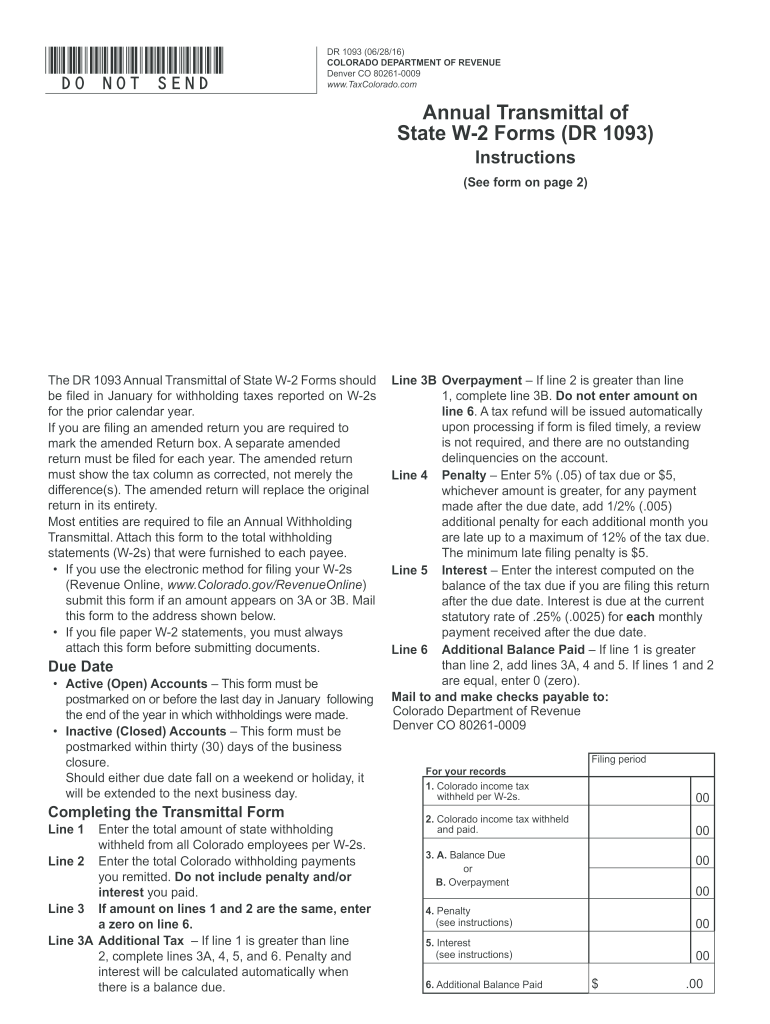
Enalty (see instructions) 00 5. Interest (see instructions) 00 6. Additional Balance Paid $ .00 Departmental Use Only *161093 19999* DR 1093 (06/28/16) COLORADO DEPARTMENT OF REVENUE Denver CO 80261-0009 www.TaxColorado.com Colorado Department of Revenue Annual Transmittal of State W-2 Forms SSN 1 SSN 2 FEIN Account Number Last Name or Business Name First Name Middle Initial Address City State Period (MM/YY MM/YY) ZIP Due Date (MM/DD/YY) Number of W.
Loading

Open form follow the instructions

Easily sign the form with your finger

Send filled & signed form or save
How to fill out the CO DoR DR 1093 online
Filling out the CO DoR DR 1093 form online is an essential process for reporting state withholding taxes associated with W-2 forms. This guide provides clear, step-by-step instructions to assist you in accurately completing this form.
Follow the steps to fill out the CO DoR DR 1093 efficiently.
- Use the ‘Get Form’ button to access the CO DoR DR 1093 form and open it in your editor.
- Line 1: Enter the total amount of state tax withheld from all Colorado employees as reported on the W-2s.
- Line 2: Input the total Colorado withholding payments that you have remitted. Ensure you do not include any penalties or interest.
- Line 3: If lines 1 and 2 are equal, place a zero on line 6. If line 1 exceeds line 2, proceed to complete lines 3A, 4, 5, and 6.
- Line 3A: If line 1 is greater than line 2, enter the additional tax due here. Penalty and interest will be calculated automatically if there is a balance owed.
- Line 3B: If line 2 is more than line 1, complete line 3B without entering any value on line 6. A tax refund may be processed if the form is filed timely.
- Line 4: Enter any applicable penalty, calculated at 5% of the tax due or a minimum of $5 for late payments. Additional penalties may apply for extended delays.
- Line 5: Compute the interest based on the current statutory rate for each month the payment is late.
- Line 6: If line 1 is greater than line 2, sum lines 3A, 4, and 5. If lines 1 and 2 are equal, record a zero.
- Once all fields are completed, review the information for accuracy. You can save changes, download the completed form, print it, or share it as needed.
Complete your CO DoR DR 1093 online today to ensure timely and accurate filing.
Experience a faster way to fill out and sign forms on the web. Access the most extensive library of templates available.
Related content
The DR 1093 Annual Transmittal of State W-2 Forms should be filed in January for...
by NM Fonseca · 2002 · Cited by 10 — Justificativa e Objetivos - O bloqueio do nervo...
Dec 27, 2022 — (4) Regulation (EU) No 1093/2010 of the European Parliament and of the...
Get answers to your most pressing questions about US Legal Forms API.
Is a 1099-R the same as a W-2?
R and a W2 are not the same; they report different types of income. While a W2 reports wages and the associated tax withholdings for employees, a 1099R reports distributions from retirement accounts. Being aware of these distinctions, including the relevance of the CO DoR DR 1093, can aid you in making informed financial decisions.
Is there a Colorado state withholding form?
Yes, Colorado has specific forms for state withholdings, including the CO DoR DR 1093. Employers must fill out this form to report the income tax withheld from employee wages. Ensuring this form is accurately completed helps employers remain compliant with state regulations, facilitating smooth payroll operations.
What is the difference between W-2 and 1093?
2 and 1093 serve different purposes; 2 reports wages and tax withholdings for employees, while CO DoR DR 1093 specifically details state tax withholdings. Employers use both forms to report earnings, but 2 includes federal taxes and other benefits, while the 1093 focuses on statelevel compliance. Understanding these differences helps simplify your tax reporting process.
What is co-dr 1093?
The CO DoR DR 1093 is Colorado's state tax withholding form used for reporting employee withholdings. This form is crucial for employers as it helps maintain the correct tax obligations for employees and avoids penalties. Utilizing the CO DoR DR 1093 correctly ensures that you fully comply with state tax laws, providing peace of mind.
Is it better to be W-2 or 1099?
Choosing between W-2 and 1099 statuses depends on your individual circumstances. Being a W-2 employee typically means higher job security and benefits, while 1099 contractors often enjoy more flexibility and potential for higher earnings. Both options have their advantages, so consider your financial situation and how the CO DoR DR 1093 tax form applies to your choice.
What does W-2 or 1099 withholding mean?
2 and 1099 withholdings refer to the tax deductions applied to an employee's paycheck or an independent contractor's earnings. 2 forms show federal tax withholdings taken from an employee's wages, while 1099 forms report income received without such withholdings. Understanding these terms is essential for proper tax planning and compliance, including the use of the CO DoR DR 1093 form.
Is a 1095-C the same as a W-2?
No, a 1095-C and a W-2 serve different purposes. The 1095-C provides information about health insurance coverage offered by employers, while the W-2 reports wages and tax withholdings. Understanding the differences between these forms, including the CO DoR DR 1093, can help you manage your taxation more effectively.
What is the 1093 tax form?
The CO DoR DR 1093 tax form is used in Colorado for reporting personal income taxes withheld for certain employees. This form provides important information about state withholdings which helps in maintaining compliance with tax regulations. When you file the CO DoR DR 1093, you ensure accurate withholding for your employees, thus avoiding potential penalties.
What is the 2% withholding in Colorado?
Colorado requires a 2% withholding from payments made to independent contractors as per CO DoR DR 1093 regulations. This withholding ensures that individuals contribute appropriately to their state taxes on earned income. Knowing the 2% requirement helps freelancers and contractors prepare for their tax obligations efficiently.
What is form 1093 IRS used for?
Form 1093, or CO DoR DR 1093, is used for ensuring that the correct amount of Colorado state taxes are withheld from payments made for services. It plays a vital role in income reporting for individuals who are not classified as employees. Using this form helps maintain transparency with tax regulations in Colorado.
Use professional pre-built templates to fill in and sign documents online faster. Get access to thousands of forms.
If you believe that this page should be taken down, please follow our DMCA take down process here.
This form is available in several versions. Select the version you need from the drop-down list below.