Fered in our Taxpayer Service Center locations. Please visit the Education page of the Taxation web site www.TaxColorado.com to view current schedules and to register. Colorado Sales Taxes State Sales Tax The state sales tax rate is 2.9% and is reported in the state column of this return. RTD and CD Taxes Regional Transportation District (RTD) and the Scientific and Cultural Facilities District (CD) taxes are administered in the same manner as state sales tax. The RTD sales tax rate is 1% and th.
Loading

Open form follow the instructions

Easily sign the form with your finger

Send filled & signed form or save
How to fill out the CO DoR DR 0100 online
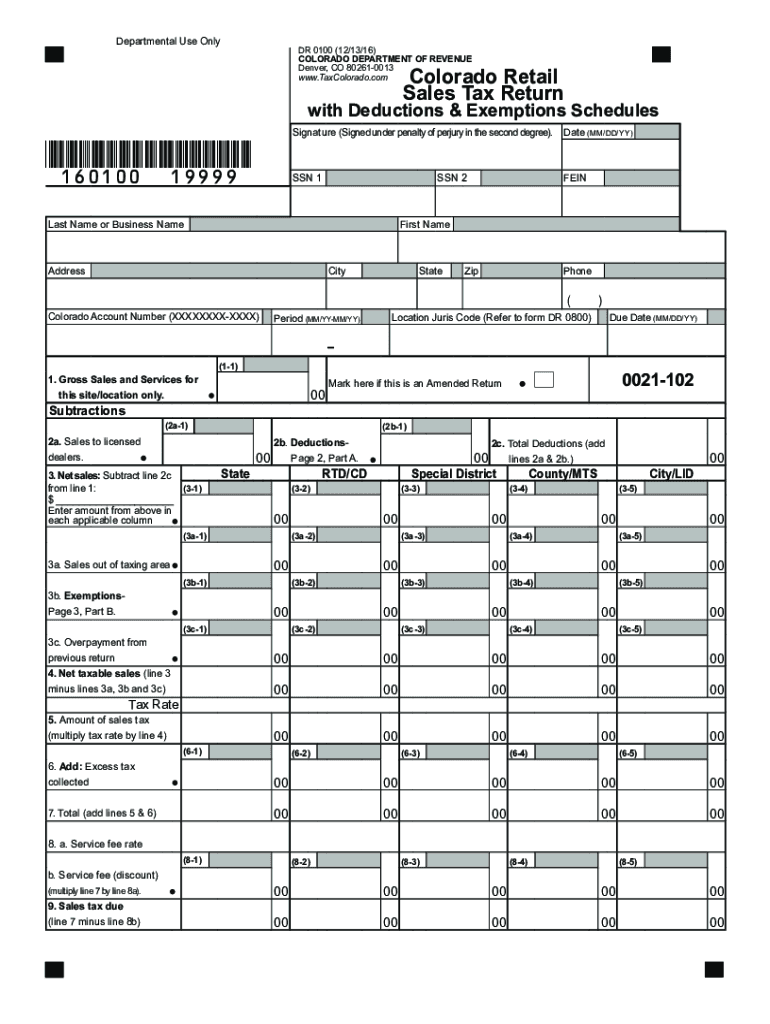
The CO DoR DR 0100 is a vital form used for reporting Colorado sales tax. This guide will provide you with clear, step-by-step instructions on how to complete this form online, ensuring compliance and accuracy in your submission.
Follow the steps to complete your sales tax return online.
- Click the ‘Get Form’ button to obtain the form and open it in the online editor.
- Fill in your Federal Employer Identification Number (FEIN) or Social Security Number (SSN) accurately. This information is crucial for processing your return and preventing delays.
- Enter your Colorado Account Number, including the site/location number. Ensure that the format is XXXXXXXX-XXXX for proper processing.
- Indicate the filing period by entering it in MM/YY-MM/YY format. For example, if filing for the first quarter, enter 01/16-03/16.
- Input the six-digit Location Jurisdiction Code specific to your site/location. You can find these codes in the DR 0800 guide.
- Complete the Gross Sales and Services section by entering your total gross sales for the reporting period.
- Detail any sales to licensed dealers and list your deductions as required, ensuring you complete the Deductions Schedule if necessary.
- Calculate your net sales by subtracting deductions from gross sales and enter this amount in the designated columns.
- If you are claiming any exemptions, input these amounts in the Exemptions section, also ensuring you complete the Exemptions Schedule.
- Review all entries for accuracy. Check that totals match across all relevant sections to avoid processing delays.
- Once completed, save your changes and choose to download, print, or share the filled form, depending on your preferred submission method.
Complete your CO DoR DR 0100 form online today to ensure timely and accurate tax reporting.
Experience a faster way to fill out and sign forms on the web. Access the most extensive library of templates available.
Related content
Retailers must file a sales tax return for every filing period, even if the retailer made...
Apply for an account online via the Colorado Business Express website:...
Jun 29, 2011 — O aparelho não deve ser exposto a goteiras ou respingos e não deve...
Get answers to your most pressing questions about US Legal Forms API.
How do I contact the Colorado Department of Revenue for taxes?
To contact the Colorado Department of Revenue regarding tax inquiries, you can visit their official website for up-to-date contact information. They provide resources for phone, email, and even in-person consultations. Whether you're seeking answers about the CO DoR DR 0100 or other tax matters, reaching out to them directly will ensure you receive the assistance you need.
What's the purpose of the green disclosure form in Colorado?
The green disclosure form in Colorado serves to inform taxpayers of their rights and obligations concerning tax assessments and liabilities. This form ensures transparency and provides necessary information about appeals and disputes. Understanding this form is crucial, especially when dealing with tax situations related to the CO DoR DR 0100.
What is a Dr. 0100 form in Colorado?
The Dr. 0100 form is used by the Colorado Department of Revenue to collect and report tax information for individuals and businesses. This form includes essential details that help calculate taxes owed or refunds due. If you need assistance completing the Dr. 0100 form, consider using the resources available through UsLegalForms, which can simplify the process for you.
What is a DR case in Colorado?
A DR case in Colorado refers to a case that involves a dispute concerning tax debts or issues between a taxpayer and the Colorado Department of Revenue. These cases may involve notices of deficiency, issues with tax returns, or collections. If you find yourself in a DR case, reviewing the CO DoR DR 0100 could help clarify your obligations and rights.
Who can be included in a Colorado composite return?
A Colorado composite return allows certain taxpayers to combine their income. This typically includes non-resident partners of a partnership, non-resident shareholders of an S corporation, and beneficiaries of an estate or trust. By filing a composite return, these individuals can simplify their tax obligations while complying with the CO DoR DR 0100 guidelines.
How do I write a check to the Colorado Department of Revenue?
To write a check to the Colorado Department of Revenue, start by filling out the check with the correct amount you owe and make it payable to 'Colorado Department of Revenue'. Include your tax identification number in the memo line to ensure they can apply your payment accurately. Remember to mail your check to the appropriate address based on the type of tax you are paying, as outlined in the CO DoR DR 0100 instructions.
How to fill out Employee Withholding Certificate form?
To fill out an Employee Withholding Certificate, or the W-4 form, you must provide personal information like your address, Social Security number, and filing status. Accurately completing this form is important for your employer to withhold the correct amount of state income tax. References to the CO DoR DR 0100 can guide you to ensure compliance with Colorado's tax laws.
How to fill out a sales tax exemption form?
Filling out a sales tax exemption form requires you to provide specific details about your business and the reason for the exemption. Gather necessary documentation, and ensure that you use the correct form corresponding to the CO DoR DR 0100 rules. This accuracy can help prevent future disputes with the Colorado Department of Revenue.
What is the RTD tax in Colorado?
The Regional Transportation District (RTD) tax in Colorado supports public transportation initiatives in specific areas. This tax is added to sales in the jurisdictions served by RTD, contributing to better transit options for residents. It is important for businesses to include this tax in their calculations when using the CO DoR DR 0100 form for reporting. Understanding this tax can help you align your business practices with local regulations.
Who needs a sales tax license in Colorado?
Any business selling goods or services in Colorado generally needs a sales tax license. This includes online retailers, food vendors, and service providers. Obtaining this license is necessary to legally collect sales tax from customers. For guidance on how to obtain this license, you can consult the CO DoR DR 0100 documentation.
Use professional pre-built templates to fill in and sign documents online faster. Get access to thousands of forms.
If you believe that this page should be taken down, please follow our DMCA take down process here.
This form is available in several versions. Select the version you need from the drop-down list below.