Loading
Form preview
  • US Legal Forms
  • Other Templates
  • Tax Forms
  • Colorado Tax Forms
  • Co Dor 104 2018

Get Co Dor 104 2018

Estimated Tax Payments, enter the sum of the quarterly payments remitted for this tax year 17 00 18 00 19. Extension Payment remitted with the DR 0158-I 19 00 20. Other Prepayments: DR 0104BEP DR 0108 DR 1079 20 21. Gross Conservation Easement Credit from the DR 1305G line 33, you must submit the DR 1305G with your return. 22. Innovative Motor Vehicle Credit from the DR 0617, you must submit each DR 0617 with your return. 23. Refundable Credits from the DR 0104CR line 8,.

How it works

  1. Open form

    Open form follow the instructions

  2. Easily sign form

    Easily sign the form with your finger

  3. Share form

    Send filled & signed form or save

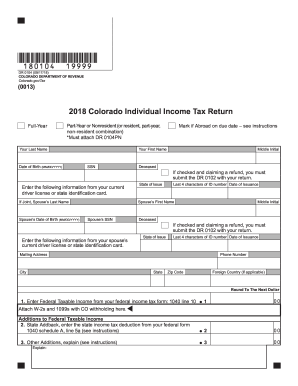
How to fill out the CO DoR 104 online

The CO DoR 104 form is used to file individual income tax returns in Colorado. This guide provides a clear, step-by-step approach to help you complete the form efficiently and accurately online.

Follow the steps to successfully complete the CO DoR 104 online.

  1. Click ‘Get Form’ button to obtain the form and open it in the designated editor.
  2. Enter your last name in the appropriate field, followed by your first name and middle initial. Provide your date of birth in the MM/DD/YYYY format.
  3. Input your Social Security number (SSN). If you are filing jointly, include your partner’s last name, first name, middle initial, and SSN.
  4. Fill in the information from your current driver license or state identification card. Include the state of issue, date of issuance, and the last four characters of the ID number.
  5. Complete your mailing address fields including street, city, state, and ZIP code. If applicable, provide your foreign country information.
  6. Round your Federal Taxable Income to the next dollar and enter it in line 1. Attach W-2s and 1099s with Colorado withholding here.
  7. For line 2, enter any state addback, which is the state income tax deduction from your federal form 1040 Schedule A, line 5a.
  8. If applicable, enter any other additions in line 3 and provide an explanation if necessary.
  9. Calculate the subtotal by summing lines 1 through 3 and enter it in line 4.
  10. Complete line 5 by entering subtractions from the DR 0104AD schedule. Ensure to submit the DR 0104AD schedule with your return.
  11. For line 6, calculate your Colorado Taxable Income by subtracting line 5 from line 4.
  12. In lines 7 through 9, enter taxes and credits as directed, making sure to include any necessary schedules.
  13. Calculate the subtotal for lines 7 through 9 in line 10, and follow the same process for lines 11 through 24 where you will report credits and prepayments.
  14. Complete lines 25 to 35 as directed, ensuring to deduct any applicable penalties or interests.
  15. At the end of the process, you can save changes, download, print, or share the completed form as required.

Begin filling out your CO DoR 104 online today for a smooth tax filing experience.

Get form

Experience a faster way to fill out and sign forms on the web. Access the most extensive library of templates available.

Related content

DR 0104 - Individual Income Tax Return (form only)
Colorado residents must file this return if they are required to file an income tax return...
Learn more
NOCICEPTORES: As células que sentem dor
Os fisiologistas distinguem entre dor e nocicepção, onde a nocicepção se refere aos...
Learn more
e-SUS Atenção Básica MANUAL DE USO DO SISTEMA...
O e-SUS AB é uma estratégia do Departamento de Atenção Básica (DAB) para reestruturar...
Learn more

Related links form

NE DoR 1040N-ES 2014 NE DoR 1040N-ES 2013 NE DoR 1040N-ES 2012 NE DoR 1040N-MIL 2018

Questions & Answers

Get answers to your most pressing questions about US Legal Forms API.

Contact support

Not everyone in Colorado automatically receives a TABOR refund. The refund is contingent upon specific criteria related to state revenue and individual tax situations. To understand if you qualify, refer to the CO DoR 104 for guidelines and current information on the refund process.

The state income tax in Colorado for 2025 is expected to remain at a flat rate, which generally simplifies calculating your taxes. This means that all residents are taxed at the same percentage for their taxable income. To stay informed on any changes, check updates from the CO DoR 104.

To qualify for the Colorado pension and annuity exclusion, you must be receiving retirement benefits from various sources, including public and private pensions. The exclusion also applies to certain annuities that meet specific state criteria. It’s best to consult CO DoR 104 for detailed qualifying conditions that might apply to your situation.

In 2025, you can typically start filing your Colorado state taxes in early January. The deadline usually aligns with federal tax deadlines, which fall on April 15. Staying proactive with your taxes by using resources like CO DoR 104 can ensure you do not miss any important dates.

Whether you will receive a TABOR refund in 2025 largely depends on Colorado's tax revenues and legislative measures. The state evaluates its financial status annually, which affects refund eligibility. Keep an eye on updates from CO DoR 104 to stay informed about potential refunds.

The Colorado tax form 104AD is designed for the allocation of Colorado resident and non-resident income. This form helps clarify how income should be taxed based on residency status. For guidance on how to complete this form, you may consider utilizing USLegalForms to access step-by-step instructions.

Currently, the specifics regarding the TABOR refund for 2025 are pending. Generally, a TABOR refund depends on the state’s revenue exceeding the growth rate. For the most accurate information, you can refer to the CO DoR 104 updates as they become available.

Pension exclusion refers to the tax benefit associated with excluding a portion of your pension income from state taxes. This benefit is designed to assist retired individuals by lowering their taxable income in Colorado. Specifically, the CO DoR 104 offers details about the limits and eligibility for pension exclusions that may apply to your situation.

The portion that qualifies for the Colorado pension and annuity exclusion depends on your total pension and annuity income. Generally, a certain amount of this income can be excluded from state taxes under the CO DoR 104 regulations. Be sure to review the guidelines closely to understand how much of your income can benefit from this exclusion.

You can obtain Colorado form 104 through a variety of channels, including the Colorado Department of Revenue's website. Additionally, the uslegalforms platform provides easy access to the CO DoR 104, along with guidance on how to fill it out. This ensures that you have the most accurate and up-to-date version of the form.

Get This Form Now!

Use professional pre-built templates to fill in and sign documents online faster. Get access to thousands of forms.
If you believe that this page should be taken down, please follow our DMCA take down processhere.
Get CO DoR 104
  • Adoption
  • Bankruptcy
  • Contractors
  • Divorce
  • Home Sales
  • Employment
  • Identity Theft
  • Incorporation
  • Landlord Tenant
  • Living Trust
  • Name Change
  • Personal Planning
  • Small Business
  • Wills & Estates
  • Packages A-Z
  • Affidavits
  • Bankruptcy
  • Bill of Sale
  • Corporate - LLC
  • Divorce
  • Employment
  • Identity Theft
  • Internet Technology
  • Landlord Tenant
  • Living Wills
  • Name Change
  • Power of Attorney
  • Real Estate
  • Small Estates
  • Wills
  • All Forms
  • Forms A-Z
  • Other Templates
  • Legal Hub
  • About Us
  • Help Portal
  • Legal Resources
  • Blog
  • Affiliates
  • Contact Us
  • Delete My Account
  • Site Map
  • Industries
  • Forms in Spanish
  • Localized Forms
  • State-specific Forms
  • Forms Kit
  • Real Estate Handbook
  • All Guides
  • Notarize
  • Incorporation services
  • For Consumers
  • For Small Business
  • For Attorneys
  • USLegal
  • FormsPass
  • pdfFiller
  • signNow
  • altaFlow
  • DocHub
  • Instapage
Form Packages
  • Adoption
  • Bankruptcy
  • Contractors
  • Divorce
  • Home Sales
  • Employment
  • Identity Theft
  • Incorporation
  • Landlord Tenant
  • Living Trust
  • Name Change
  • Personal Planning
  • Small Business
  • Wills & Estates
  • Packages A-Z
Form Categories
  • Affidavits
  • Bankruptcy
  • Bill of Sale
  • Corporate - LLC
  • Divorce
  • Employment
  • Identity Theft
  • Internet Technology
  • Landlord Tenant
  • Living Wills
  • Name Change
  • Power of Attorney
  • Real Estate
  • Small Estates
  • Wills
  • All Forms
  • Forms A-Z
  • Other Templates
Customer Service
  • Legal Hub
  • About Us
  • Help Portal
  • Legal Resources
  • Blog
  • Affiliates
  • Contact Us
  • Delete My Account
  • Site Map
  • Industries
  • Forms in Spanish
  • Localized Forms
  • State-specific Forms
  • Forms Kit
Legal Guides
  • Real Estate Handbook
  • All Guides
Prepared for you
  • Notarize
  • Incorporation services
Our Customers
  • For Consumers
  • For Small Business
  • For Attorneys
Our Sites
  • USLegal
  • FormsPass
  • pdfFiller
  • signNow
  • altaFlow
  • DocHub
  • Instapage
Social Media
Call us now toll free:
+1 833 426 79 33
As seen in:
© Copyright 1999-2026 airSlate Legal Forms, Inc. 17 Station Street, Ste. 203, Brookline, MA 02445
  • Your Privacy Choices
  • Terms of Service
  • Privacy Notice
  • Content Takedown Policy
  • Bug Bounty Program
CO DoR 104
This form is available in several versions.
Select the version you need from the drop-down list below.
2020 CO DoR 104
Select form
  • 2020 CO DoR 104
  • 2019 CO DoR 104
  • 2018 CO DoR 104
  • 2016 CO DoR 104
  • 2015 CO DoR 104
  • 2014 CO DoR 104
  • 2013 CO DoR 104
  • 2011 CO DoR 104
  • 2005 CO DoR 104
Select form