Loading
Form preview
  • US Legal Forms
  • Other Templates
  • Tax Forms
  • Colorado Tax Forms
  • Co Cr 0100ap 2013

Get Co Cr 0100ap 2013

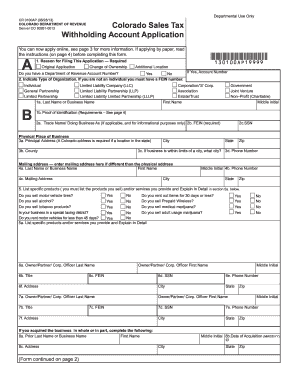
Rmation. If applying by paper, read the instructions (on page 4) before completing this form. A *130100AP19999* 1. Reason for Filing This Application Required Original Application Change of Ownership Additional Location If Yes, Account Number Do you have a Department of Revenue Account Number? Yes No 2. Indicate Type of Organization. If you are not an individual you must have a FEIN number. Individual Limited Liability Company (LLC) General Partnership Limited Liability Partnership (LL.

How it works

  1. Open form

    Open form follow the instructions

  2. Easily sign form

    Easily sign the form with your finger

  3. Share form

    Send filled & signed form or save

How to use or fill out the CO CR 0100AP online

The CO CR 0100AP is a crucial form for registering a sales tax withholding account in Colorado. This guide provides clear, step-by-step instructions on accurately completing this form online, ensuring you meet your business obligations effectively.

Follow the steps to complete the CO CR 0100AP online.

  1. Click ‘Get Form’ button to obtain the application and open it in the editor.
  2. In the first section, select the reason for filing the application: original application, change of ownership, or additional location. If applicable, provide your existing Department of Revenue account number.
  3. Indicate your type of organization. Choose from options such as individual, limited liability company, corporation, or non-profit. If your organization is not an individual, ensure you have your Federal Employer Identification Number (FEIN) ready.
  4. Fill in the taxpayer name. Individuals should enter their last name, first name, and middle initial. Business entities must provide the legal name as registered with the Colorado Secretary of State.
  5. Complete the proof of identification requirements. Ensure you include valid identification such as a Colorado Driver's License or a United States Passport.
  6. Provide the principal address of your business. Note that a physical Colorado address is required, so do not use a P.O. box.
  7. List your specific products and services in detail in the designated section. This information helps categorize your business and may impact tax obligations.
  8. Complete the owner or partner information sections. Provide names, titles, FEINs, and social security numbers for each individual involved.
  9. If applicable, detail previous business information if you acquired the business from another entity, including the prior name and the date of acquisition.
  10. Select your filing frequency based on your estimated sales tax collection. Mark the appropriate box to indicate whether you will file annually, quarterly, or monthly.
  11. Verify all information is correct before submission. If you wish to save changes, download, print, or share the form, ensure you follow the provided options in the online editor.

Start completing your CO CR 0100AP online today to streamline your business registration process.

Get form

Experience a faster way to fill out and sign forms on the web. Access the most extensive library of templates available.

Related content

CR 0100 - Colorado Sales Tax and Withholding...
Use form CR 0100 to open a sales tax and withholding account, or to add an additional new...
Learn more
(PDF) RESOLUÇÃO RESISTÊNCIA DOS MATERIAIS
Dica: A distância entre o centroide C do segmento AB e o ponto O é CO = 0,9745r. ∑(TB...
Learn more

Related links form

NE DoR 1040N 2016 NE DoR 1040N 2015 NE DoR 1040N 2014 NE DoR 1040N 2013

Questions & Answers

Get answers to your most pressing questions about US Legal Forms API.

Contact support

Setting up a Colorado Revenue Online account is straightforward. Visit the Colorado Department of Revenue’s website and click on the Revenue Online link to start the registration process. After filling in your business information, you will be set up with your CO CR 0100AP, which simplifies accessing your tax information and filing requirements.

To get a Colorado sales tax license, you need to apply through the Colorado Department of Revenue's Revenue Online system. This involves submitting your business information and details about your sales activities. Once approved, you'll receive your CO CR 0100AP, allowing you to legally collect sales tax from your customers.

Obtaining a Colorado wage withholding account number can be done through online registration with the Colorado Department of Revenue. You must provide necessary business and employee information during this process. Upon completion, you'll receive your CO CR 0100AP, which is essential for fulfilling your tax obligations regarding employee wages.

To get a Colorado wage withholding account number, you'll register online at the Colorado Department of Revenue’s Revenue Online platform. This process requires basic information about your business and the employees you manage. Once registered, your CO CR 0100AP will be issued, enabling you to properly withhold and report employee wages for tax purposes.

Registering for payroll taxes in Colorado involves signing up through the Colorado Department of Revenue's website. You'll need to provide your business details, including your Employee Identification Number (EIN) and information on your employees. This process includes obtaining your CO CR 0100AP, which ensures your business complies with state payroll tax laws.

To obtain a Colorado sales tax account number, you need to register online through the Colorado Department of Revenue's Revenue Online portal. Simply fill out the necessary information about your business and the type of activities you conduct. Once you complete the registration, you'll receive your CO CR 0100AP as part of the process, allowing you to collect sales tax and comply with state regulations.

The 2% withholding in Colorado typically refers to the state income tax rate for certain specific tax credits or adjustments, which could affect your overall tax situation. Understanding your individual tax obligations can be complex, so using resources such as the CO CR 0100AP form can clarify these rates. This knowledge assists in optimizing your tax contributions throughout the year.

To determine your withholding tax rate, review your paycheck stubs and consult your employer's payroll department. Consider using the IRS withholding calculator or tools like CO CR 0100AP for more precise insights tailored to your circumstances. Staying informed about this rate helps ensure that you're not underpaying or overpaying your taxes.

In Colorado, tips are considered taxable income and are subject to the same income tax rates as regular wages. The withholding on this income can vary, but it generally aligns with the standard state income tax rates. It's advantageous to keep records of tips received, especially when preparing your tax forms, such as the CO CR 0100AP.

The sales tax form CR 0100 is used by businesses in Colorado to report and remit sales tax collected on taxable sales. This form ensures your business remains compliant with state tax laws. Utilizing tools like CO CR 0100AP can help you understand your obligations and streamline this reporting process.

Get This Form Now!

Use professional pre-built templates to fill in and sign documents online faster. Get access to thousands of forms.
If you believe that this page should be taken down, please follow our DMCA take down processhere.
Get CO CR 0100AP
  • Adoption
  • Bankruptcy
  • Contractors
  • Divorce
  • Home Sales
  • Employment
  • Identity Theft
  • Incorporation
  • Landlord Tenant
  • Living Trust
  • Name Change
  • Personal Planning
  • Small Business
  • Wills & Estates
  • Packages A-Z
  • Affidavits
  • Bankruptcy
  • Bill of Sale
  • Corporate - LLC
  • Divorce
  • Employment
  • Identity Theft
  • Internet Technology
  • Landlord Tenant
  • Living Wills
  • Name Change
  • Power of Attorney
  • Real Estate
  • Small Estates
  • Wills
  • All Forms
  • Forms A-Z
  • Other Templates
  • Legal Hub
  • About Us
  • Help Portal
  • Legal Resources
  • Blog
  • Affiliates
  • Contact Us
  • Delete My Account
  • Site Map
  • Industries
  • Forms in Spanish
  • Localized Forms
  • State-specific Forms
  • Forms Kit
  • Real Estate Handbook
  • All Guides
  • Notarize
  • Incorporation services
  • For Consumers
  • For Small Business
  • For Attorneys
  • USLegal
  • FormsPass
  • pdfFiller
  • signNow
  • altaFlow
  • DocHub
  • Instapage
Form Packages
  • Adoption
  • Bankruptcy
  • Contractors
  • Divorce
  • Home Sales
  • Employment
  • Identity Theft
  • Incorporation
  • Landlord Tenant
  • Living Trust
  • Name Change
  • Personal Planning
  • Small Business
  • Wills & Estates
  • Packages A-Z
Form Categories
  • Affidavits
  • Bankruptcy
  • Bill of Sale
  • Corporate - LLC
  • Divorce
  • Employment
  • Identity Theft
  • Internet Technology
  • Landlord Tenant
  • Living Wills
  • Name Change
  • Power of Attorney
  • Real Estate
  • Small Estates
  • Wills
  • All Forms
  • Forms A-Z
  • Other Templates
Customer Service
  • Legal Hub
  • About Us
  • Help Portal
  • Legal Resources
  • Blog
  • Affiliates
  • Contact Us
  • Delete My Account
  • Site Map
  • Industries
  • Forms in Spanish
  • Localized Forms
  • State-specific Forms
  • Forms Kit
Legal Guides
  • Real Estate Handbook
  • All Guides
Prepared for you
  • Notarize
  • Incorporation services
Our Customers
  • For Consumers
  • For Small Business
  • For Attorneys
Our Sites
  • USLegal
  • FormsPass
  • pdfFiller
  • signNow
  • altaFlow
  • DocHub
  • Instapage
Social Media
Call us now toll free:
+1 833 426 79 33
As seen in:
© Copyright 1999-2026 airSlate Legal Forms, Inc. 17 Station Street, Ste. 203, Brookline, MA 02445
  • Your Privacy Choices
  • Terms of Service
  • Privacy Notice
  • Content Takedown Policy
  • Bug Bounty Program
CO CR 0100AP
This form is available in several versions.
Select the version you need from the drop-down list below.
2018 CO CR 0100AP
Select form
  • 2018 CO CR 0100AP
  • 2014 CO CR 0100AP
  • 2013 CO CR 0100AP
Select form