Loading
Form preview
  • US Legal Forms
  • Other Templates
  • Legal Forms
  • Alaska Legal Forms
  • Ak Ap-102 2012

Get Ak Ap-102 2012-2026

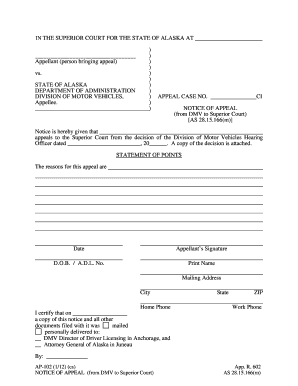
) ) ) ) ) ) ) ) ) ) APPEAL CASE NO. CI NOTICE OF APPEAL (from DMV to Superior Court) AS 28.15.166(m) Notice is hereby given that appeals to the Superior Court from the decision of the Division of Motor Vehicles Hearing Officer dated , 20 . A copy of the decision is attached. STATEMENT OF POINTS The reasons for this appeal are Date Appellant s Signature D.O.B. / A.D.L. No. Print Name Mailing Address City Home Phone I certify that on a copy of this notice.

How it works

  1. Open form

    Open form follow the instructions

  2. Easily sign form

    Easily sign the form with your finger

  3. Share form

    Send filled & signed form or save

How to fill out the AK AP-102 online

The AK AP-102 is a vital form for individuals seeking to file an appeal from a decision made by the Division of Motor Vehicles in Alaska. This guide provides clear, step-by-step instructions to help users complete the form online effectively and accurately.

Follow the steps to successfully complete the AK AP-102 form online.

  1. Press the ‘Get Form’ button to access the AK AP-102 and open it in your preferred editor.
  2. In the first section, fill in the Appellant's name, which is the individual bringing the appeal. Ensure the name is accurate as it will be used throughout the process.
  3. Enter the Appeal Case Number provided for your specific case. This number helps identify your appeal in the court system.
  4. Complete the date field with the day you are filing the appeal. This should be the current date when you are submitting the form.
  5. Provide the date of the DMV decision you are appealing against. Accurate dates are essential for the appeal's timeline.
  6. In the Statement of Points section, clearly articulate the reasons for your appeal. Be concise and specific in outlining your challenges to the DMV's decision.
  7. Sign the form to validate your appeal. Ensure that your signature is legible and matches the name provided at the beginning of the form.
  8. Fill in your date of birth and your Alaska Driver's License Number, ensuring that this information is current.
  9. Provide your complete mailing address, including city, state, and ZIP code, to ensure the court can contact you regarding your appeal.
  10. Include your home and work phone numbers for any correspondence about the appeal.
  11. Certify that you have mailed or personally delivered a copy of this notice and all relevant documents to the DMV Director of Driver Licensing and the Attorney General of Alaska.
  12. Once all steps are completed, review the form for accuracy, then save your changes, download, print, or share the completed document as required.

Complete your AK AP-102 form online today for a smooth appeal process.

Get form

Experience a faster way to fill out and sign forms on the web. Access the most extensive library of templates available.
Get form

Related content

Forms by Topic & Number (A - I) - Alaska Court...
AP-101 Notice of Appeal (from Administrative Agency to Superior Court); AP-102 Notice of...
Learn more
SC-AK-102 Data Calendar for Jul 2025 - IEM
[SC-AK-113] Aiken 2.2 NNW [2024-], [SC-AK-69] Aiken 2.2 NW [2016-], [SC-AK-11] Aiken 2.2...
Learn more
AK-47 | Case Hardened
View skin details and all possible unique seed patterns for the AK-47 Case Hardened....
Learn more

Related links form

USEA Show Jumping Score Sheet 2017 DK International School Of Hellerup School Withdrawal Form 2017 FL Application For Water Service - City Of Boca Raton 2011 FL Notice Of Commencement - County Of St Johns 2008

Questions & Answers

Get answers to your most pressing questions about US Legal Forms API.

Contact support

Establishing residency at a hotel in Texas is generally possible if you stay for an extended period, usually 30 days or more. However, residency status can depend on the intention behind the stay and local laws. If you plan to stay long-term, reviewing the regulations with resources related to AK AP-102 can provide the necessary information to support your residency claim.

Yes, tax-exempt status can apply to hotels under certain conditions. For instance, specific organizations and government entities can qualify for exemptions. If you believe you might be eligible, consider using the guidance from uslegalforms, which aligns with the AK AP-102 framework to help you navigate these tax exemptions efficiently.

The state hotel occupancy tax rate in Texas is set at 6%, but local municipalities may add their own rates, raising the total tax to as much as 15% or more. Understanding these rates is vital for budgeting during your stay. Tools and resources under AK AP-102 can assist both travelers and hotel operators in calculating these expenses efficiently.

To apply for a hotel occupancy tax exemption in Texas, you must complete the appropriate exemption form, such as Form 50-302 for state exemptions. It's crucial to gather necessary documentation, such as proof of eligibility. Using resources like uslegalforms can simplify this process, guiding you through the steps to ensure your application is successful under AK AP-102.

The hotel occupancy tax in Texas typically amounts to 6% of the room rate, along with any local taxes that may apply. This means that the total tax can vary by city since local jurisdictions can impose additional taxes. For those managing accommodations, understanding the AK AP-102 protocol can help ensure compliance with these tax requirements.

The comparison between AK 105 and AK-102 highlights distinct functionalities. The AK 105 aims at users needing highly specific legal services, while the AK-102 caters to a broader audience with versatile options. For a balanced solution that merges accessibility with practicality, the AK AP-102 is an excellent fit.

The AK-104 and AK-102 differ primarily in their intended use and features offered. The AK-104 often targets specialized legal areas, providing niche solutions, while the AK-102 focuses on general legal needs efficiently. Users seeking streamlined service without the complexities might prefer the efficiency of the AK AP-102.

When comparing the AK-102 with the AK-103, both features provide valuable services but focus on different user needs. The AK-102 serves as a robust option for efficient legal documentation, while the AK-103 includes options for customization and multifaceted solutions. If you prioritize simplicity and functionality, the AK AP-102 is worth considering.

The AK-102 and AK-103 cater to different segments of legal documentation. The AK-102 is designed for those seeking user-friendly, straightforward solutions, whereas the AK-103 incorporates more advanced tools for intricate legal processes. For users who want ease and efficiency, the AK AP-102 stands out as a preferred choice.

The AK-101 and AK-102 are both important features, but they serve distinct purposes. While the AK-101 often addresses basic legal needs, the AK-102 boasts enhanced functionalities for more complex requirements. Users looking for comprehensive solutions may find the AK AP-102 more aligned with their needs, offering a better experience overall.

Get This Form Now!

Use professional pre-built templates to fill in and sign documents online faster. Get access to thousands of forms.
Get form
If you believe that this page should be taken down, please follow our DMCA take down processhere.
Get AK AP-102
Get form
  • Adoption
  • Bankruptcy
  • Contractors
  • Divorce
  • Home Sales
  • Employment
  • Identity Theft
  • Incorporation
  • Landlord Tenant
  • Living Trust
  • Name Change
  • Personal Planning
  • Small Business
  • Wills & Estates
  • Packages A-Z
  • Affidavits
  • Bankruptcy
  • Bill of Sale
  • Corporate - LLC
  • Divorce
  • Employment
  • Identity Theft
  • Internet Technology
  • Landlord Tenant
  • Living Wills
  • Name Change
  • Power of Attorney
  • Real Estate
  • Small Estates
  • Wills
  • All Forms
  • Forms A-Z
  • Other Templates
  • Legal Hub
  • About Us
  • Help Portal
  • Legal Resources
  • Blog
  • Affiliates
  • Contact Us
  • Delete My Account
  • Site Map
  • Industries
  • Forms in Spanish
  • Localized Forms
  • State-specific Forms
  • Forms Kit
  • Real Estate Handbook
  • All Guides
  • Notarize
  • Incorporation services
  • For Consumers
  • For Small Business
  • For Attorneys
  • USLegal
  • FormsPass
  • pdfFiller
  • signNow
  • altaFlow
  • DocHub
  • Instapage
Form Packages
  • Adoption
  • Bankruptcy
  • Contractors
  • Divorce
  • Home Sales
  • Employment
  • Identity Theft
  • Incorporation
  • Landlord Tenant
  • Living Trust
  • Name Change
  • Personal Planning
  • Small Business
  • Wills & Estates
  • Packages A-Z
Form Categories
  • Affidavits
  • Bankruptcy
  • Bill of Sale
  • Corporate - LLC
  • Divorce
  • Employment
  • Identity Theft
  • Internet Technology
  • Landlord Tenant
  • Living Wills
  • Name Change
  • Power of Attorney
  • Real Estate
  • Small Estates
  • Wills
  • All Forms
  • Forms A-Z
  • Other Templates
Customer Service
  • Legal Hub
  • About Us
  • Help Portal
  • Legal Resources
  • Blog
  • Affiliates
  • Contact Us
  • Delete My Account
  • Site Map
  • Industries
  • Forms in Spanish
  • Localized Forms
  • State-specific Forms
  • Forms Kit
Legal Guides
  • Real Estate Handbook
  • All Guides
Prepared for you
  • Notarize
  • Incorporation services
Our Customers
  • For Consumers
  • For Small Business
  • For Attorneys
Our Sites
  • USLegal
  • FormsPass
  • pdfFiller
  • signNow
  • altaFlow
  • DocHub
  • Instapage
Social Media
Call us now toll free:
+1 833 426 79 33
As seen in:
© Copyright 1999-2026 airSlate Legal Forms, Inc. 17 Station Street, Ste. 203, Brookline, MA 02445
  • Your Privacy Choices
  • Terms of Service
  • Privacy Notice
  • Content Takedown Policy
  • Bug Bounty Program