Open form follow the instructions
Easily sign the form with your finger
Send filled & signed form or save
How to fill out the CA BCIA 8374 online
The CA BCIA 8374 form is an essential document for individuals seeking confirmation as a custodian of records within an applicant agency. This guide will provide you with a clear, step-by-step process to complete the form online, ensuring that all required information is accurately submitted.
Follow the steps to complete the CA BCIA 8374 online
- Press the ‘Get Form’ button to acquire the CA BCIA 8374 form and open it for editing.
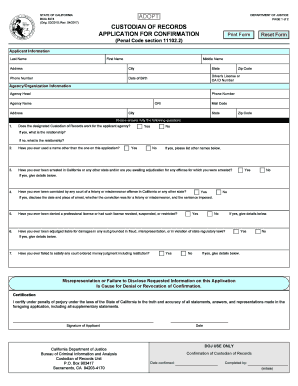
- Begin by filling in the applicant information section, which includes details such as last name, first name, middle name, address, city, state, zip code, phone number, date of birth, and driver's license or California ID number.
- Next, provide the agency or organization information. This includes the agency head's name, phone number, agency name, ORI, address, mail code, city, state, and zip code.
- Answer the questions about the designated custodian of records. Indicate whether they work for the applicant agency and elucidate on the relationship if applicable.
- Respond to the questions regarding any previous names used, arrests, convictions, professional license denials, or civil judgments. Be thorough in providing details when answering yes.
- Complete the certification section by affirming the truthfulness of the information presented. Sign the form digitally or print it for manual signing.
- Finally, review all provided information for accuracy. Once confirmed, you may opt to save changes, download the completed form, print it, or share it as necessary.
Start completing your CA BCIA 8374 form online today!
Experience a faster way to fill out and sign forms on the web. Access the most extensive library of templates available.
Related content
I certify under penalty of perjury under the laws of the State of California to the truth...
Feb 8, 2019 — The Guidance sets forth recommended policies and practices to help...
Get answers to your most pressing questions about US Legal Forms API.
How to get a fingerprint clearance card in California?
To obtain a fingerprint clearance card in California, submit a completed application along with your fingerprint card to the appropriate authority. The process often includes thorough background checks, including the CA BCIA 8374, to ensure all records are checked. USLegalForms can help streamline this process by providing templates and guidance to help you navigate the requirements.
How do I fill out a CA Live Scan form?
Filling out a CA Live Scan form involves providing personal information, including your name, address, and reason for the request. Detailed instructions accompany the form to ensure that it meets the requirements of the CA BCIA 8374. Read these carefully to avoid errors that could complicate your application.
Can I fill out my own fingerprint card?
Yes, you can fill out your own fingerprint card, but accuracy is essential. Ensure you understand the requirements laid out for the CA BCIA 8374, as any mistakes could delay your background check process. You can also utilize resources like USLegalForms to guide you through this process.
How to fill out a fingerprint card in California?
To fill out a fingerprint card in California, start by using a black ink fingerprint roller for clarity. Ensure that your personal details, such as name and address, are accurately entered as required. For a successful CA BCIA 8374 submission, it is crucial to follow the guidelines provided by the California Department of Justice.
How to fill up a fingerprint card?
Filling up a fingerprint card involves several steps for accuracy. Begin by entering your name, date of birth, and any required identifiers on the designated lines. Make sure to provide all necessary information as this data must match what appears on the CA BCIA 8374 for validation.
What shows up on a Live Scan background check in California?
A Live Scan background check in California provides a comprehensive review of an individual's criminal history. It includes records from state and national databases, showing any arrests, convictions, and pending cases. This process is crucial for occupations requiring a CA BCIA 8374, ensuring employers have a clear view of a potential employee's background.
How to get your ori?
To get your Ori number, follow the live scan fingerprinting process outlined by the state. After fingerprints are taken at a certified location, submit your California Live Scan form to the appropriate agency. The agency will then review your submission and, upon approval, issue your Ori number. Using USLegalForms can streamline this process and help ensure you're following the correct steps.
How to fill out CA Live Scan form?
Filling out the CA Live Scan form requires accurate personal information, including your name, date of birth, and purpose for the live scan. Make sure to check all entries for correctness, as errors can lead to processing delays. Once completed, present the form at a live scan location along with your identification. If you're unsure about the details, USLegalForms offers templates and guidance to aid you in the process.
How do I find my ori code?
You can find your Ori code by contacting the agency you submitted your applications to after completing the live scan process. They usually have a record of all submitted applications and can provide you with your Ori number. Additionally, keep an eye on any official correspondence from the agency, as your Ori code will typically be included in that documentation. If you face difficulties, USLegalForms is here to support you in retrieving the information you need.
How to do an ori?
To complete an Ori request, start by securing an appointment at a local live scan center for fingerprinting. Once your fingerprints are captured, fill out the California Live Scan form with accurate information. After submitting your fingerprints and form to the right agency, you will receive your Ori number once the process is finalized. Remember, USLegalForms can assist you in filling out necessary documents correctly.
Use professional pre-built templates to fill in and sign documents online faster. Get access to thousands of forms.
If you believe that this page should be taken down, please follow our DMCA take down process here.
This form is available in several versions. Select the version you need from the drop-down list below.