Loading
Form preview
  • US Legal Forms
  • Other Templates
  • Legal Forms
  • New Jersey Legal Forms
  • Nj Enter 2012

Get Nj Enter 2012-2026

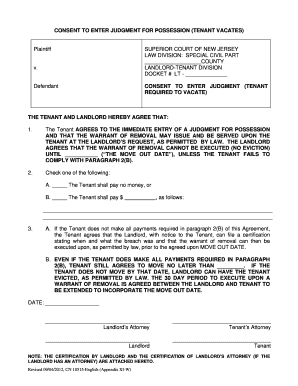
Print Form Clear form CONSENT TO ENTER JUDGMENT FOR POSSESSION (TENANT VACATES) Plaintiff v. Defendant SUPERIOR COURT OF NEW JERSEY LAW DIVISION: SPECIAL CIVIL PART COUNTY LANDLORD-TENANT DIVISION.

How it works

  1. Open form

    Open form follow the instructions

  2. Easily sign form

    Easily sign the form with your finger

  3. Share form

    Send filled & signed form or save

How to fill out the Nj Enter online

This guide provides a clear and supportive approach to completing the Nj Enter form online. Whether you are new to legal documents or have some experience, this step-by-step instruction will help you navigate the process effectively.

Follow the steps to complete the Nj Enter form with ease.

  1. Press the ‘Get Form’ button to access the Nj Enter document and open it in your editing tool.
  2. Identify the section for the plaintiff and defendant information. Enter the names of the landlord (plaintiff) and tenant (defendant) clearly in the designated fields.
  3. In the court information section, populate the details for the superior court, including the county where the case is filed, and fill in the docket number provided by the court.
  4. Review the agreement terms carefully. In paragraph one, ensure that both parties understand and agree to the immediate entry of a judgment for possession. Confirm that the move-out date is clearly noted.
  5. Proceed to paragraph two and select between option A or B regarding payment. If a payment is to be made, specify the amount in the provided field.
  6. Ensure that paragraph three details the consequences of not meeting payment obligations. Verify that both parties acknowledge their responsibilities and timelines outlined in this section.
  7. Lastly, provide the date of the agreement at the bottom of the form. Each party, including the landlord and tenant, must sign the document along with their respective attorneys if applicable.
  8. Once all sections are filled out accurately, save your changes. You can download, print, or share the completed Nj Enter form as needed.

Complete your documents online efficiently and confidently. Start now!

Get form

Experience a faster way to fill out and sign forms on the web. Access the most extensive library of templates available.
Get form

Related content

Income Tax - Credit for Taxes Paid to Other...
May 27, 2025 — Enter on your New Jersey return the total amount of credit from your...
Learn more
N.J. Admin. Code § 7:27E-1.5 - Right to enter |...
(a) The Department, and its representatives, shall have the right to enter and inspect, at...
Learn more
Vapor Intrusion Technical Guidance (Version 4.1)
The entry of organic vapors into a building is due to the infiltration of contaminants...
Learn more

Related links form

911 Service Charge Prepaid Wireless Telecommunications Return Nc Form E 585e Nc 5p NC-3M Annual Withholding Reconciliation NOTE: FORM DID NOT ...

Questions & Answers

Get answers to your most pressing questions about US Legal Forms API.

Contact support

Filing two state taxes involves completing separate tax returns for each state where you earned income. You'll report the income earned in each state, along with any deductions and credits applicable to your situation. Careful planning is crucial to avoid double taxation, so be sure to review the tax laws for both states. For a smooth filing experience, UsLegalForms can help streamline the process with step-by-step resources.

The number of allowances you claim on your NJ-W4 affects how much state income tax is withheld from your paycheck. Generally, you should claim more allowances if you support dependents or have other financial considerations. It’s essential to assess your overall tax situation to determine the exact number of allowances that suit your needs. For tailored assistance, UsLegalForms provides tools and resources to guide you in making the right choice.

Yes, it is possible to be taxed by two states on the same income, generally when you work in one state but reside in another. In these cases, you may have to file tax returns in both states. Fortunately, many states offer credits or deductions to prevent double taxation on the same income. To navigate this complex issue, consider consulting UsLegalForms, which can help clarify your tax obligations.

If your income is taxed in both New Jersey and another state, you should report that income on your NJ tax return. Typically, you will enter this information on specific lines of your NJ-1040 form. Additionally, you may be eligible for a credit to avoid double taxation, depending on the state with which you have income. To simplify the process, UsLegalForms can provide resources tailored to your unique situation.

A contractor's New Jersey certificate of authority number is a unique identifier assigned to contractors who register to perform work in the state. This number ensures that the contractor adheres to state regulations and maintains their qualifications. If you're a contractor, it's important to have this number to secure jobs legally in NJ. USLegalForms can assist you in obtaining your certificate and navigating the state's requirements with ease.

No, a certificate of authority and an EIN are not the same. A certificate of authority allows you to conduct business in New Jersey, while an EIN, or Employer Identification Number, is primarily for tax identification. Both are essential for operating legally, but they serve different purposes in your business registration process. USLegalForms can help clarify the requirements for each and ensure you have both.

Getting an NJ certificate of authority starts with preparing your business documentation, such as formation certificates and identification. Once ready, you can either file online or mail your application to the New Jersey Division of Revenue. It's important to track your application status through their website. With USLegalForms, you can simplify the process by accessing all necessary forms and guidance to ensure compliance.

Becoming a resident of NJ involves establishing your home in the state. Typically, you must live in NJ for at least 12 consecutive months and prove your intent to stay. You need to provide evidence, such as registering to vote or changing your driver's license to your NJ address. For assistance with documentation and requirements, consider using resources from USLegalForms.

To obtain a certificate of authority in NJ, you should first gather your business documents, including your business registration and identification. Then, submit your application to the New Jersey Division of Revenue and Enterprise Services. This process can be easily managed online or through the mail. Utilizing USLegalForms can streamline your application process, ensuring you have the correct forms and guidance.

Yes, you can file your NJ tax return online, which is both convenient and efficient. The New Jersey Division of Taxation offers options for online filing, and many private platforms also support e-filing. Using a comprehensive service like UsLegalForms can make it easier for you to prepare and submit your return electronically.

Get This Form Now!

Use professional pre-built templates to fill in and sign documents online faster. Get access to thousands of forms.
Get form
If you believe that this page should be taken down, please follow our DMCA take down processhere.
Get Nj Enter
Get form
  • Adoption
  • Bankruptcy
  • Contractors
  • Divorce
  • Home Sales
  • Employment
  • Identity Theft
  • Incorporation
  • Landlord Tenant
  • Living Trust
  • Name Change
  • Personal Planning
  • Small Business
  • Wills & Estates
  • Packages A-Z
  • Affidavits
  • Bankruptcy
  • Bill of Sale
  • Corporate - LLC
  • Divorce
  • Employment
  • Identity Theft
  • Internet Technology
  • Landlord Tenant
  • Living Wills
  • Name Change
  • Power of Attorney
  • Real Estate
  • Small Estates
  • Wills
  • All Forms
  • Forms A-Z
  • Other Templates
  • Legal Hub
  • About Us
  • Help Portal
  • Legal Resources
  • Blog
  • Affiliates
  • Contact Us
  • Delete My Account
  • Site Map
  • Industries
  • Forms in Spanish
  • Localized Forms
  • State-specific Forms
  • Forms Kit
  • Real Estate Handbook
  • All Guides
  • Notarize
  • Incorporation services
  • For Consumers
  • For Small Business
  • For Attorneys
  • USLegal
  • FormsPass
  • pdfFiller
  • signNow
  • altaFlow
  • DocHub
  • Instapage
Form Packages
  • Adoption
  • Bankruptcy
  • Contractors
  • Divorce
  • Home Sales
  • Employment
  • Identity Theft
  • Incorporation
  • Landlord Tenant
  • Living Trust
  • Name Change
  • Personal Planning
  • Small Business
  • Wills & Estates
  • Packages A-Z
Form Categories
  • Affidavits
  • Bankruptcy
  • Bill of Sale
  • Corporate - LLC
  • Divorce
  • Employment
  • Identity Theft
  • Internet Technology
  • Landlord Tenant
  • Living Wills
  • Name Change
  • Power of Attorney
  • Real Estate
  • Small Estates
  • Wills
  • All Forms
  • Forms A-Z
  • Other Templates
Customer Service
  • Legal Hub
  • About Us
  • Help Portal
  • Legal Resources
  • Blog
  • Affiliates
  • Contact Us
  • Delete My Account
  • Site Map
  • Industries
  • Forms in Spanish
  • Localized Forms
  • State-specific Forms
  • Forms Kit
Legal Guides
  • Real Estate Handbook
  • All Guides
Prepared for you
  • Notarize
  • Incorporation services
Our Customers
  • For Consumers
  • For Small Business
  • For Attorneys
Our Sites
  • USLegal
  • FormsPass
  • pdfFiller
  • signNow
  • altaFlow
  • DocHub
  • Instapage
Social Media
Call us now toll free:
+1 833 426 79 33
As seen in:
© Copyright 1999-2026 airSlate Legal Forms, Inc. 17 Station Street, Ste. 203, Brookline, MA 02445
  • Your Privacy Choices
  • Terms of Service
  • Privacy Notice
  • Content Takedown Policy
  • Bug Bounty Program