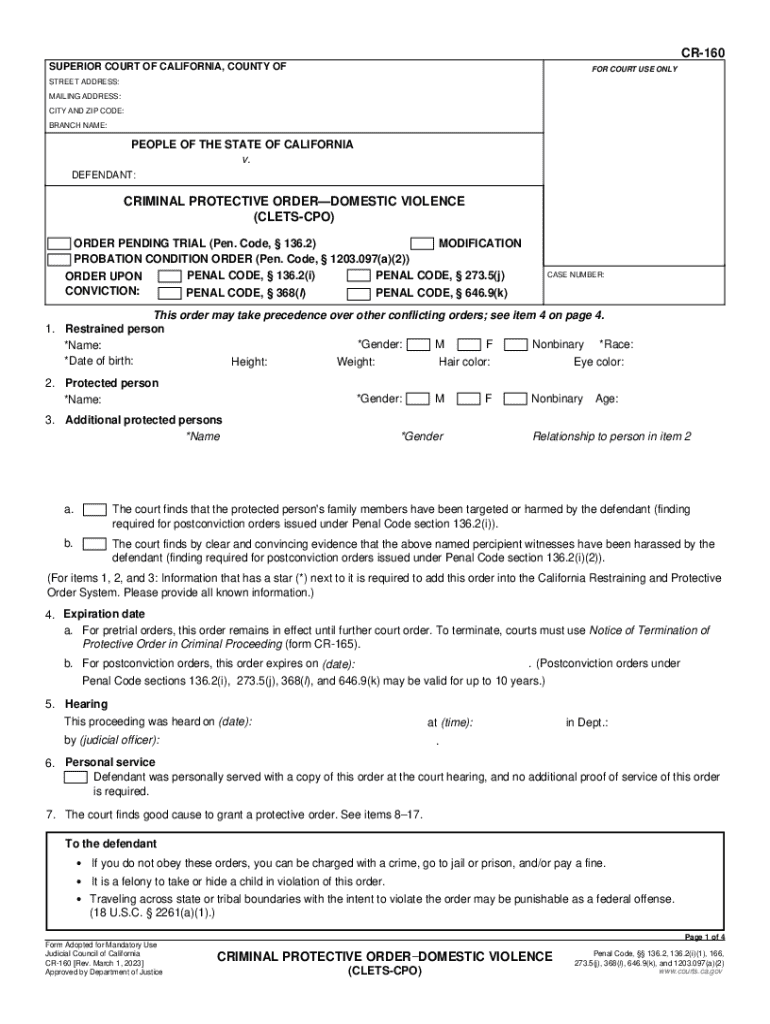
CR160 SUPERIOR COURT OF CALIFORNIA, COUNTY OFFOR COURT USE ONLYSTREET ADDRESS: MAILING ADDRESS: CITY AND ZIP CODE: BRANCH NAME:PEOPLE OF THE STATE OF CALIFORNIA v. DEFENDANT:CRIMINAL PROTECTIVE ORDERDOMESTIC.
Loading

Open form follow the instructions

Easily sign the form with your finger

Send filled & signed form or save
How to fill out the CA CR-160 online
This guide provides a clear and supportive explanation of how to fill out the CA CR-160 form online. It is designed to assist individuals, regardless of their legal experience, in understanding each section and field of the document.
Follow the steps to successfully complete your CA CR-160 form.
- Press the ‘Get Form’ button to access the form and open it in the editor.
- Enter the court's street address, mailing address, city, and zip code at the top of the form. Ensure that this information is accurate to avoid delays.
- In the section labeled 'People of the State of California v. Defendant', fill in the necessary details about the defendant, such as their gender, race, name, date of birth, height, weight, hair color, and eye color.
- Provide the name and gender of the protected person. If there are additional protected persons, fill in their names and genders as well. Remember, fields with an asterisk (*) are required.
- Specify the expiration date for the order based on whether it is a pretrial or a postconviction order.
- Fill in the details regarding the hearing, including the date, time, judicial officer, and department number.
- Indicate if the defendant has been personally served with the order and review the restrictions imposed on the defendant regarding contact, firearms, and other outlined behaviors.
- Complete any additional required fields or sections regarding the specifics of the protective order, including terms of contact, stay-away orders, and protective measures.
- Review all entered information for accuracy and completeness. Ensure that all required fields have been filled out.
- Save your changes, then download or print the completed form for your records, which can also be shared if necessary.
Start filling out your CA CR-160 form online today for a smoother court process.
Experience a faster way to fill out and sign forms on the web. Access the most extensive library of templates available.
Related content
Nov 30, 2017 - ... CR-160 preventing defendant from initiating any contact whatsoever with...
Sharp, E.S., Beam, C.R., Reynolds, C.A., & Gatz, M. (2019). Openness declines...
Judicial Council of California. CR-160 [Rev. January 1, 2017]. Approved by Department of...
Get answers to your most pressing questions about US Legal Forms API.
What shows up on a fingerprint background check?
The fingerprint database will include your rap sheet consisting of any criminal arrest dates, charges, and the disposition of cases. Your fingerprints also identify basic information about your life, such as birth, name, address, and employment.
Does protective order affect employment?
Even if the restraining order goes on your record, it likely won't affect your current or future employment. ... Minor issues, like restraining orders, often won't show up unless the employer does an exhaustive search. It also depends whether you have a criminal or civil restraining order.
What shows up on a background check for a job?
Generally speaking, a background check for employment may show identity verification, employment verification, credit history, driver's history, criminal records, education confirmation, and more.
Does an order of protection show up on a background check?
Orders of Protection do show up on background checks. Once an Order of Protection has been granted, it is on your record. Anyone can find find it, even if it gets dismissed. (If it's not too late, you should definitely learn more and speak to a lawyer about your Order of Protection.)
Does a protective order show on a background check?
Background checks are meant to show criminal activity. A civil restraining order shouldn't show up. A criminal background check will get in the way of some jobs, though.
How long does a no contact order last in California?
What is the penalty for disobeying a no contact restraining order? A knowing and intentional violation of a California protective order is a misdemeanor punishable by a fine and/or a sentence of up to one year in jail.
Why would someone fight a restraining order?
Restraining orders are excellent tools to help victims of domestic violence, harassment, or crime stay protected against future harm. ... In most situations, fighting a restraining order will be very difficult if there is good evidence against the person whom restraint is sought against.
What is a CPO in legal terms?
The meaning of the term privacy changes according to its legal context. In constitutional law, privacy means the right to make certain fundamental decisions concerning deeply personal matters free from government coercion, intimidation, or regulation.
What does CPO mean in court?
CPO = Criminal Protective Order. It's a restraining order, basically.
What is a civil stalking protection order?
Victims who have been threatened with physical harm or mental distress by an abuser more than once recently can seek a Civil Stalking Protection Order (CSPO). Victims of a sexual offense can seek a Sexually Oriented Offense Protection Order after the first threat.
Use professional pre-built templates to fill in and sign documents online faster. Get access to thousands of forms.
If you believe that this page should be taken down, please follow our DMCA take down process here.