Loading
Get Sc Cj-022 2020-2026
How it works
-

Open form follow the instructions
-

Easily sign the form with your finger
-

Send filled & signed form or save
How to fill out the SC CJ-022 online
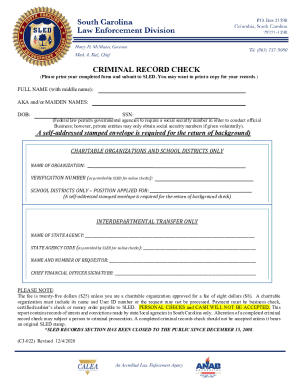
This guide provides comprehensive instructions for filling out the SC CJ-022 form online, ensuring users understand each section required for their criminal record check. Follow these steps to accurately complete the form and ensure the submission is processed smoothly.
Follow the steps to complete the SC CJ-022 form online:
- To obtain the SC CJ-022 form, click the ‘Get Form’ button to access it. This will allow you to open the form in your online editor.
- Begin by entering your full name, including your middle name, in the designated field.
- If applicable, provide your also-known-as (AKA) names or maiden names in the section provided.
- Fill in your date of birth (DOB) in the appropriate format.
- Enter your social security number (SSN). Remember that federal law permits this requirement for governmental agencies, and it may be requested for official purposes.
- For the return of your background check, include a self-addressed stamped envelope as specified.
- If you are a representative of a charitable organization or school district, state the name of your organization in the respective field.
- Input the verification number provided by SLED for online checks.
- School districts must specify the position for which the background check is requested.
- If you are requesting an interdepartmental transfer, mention the name of the state agency involved.
- Include the state agency code, as provided by SLED, in the appropriate field.
- Fill in the name and contact number of the requestor.
- The chief financial officer must sign the form in the designated space.
- Review all fields to ensure accuracy, then save your changes, and prepare to print the completed form.
- Once reviewed, download the form for your records or print it out for submission.
- Share the completed form as needed, ensuring all necessary components are included.
Complete your SC CJ-022 form online today for a hassle-free experience!