Loading
Get Fl Form 3 2019-2026
How it works
-

Open form follow the instructions
-

Easily sign the form with your finger
-

Send filled & signed form or save
How to fill out the FL Form 3 online
This guide provides comprehensive instructions on how to complete the FL Form 3 online, ensuring users can easily fill out the necessary details. Whether you are a recent law school graduate or assisting someone else, this guide will support you through the process.
Follow the steps to fill out FL Form 3 accurately
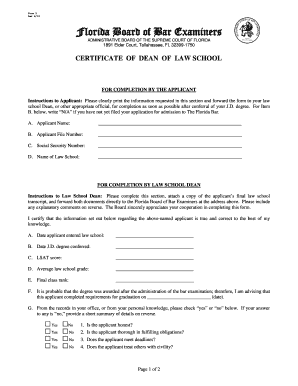
- To start, click the 'Get Form' button to obtain the FL Form 3 and open it in your preferred editing tool.
- In the section designated for the applicant, clearly print your name in the space provided under Item A. This information is essential for identifying your application.
- For Item B, enter your applicant file number. If you have not yet filed your application for admission to The Florida Bar, write 'N/A.'
- In Item C, provide your social security number. Ensure that it is accurate and clearly written to avoid any delays in processing.
- Next, in Item D, indicate the name of your law school. This details your educational background as part of the application.
- Once you have completed the applicant section, if you are the applicant, forward the form to your law school Dean for completion of the next section.
- Instruct the law school Dean to fill out the section with their certification, including the dates of your law school entry and J.D. degree conferral, LSAT score, average law school grade, and final class rank.
- Ensure the Dean completes the checkbox items regarding character and fitness, as their assessments are crucial to your application.
- After the form is fully completed by both you and the Dean, review it for clarity and accuracy, making any necessary adjustments.
- Finally, save your changes, download the completed form, and print it for submission, ensuring it is sent to the Florida Board of Bar Examiners as instructed.
Complete your FL Form 3 online to ensure a smooth application process.
Mail the payment and the note to the judgment creditor. Keep your cancelled check or copy of the money order as proof of payment. Petition the court to set up an installment plan to pay off the judgments over time if you can't pay the judgments in full.