ATTORNEY OR PARTY WITHOUT ATTORNEYMC350EXSTATE BAR NUMBER:FOR COURT USE ONLYNAME: FIRM NAME: STREET ADDRESS: CITY:STATE:TELEPHONE NO.:ZIP CODE:FAX NO.:EMAIL ADDRESS: ATTORNEY FOR (Name):SUPERIOR COURT.
Loading

Open form follow the instructions

Easily sign the form with your finger

Send filled & signed form or save
How to fill out the CA MC-350EX online
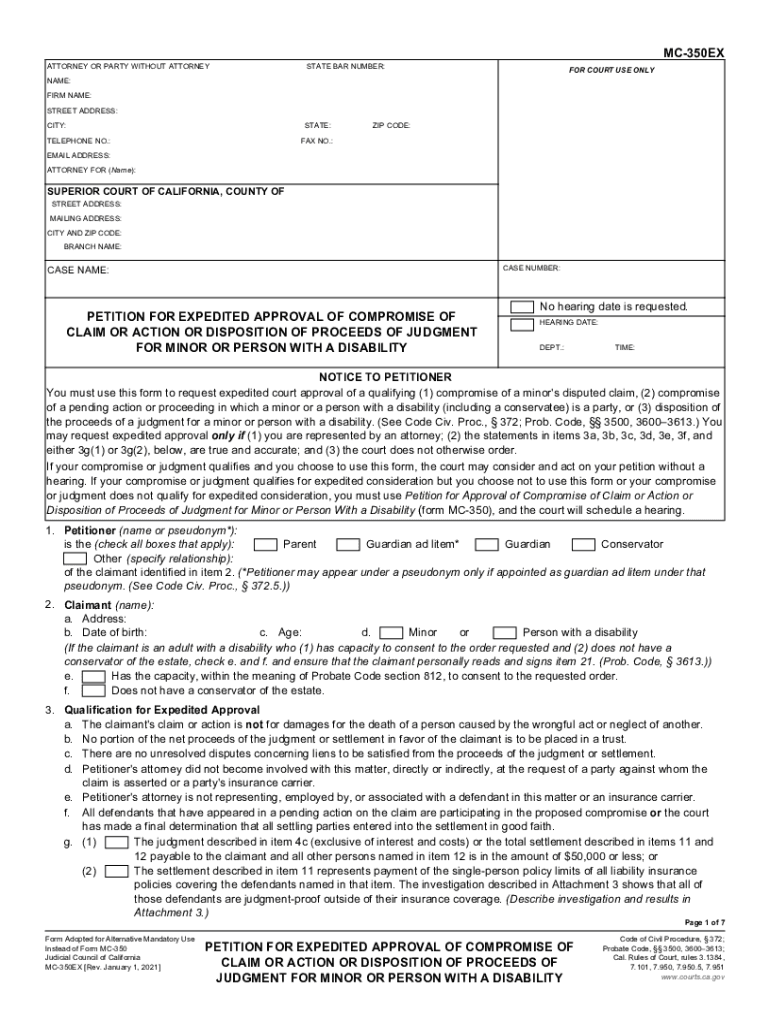
The CA MC-350EX is a form used to request expedited court approval for the compromise of a claim or action concerning a minor or a person with a disability. This guide will provide clear, step-by-step instructions on how to complete the form effectively online.
Follow the steps to fill out the CA MC-350EX online.
- Click ‘Get Form’ button to obtain the form and open it in the editor.
- In the first section, input your state bar number, name, firm name, and contact information including your telephone number, email address, and mailing address.
- Provide the details related to the court, including the name, street address, and mailing address for the specific Superior Court of California.
- Fill in the case name and case number in the appropriate fields to identify your case.
- Indicate whether a hearing date is requested. If not, note that no hearing date is requested, or fill in the date, department, and time if applicable.
- For item 1, specify the petitioner’s name or pseudonym, including their relationship to the claimant.
- In item 2, enter the name, address, date of birth, and age of the claimant, checking the applicable box if the claimant is a minor or a person with a disability.
- Complete item 3 to confirm qualifications for expedited approval, ensuring all criteria are met and marked accurately.
- In item 4, provide details about the claim, including whether it's pending action and names of involved defendants.
- Describe the incident or accident in item 5, providing date, time, place, and persons involved.
- Outline the nature of the incident and injuries in items 6 and 7 to give a clear account of what happened.
- In item 8, list all treatments received by the claimant for injuries, ensuring detailed descriptions.
- Summarize the extent of injuries and recovery in item 9, including any required medical reports.
- Provide the financial details related to the settlement in items 11 through 17, ensuring clarity on amounts and distribution.
- In item 18, include information about your attorney, confirming any relationships that may affect conflict of interest.
- Finish by specifying the distribution of any balances and completing additional orders in items 19 and 20, respectively.
- Ensure that the claimant consents to the requested order in item 21 and that the petitioner recommends the compromise in item 22.
- Finally, verify that the number of attachments are correctly counted and signed, and submit the form.
- Once you have filled out the form, save changes, and download or print your document as needed for submission.
Complete and submit the CA MC-350EX online to effectively manage your petition.
Experience a faster way to fill out and sign forms on the web. Access the most extensive library of templates available.
Related content
Image of the Judicial Council of California Seal ... Pending Action or Disposition of...
MC-4, 1 M.C.C. 1), is an individual who drives a motor vehicle in transporation which is...
... to change without notice Printed in Canada PartsCat2007-Vol11-Issue01.pdf ..... KNOB...
Use professional pre-built templates to fill in and sign documents online faster. Get access to thousands of forms.
If you believe that this page should be taken down, please follow our DMCA take down process here.