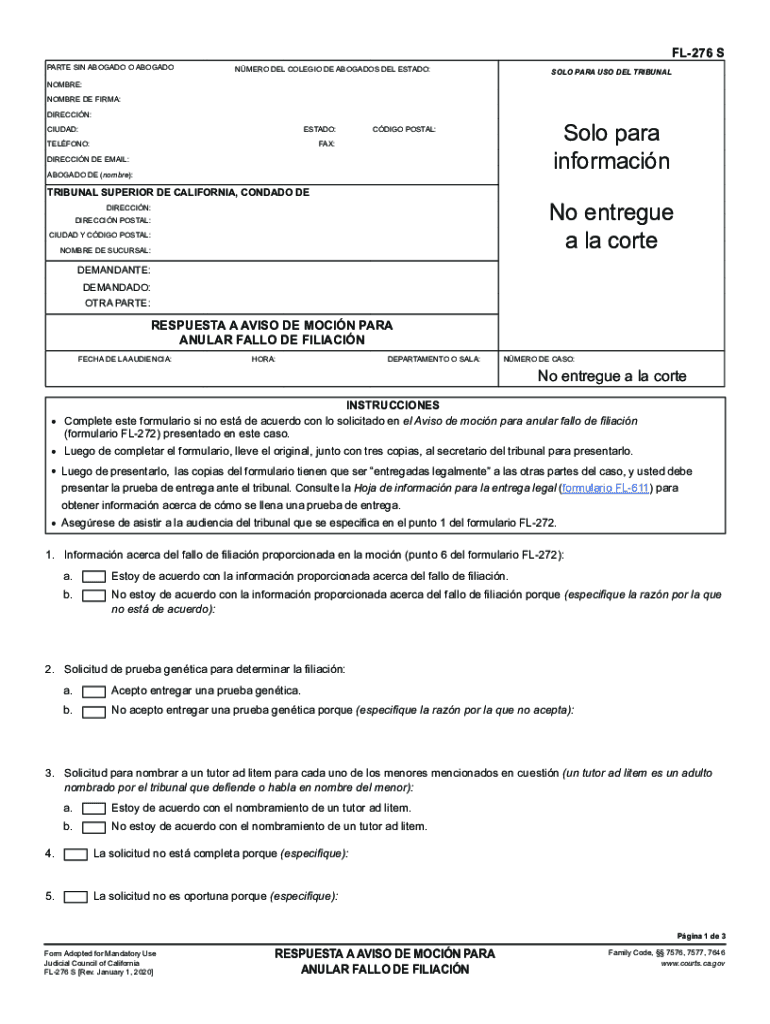
FL276 S PARTE SIN ABOGADO O ABOGADONMERO DEL COLEGIO DE AVOCADOS DEL ESTADO:SOLO PARA USO DEL TRIBUNALNOMBRE: NOMBRE DE FIRMA: DIRECCIN: CIUDAD:ESTADO:TELFONO:Solo para informacinCDIGO POSTAL:FAX:DIRECCIN.
Loading

Open form follow the instructions

Easily sign the form with your finger

Send filled & signed form or save
How to fill out the CA FL-276 S online
The CA FL-276 S form is a critical legal document used in family law cases regarding paternity and motion responses. This guide provides clear, step-by-step instructions for users to complete the form online efficiently.
Follow the steps to complete your CA FL-276 S form effectively.
- Click ‘Get Form’ button to obtain the form and open it in the editor.
- Begin filling in your information by entering your name in the designated field, followed by your firm name, address, city, state, phone number, and email address in the required fields.
- Input the relevant court information including the court name and address, case number, and details regarding the parties involved in the case.
- Indicate whether you agree or disagree with the information provided regarding the paternity ruling. Specify your reasons if you disagree.
- Respond to the requests for genetic testing and the appointment of a guardian ad litem by checking the appropriate boxes and providing reasons if necessary.
- Address any issues related to the completeness or timeliness of the request by specifying your observations in the provided fields.
- Detail the facts supporting your response by checking all applicable boxes from the provided options.
- Sign and date the form, ensuring to print your name clearly in the designated field.
- Finalize your document by saving the changes you made. You can then choose to download, print, or share the form as required.
Complete your CA FL-276 S form online today to ensure your legal response is properly filed.
Experience a faster way to fill out and sign forms on the web. Access the most extensive library of templates available.
Related content
FL-276 S PDF file type icon, Jan 1, 2006, Response to Notice of Motion to Set Aside...
213, CA, -8, S California: Los Angeles (see 310, 323, 626, 818) ... 276, VA, -5, S and SW...
Get answers to your most pressing questions about US Legal Forms API.
How much does it cost to file a small claim in Riverside County?
In order to file your claim, you will first need to file the appropriate form, which can be found at the Riverside County Court System's ezfile website. There is a court fee of $30 if the amount of the claim is $1,500 or less. If the amount of the claim is over $1,500 up to $5,000, then the fee is $50.
How long does a small claims court take?
How long does it take for a small claims court case to be resolved? From when you file with the clerk, it takes about sixty days until your court date. You'll know right away, since the date is on the paperwork. You can probably even ask the clerk to aim at a date that works better for you.
Can you take a company to small claims court?
Suing an Out of State Business If a business is incorporated or they created an LLC in your state, you can sue them in Small Claims Court locally. And even if they don't meet these requirements, you can still get to a business through Small Claims as long as they: Carry out on-going business activities in your state.
What does it cost to take someone to small claims court?
As to the cost of taking someone to small claims court, you'll generally pay a filing fee of less than $100 that is recoverable if you win. Meanwhile, each state will cap the amount you are allowed to sue for. It typically ranges anywhere from $2,000 to $10,000, according to LegalZoom.
How do I file a small claims case?
Try to settle the dispute outside of court. ... Contact the county clerk in the small claims court district closest to the residence or business of the person you are suing. ... Fill out a complaint form, otherwise known as a "Statement of Claim" at the clerk's office, and pay the filing fee.
How do I file a small claims?
Try to settle the dispute outside of court. ... Contact the county clerk in the small claims court district closest to the residence or business of the person you are suing. ... Fill out a complaint form, otherwise known as a "Statement of Claim" at the clerk's office, and pay the filing fee.
How much does it cost to file a civil suit in California?
Complaint/Filing Fee In California, filing a small claim for $1,500 or less will cost $30. But the costs go up for higher claims. In limited civil cases, you pay $370 for a complaint of amounts over $10,000 and up to $25,000. There are different charges depending on the complaint.
Can you bring a lawyer to small claims court in California?
Can I bring a lawyer to small claims court? In a handful of states, including California, Michigan, and Nebraska, you must appear in small claims court on your own. In many states, however, you can be represented by a lawyer if you like. But even where it's allowed, hiring a lawyer is rarely cost efficient.
How much does it cost to go to small claims court in California?
There's a $30 filing fee for a case asking for up to $1,500; $50 for a claim over $1,500 and up to $5,000; and $75 for a claim over $5,000. If you file more than 12 cases in a year, subsequent cases will cost $100 to file. Where do I file? Each county has its own Small Claims Court.
How many small claims can I file in California?
You can sue for up to $10,000, if you are an individual or a sole proprietor. Corporations and other entities are limited to $5,000. In addition, a party (individuals or corporations) can file no more than two claims exceeding $2,500 in any court throughout the State of California during a calendar year.
Use professional pre-built templates to fill in and sign documents online faster. Get access to thousands of forms.
If you believe that this page should be taken down, please follow our DMCA take down process here.