Loading
Get Ct Jd-cv-5b 2021-2026
How it works
-

Open form follow the instructions
-

Easily sign the form with your finger
-

Send filled & signed form or save
How to fill out the CT JD-CV-5b online
This guide is designed to assist you in filling out the CT JD-CV-5b exemption claim form online. By following these clear steps, you will be able to navigate through the form confidently and accurately.
Follow the steps to complete your exemption claim form.
- Press the 'Get Form' button to access the form and open it for editing.
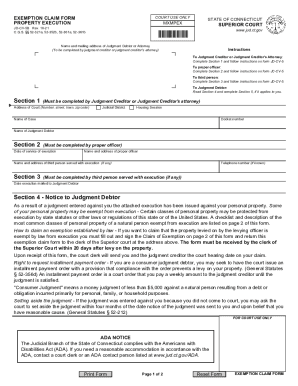
- Begin by completing Section 1, which must be filled out by the judgment creditor or the judgment creditor's attorney. Provide the address of the court, judicial district, housing session, name of the case, docket number, and the name of the judgment debtor.
- Proceed to Section 2, where the proper officer must enter the date of service of execution, their name and address, as well as the name and address of any third person served with the execution.
- In Section 3, the third person served with execution is required to provide a telephone number (if known) and the date the execution was mailed to the judgment debtor.
- Read Section 4 carefully as it provides essential information to the judgment debtor regarding their rights. If applicable, complete Section 5, which is the claim of exemption section. This includes certifying that the property stated is exempt from execution.
- Section 6 will be completed by the court, noting the date, time, and courtroom number for the hearing on the exemption claim.
- Finally, Section 7 is the order of court. This section will be filled out by a judge, magistrate, or assistant clerk and should specify which items are exempt from execution. Make sure to review these details.
- Once you have filled out all applicable sections, proceed to save your changes, and download or print the form for your records or submission.
Complete your exemption claim form online today to ensure your rights are protected.