Loading
Get Wi Be-174 2021-2026
How it works
-

Open form follow the instructions
-

Easily sign the form with your finger
-

Send filled & signed form or save
How to fill out the WI BE-174 online
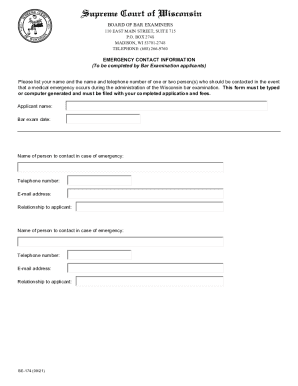
The WI BE-174 form is an essential document for bar examination applicants in Wisconsin. This guide provides clear, step-by-step instructions to assist you in accurately completing the form online.
Follow the steps to effectively complete the WI BE-174 form.
- Click ‘Get Form’ button to obtain the form and open it in your preferred editing tool.
- In the first section, provide your full name as the applicant. Ensure that it matches the name on your bar examination application.
- Enter the date of the bar exam. This is important for matching emergency contact information with the specific examination date.
- For the emergency contact information, start by listing the name of the first person to contact in case of a medical emergency.
- Fill in the telephone number for the first contact person. It's vital that this number is accurate and reachable.
- Include the email address of the first contact person for additional communication if necessary.
- Describe the relationship of the first contact person to you, the applicant, such as friend, sibling, or partner.
- Repeat steps 4 through 7 for a second emergency contact person to ensure multiple contacts are available.
- After completing all fields, review the information for accuracy before finalizing your form.
- Once you have filled out the form, you can save changes, download the completed document, print it for your records, or share it if needed.
Complete and submit your WI BE-174 form online for a smooth bar exam experience.
A partnership must file an annual information return to report the income, deductions, gains, losses, etc., from its operations, but it does not pay income tax. Instead, it "passes through" any profits or losses to its partners. ... Partners are not employees and should not be issued a Form W-2.