Loading
Get Ca Jv-569 2020-2026
How it works
-

Open form follow the instructions
-

Easily sign the form with your finger
-

Send filled & signed form or save
How to fill out the CA JV-569 online
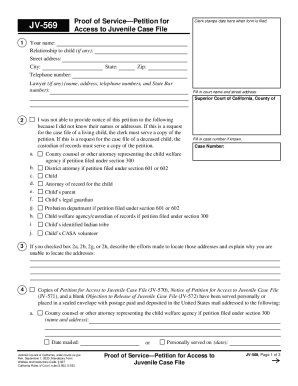
Filling out the CA JV-569 form online can be a straightforward process when you have clear guidance. This form, known as the Proof of Service—Petition for Access to Juvenile Case File, is essential for those seeking access to juvenile case files within California.
Follow the steps to successfully complete the CA JV-569 online.
- Click the ‘Get Form’ button to obtain the form and open it in the editor.
- Fill in your name in the designated space at the top of the form. This identifies who is requesting access to the juvenile case file.
- Indicate your relationship to the child, if applicable, in the provided field. This information helps to establish your connection and reason for the request.
- Complete the address section by entering your street address, city, state, and zip code. This allows the court to contact you regarding your petition.
- Provide your telephone number to ensure that you can be reached if further information is needed.
- If you have legal representation, enter your lawyer's name, address, telephone number, and their State Bar number in the appropriate section.
- Fill in the court name and street address where your petition will be filed. This is typically the Superior Court of California in your county.
- If you were unable to give notice of this petition to certain parties, check the relevant boxes and explain your efforts to locate their names and addresses.
- Enter the case number if known. This number assists in identifying the specific juvenile case file you are requesting.
- List any parties that need to receive copies of the petition and provide their addresses and the date the documents were mailed or if they were personally served.
- At the end of the form, declare under penalty of perjury that the information provided is true and correct by typing or printing your name and signing the document.
- Once you have completed the form, you can save your changes, download it, print it, or share it as needed. Make sure to protect your privacy by clicking the 'Clear This Form' button after printing.
Start filling out your CA JV-569 form online today for a smoother access request process.