Loading
Get Ca Jv-462 2021-2026
How it works
-

Open form follow the instructions
-

Easily sign the form with your finger
-

Send filled & signed form or save
How to fill out the CA JV-462 online
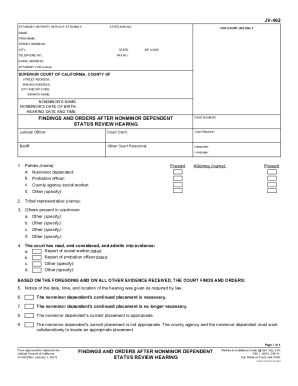
Completing the CA JV-462 form is essential for documenting findings and orders after a nonminor dependent status review hearing. This guide provides step-by-step instructions on how to accurately fill out the form online to ensure a smooth submission process.
Follow the steps to complete the CA JV-462 form effectively.
- Click ‘Get Form’ button to access the CA JV-462 form and open it in the editor.
- Begin by filling in the case number, name of the attorney or party without an attorney, and their State Bar number if applicable. Provide the firm's name, street address, city, state, ZIP code, telephone number, fax number, and email address for the attorney.
- Enter the name of the superior court, the corresponding county, and the court's street and mailing address, including city and ZIP code.
- Input the nonminor's name and date of birth, along with the date and time of the hearing. Ensure this information is accurately captured as it is crucial for the hearing records.
- In the sections regarding the parties present, list their names and roles, starting with the nonminor dependent, followed by any present attorney, probation officer, social worker, and additional parties.
- Continue by documenting any reports considered during the hearing, including those from the social worker and probation officer, by adding their corresponding dates.
- Respond to each ordered finding by checking the appropriate boxes based on the court's determinations regarding the nonminor's placement, case plan compliance, and other required evaluations.
- Complete the sections regarding the county agency's efforts, including whether reasonable efforts were made to assist the nonminor in achieving successful adulthood, and note any additional findings and orders.
- Make sure to confirm the scheduling of future hearings and provide the necessary details, including the relevant hearing dates, times, and departments.
- Finally, review all information filled in for accuracy, ensure that all required fields are completed, and then choose to save changes, download, print, or share the completed form.
Start completing the CA JV-462 form online today to streamline your documentation process.