Loading
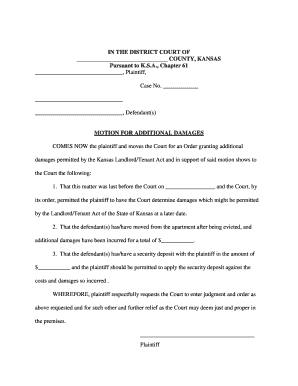
Get Ks Motion For Additional Damages 2016-2026
How it works
-

Open form follow the instructions
-

Easily sign the form with your finger
-

Send filled & signed form or save
How to fill out the KS Motion For Additional Damages online
Filling out the KS Motion For Additional Damages online can seem daunting, but with clear steps, you can complete the form effectively. This guide will provide you with a straightforward approach to help you through the process of filing this document.
Follow the steps to effectively complete the KS Motion For Additional Damages form
- Click 'Get Form' button to obtain the form and open it in the editor.
- Fill in the case number in the designated field. This should be the number assigned to your case by the court.
- Enter the names of the plaintiff and defendant(s) accurately in the appropriate spaces. Ensure correct spelling and accurate titles.
- In the first paragraph, include the date when the matter was last before the Court. This is required to reference the previous proceedings.
- Specify the total amount of additional damages incurred after eviction in the designated section. Be precise with this amount for clarity.
- Enter the amount of the security deposit held by the plaintiff in the relevant field. This amount may affect the judgment.
- In the conclusion, ensure that you clearly state your request for the Court to enter judgment and any other relief you find appropriate.
- After completing all required fields, review the information for accuracy before proceeding.
- Finalize your form. Save any changes made, and choose to download, print, or share the form as needed.
Complete your KS Motion For Additional Damages online today to ensure your request is heard promptly.
Except as otherwise provided by statute or these rules, the response must be filed no later than 7 days after service of the motion or as otherwise provided by the court. (c) Oral Argument. The following rules govern oral argument and rulings on motions.