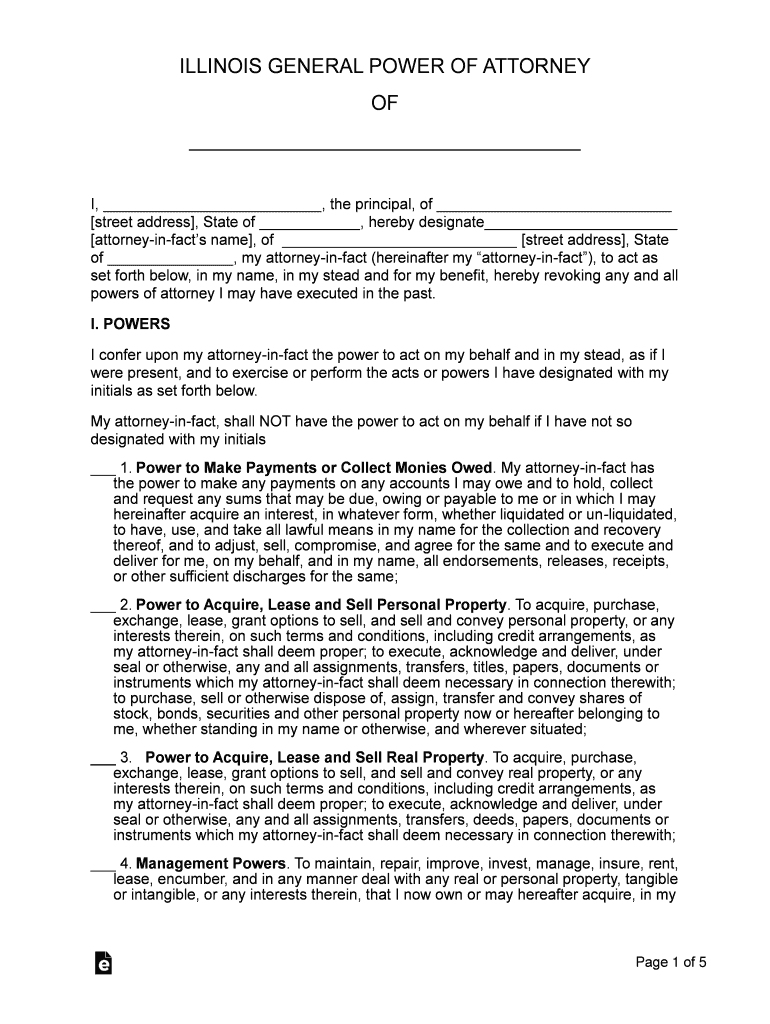
ILLINOIS GENERAL POWER OF ATTORNEY OF I, , the principal, of street address , State of , hereby designate attorneyinfacts name , of street address , State of , my attorneyinfact (hereinafter my attorneyinfact),.
Loading

Open form follow the instructions

Easily sign the form with your finger

Send filled & signed form or save
How to fill out the IL 755 ILCS 45 online
This guide provides clear, step-by-step instructions for completing the IL 755 ILCS 45 form online, known as the Illinois General Power of Attorney. Designed to help individuals navigate the process effortlessly, this resource is suitable for users with varying levels of legal experience.
Follow the steps to fill out your IL 755 ILCS 45 form online carefully.
- Click the ‘Get Form’ button to obtain the IL 755 ILCS 45 document and open it in your preferred online editor.
- Begin by entering your name as the principal in the designated field, along with your street address and state.
- Designate your attorney-in-fact by entering their name and address in the specified section.
- Review the list of powers you can grant to your attorney-in-fact. Initial next to each power you wish to confer upon them.
- Decide on the effective date for this power of attorney by initializing your chosen option in that section.
- Determine the termination circumstances for the document by initializing your preferences in that section.
- Provide the required signatures in the designated sections, ensuring the principal signs, along with the attorney-in-fact, witnesses, and notary public as needed.
- After filling out all necessary fields, save your changes and choose to download, print, or share your completed form.
Start completing your IL 755 ILCS 45 form online today!
Experience a faster way to fill out and sign forms on the web. Access the most extensive library of templates available.
Related content
ESTATES (755 ILCS 45/) Illinois Power of Attorney Act. View Entire Act · Article I...
agency is open (contrary to what many banks and financial institutions may claim, Illinois...
Illinois Power of Attorney for property short form gives your named attorney-in-fact...
Get answers to your most pressing questions about US Legal Forms API.
Does an Illinois power of attorney for property need to be notarized?
You can find this form in the Illinois Compiled Statutes, Chapter 755, Article 45, Section 3-3. It includes instructions for each section of the form. Note: Principals must sign financial POA forms before at least one witness and a notary public.
Does a POA for property need to be notarized in Illinois?
The document must be notarized. So you will need to have the notary present when you sign. Once it is signed, make multiple copies. Give a copy to the agent and copies to the people, agencies, and companies that your agent will need to deal with.
What is 85% sentencing ILCS?
A prisoner serving a sentence for selected “violent” offenses receives no more than 4.5 days good conduct credit for each month of his or her sentence of imprisonment. This amounts to about 85 percent of the sentence imposed.
What makes a power of attorney legal in Illinois?
The basic requirements of the Illinois Power of Attorney Act include: A designation of an agent and a written description of their powers. A properly signed power of attorney document (signed by the principal) A properly witnessed and signed power of attorney document (by an individual at least 18 years old)
What does ILCS mean in Illinois?
The Illinois Compiled Statutes (ILCS) is a compilation of Public Acts, organized by Chapter and Act number under nine topical categories. Public Acts are bills that have been passed by the Illinois General Assembly and signed by the Governor.
What is a durable power of attorney for property Illinois?
An Illinois durable power of attorney is a statutory form that allows a person to select someone else to act in their benefit for financial-related decision-making.
Can you have more than one power of attorney in Illinois?
You cannot have more than one Agent acting at the same time. In Illinois, if you want to name more than one Agent, you must make one of them your primary Agent. If that Agent dies or can't make decisions for you, then your second Agent (the “Successor Agent”) would act for you.
Does an Illinois power of attorney need to be witnessed?
(NOTE: This power of attorney will not be effective unless it is signed by at least one witness and your signature is notarized, using the form below. The notary may not also sign as a witness.)
Use professional pre-built templates to fill in and sign documents online faster. Get access to thousands of forms.
If you believe that this page should be taken down, please follow our DMCA take down process here.