Loading
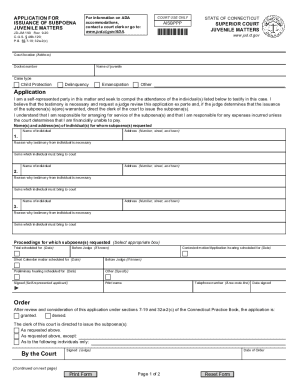
Get Ct Jd-jm-150 2020-2026
How it works
-

Open form follow the instructions
-

Easily sign the form with your finger
-

Send filled & signed form or save
How to fill out the CT JD-JM-150 online
This guide provides a detailed overview of how to complete the CT JD-JM-150 form online. Designed for users with varying levels of legal experience, it aims to simplify the process and ensure that all relevant information is accurately captured.
Follow the steps to efficiently fill out the CT JD-JM-150 form online.
- Click ‘Get Form’ button to obtain the form and open it in the editor.
- Begin by filling out the court location and docket number at the top of the form. Ensure that the information corresponds to the specific juvenile case you are addressing.
- Next, provide the name of the juvenile and select the case type from the options available: Child Protection, Delinquency, Emancipation, or Other.
- In the 'Application' section, confirm that you are a self-represented party by checking the appropriate box, then state your need for the subpoena and the necessity of the testimony.
- List the names and addresses of the individuals you wish to subpoena. Include each person's full name, address, and a brief explanation of why their testimony is necessary.
- For each individual, state the items they must bring to court when appearing.
- Indicate the proceedings for which the subpoenas are requested by selecting from the relevant options, such as indicating if it is scheduled before a judge or specifying a trial date.
- In the 'Signed' section, provide your signature, printed name, telephone number, and the date signed.
- Review the order section to ensure all requested subpoenas align with your application. This section will be completed by the court after reviewing your submission.
- Finally, save your changes, download the completed form, and print it for your records or to share as needed.
Complete your documents online today for a streamlined filing experience.