Loading
Get Ca Jv-215 2018-2026
How it works
-

Open form follow the instructions
-

Easily sign the form with your finger
-

Send filled & signed form or save
How to fill out the CA JV-215 online
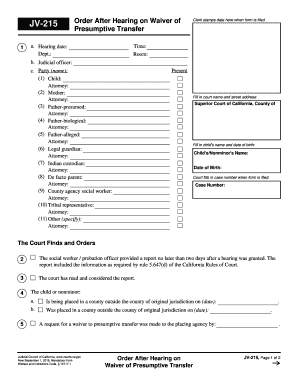
The CA JV-215 form, known as the order after hearing on waiver of presumptive transfer, is essential in custody and juvenile court proceedings. This guide aims to provide clear steps to effectively complete the form online, ensuring that users can navigate the process with ease.
Follow the steps to complete the CA JV-215 form online
- Press the ‘Get Form’ button to access the CA JV-215 document and open it in your preferred online editing tool.
- Fill in the hearing details, including the hearing date, department, time, and room.
- Enter the name of the judicial officer overseeing the case.
- List the names of the parties involved in the case, including the child, mother, father-presumed, father-biological, father-alleged, legal guardian, Indian custodian, de facto parent, county agency social worker, tribal representative, and any other relevant parties, alongside their respective attorneys.
- Complete the court name and street address by entering the Superior Court of California, County of, followed by the address.
- Enter the child's or nonminor's name and their date of birth.
- Leave space for the court to fill in the case number once the form is filed.
- Provide the findings and orders section based on the social worker’s or probation officer’s report and detail any special circumstances regarding the child or nonminor’s placement.
- Complete the assessment of potential disruptions or delays caused by transferring the child's mental health services.
- Include the date of communication by the placing agency regarding the waiver request and any determinations made.
- Finally, ensure the judge or judicial officer signs and dates the form.
- After all information is filled, you can save changes, download, print, or share the completed form.
Complete your CA JV-215 form online today!