Loading
Get Ct Jd-fm-185 2017-2026
How it works
-

Open form follow the instructions
-

Easily sign the form with your finger
-

Send filled & signed form or save
How to fill out the CT JD-FM-185 online
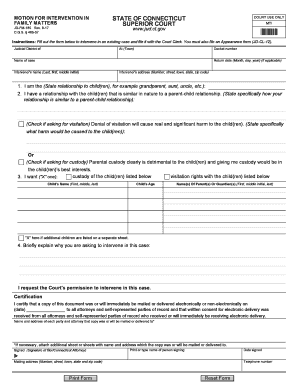
The CT JD-FM-185 is a motion for intervention in family matters. This guide will walk you through the process of filling out this form online, ensuring you provide all necessary information clearly and accurately.
Follow the steps to fill out the CT JD-FM-185 online effectively.
- Click ‘Get Form’ button to obtain the form and open it in the editor.
- Begin by entering the judicial district of your case in the designated field. This is typically found at the top of the form.
- Next, input the docket number associated with your case. If you do not have this number, please consult your court documents or contact the court for assistance.
- Proceed to specify the town where your case is being heard by filling in the relevant field.
- In the ‘name of case’ section, clearly state the title of the case as it appears in court documents.
- If applicable, include the return date by entering the month, day, and year.
- Fill in the intervenor’s name using the format of last name, first name, and middle initial.
- Add the intervenor's address, making sure to include the number, street, town, state, and zip code.
- In section 1, describe your relationship to the child or children involved, using clear and straightforward language.
- Section 2 requires you to detail how your relationship is similar to a parent-child relationship. Be specific in your explanation.
- If you are requesting visitation, indicate by checking the box provided and describe any potential harm that may arise from the denial of visitation.
- If you are requesting custody, check the relevant box and explain why custody would be in the child's best interests.
- Specify which child or children you wish to gain visitation or custody of by providing their names and ages.
- Indicate the names of the parent(s) or guardian(s) of the child or children listed.
- If there are additional children, check the box and indicate that more information is attached.
- Provide a brief explanation of why you believe you should be allowed to intervene in this case.
- In the certification section, fill in the date that you mailed or delivered a copy of this document to other parties involved, providing their names and addresses as necessary.
- Sign the form in the designated area, ensuring you print or type your name and include the date signed.
- Lastly, include your telephone number and mailing address in the specified fields before finalizing the form.
- Once you have completed the form, review all entries for accuracy and clarity. You can then save your changes, download, print, or share the completed form as needed.
Complete your CT JD-FM-185 online today to ensure your voice is heard in family matters.
Related links form
Fill out the required forms. ... Sign the divorce paperwork in the presence of the clerk. ... Pay the filing fee. ... Give your spouse notice of the action. ... File your paperwork. ... Wait for your spouse to file an appearance form, answer, or cross complaint.