Loading
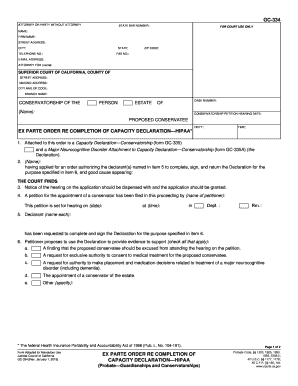
Get Ca Gc-334 2019-2026
How it works
-

Open form follow the instructions
-

Easily sign the form with your finger
-

Send filled & signed form or save
How to fill out the CA GC-334 online
This guide provides a clear, step-by-step approach to completing the CA GC-334 form online. Whether you are new to legal documents or familiar with them, this guide will help ensure that you fill out the form accurately and efficiently.
Follow the steps to successfully complete the CA GC-334 form online.
- Click the ‘Get Form’ button to access the CA GC-334 form online, allowing you to begin filling it out in a user-friendly format.
- Input your details in the 'Attorney or Party Without Attorney' section, including your State Bar number, name, firm name, street address, city, state, telephone number, fax number, and email address. Make sure all contact information is accurate for effective communication.
- Enter the name of the person for whom you are seeking conservatorship in the ‘Conservatorship of the Person’ or ‘Estate’ section, depending on the applicable case. Update the case number as required to ensure clarity.
- In the ‘Conservatorship Petition Hearing Date’ section, fill in the proposed hearing date, time, and department number. This information will help schedule the necessary court proceedings.
- Provide the names of all declarants who will complete and sign the Capacity Declaration. Ensure that their details are complete and match any relevant documentation.
- In the section regarding requests for the proposed conservatee, check all applicable options to specify the authority being sought. This may include requests for medical treatment consent, placement decisions, or conservatorship of the estate. Be thorough in your selections.
- Review the form for accuracy. Once all fields are filled out correctly, you can save your changes. You may download, print, or share the form per your requirements.
Complete your documents online today for an efficient process!