Of Court s Office.) D. At least 25% of my disposable earnings are assigned by the court order for support. 33. Would the garnishment of 20% of your disposable income reduce your household income below the federal poverty line? Yes No 34. Corporations should complete questions 23 31, as well as the following: Name of Corporation Address Officers of Corporation and Title Taxpayer ID Number Business Address Home Address 1. 2. 3. 4. Registered Agent Address 35. The information prov.
Loading

Open form follow the instructions

Easily sign the form with your finger

Send filled & signed form or save
How to fill out the WI SC-506B online
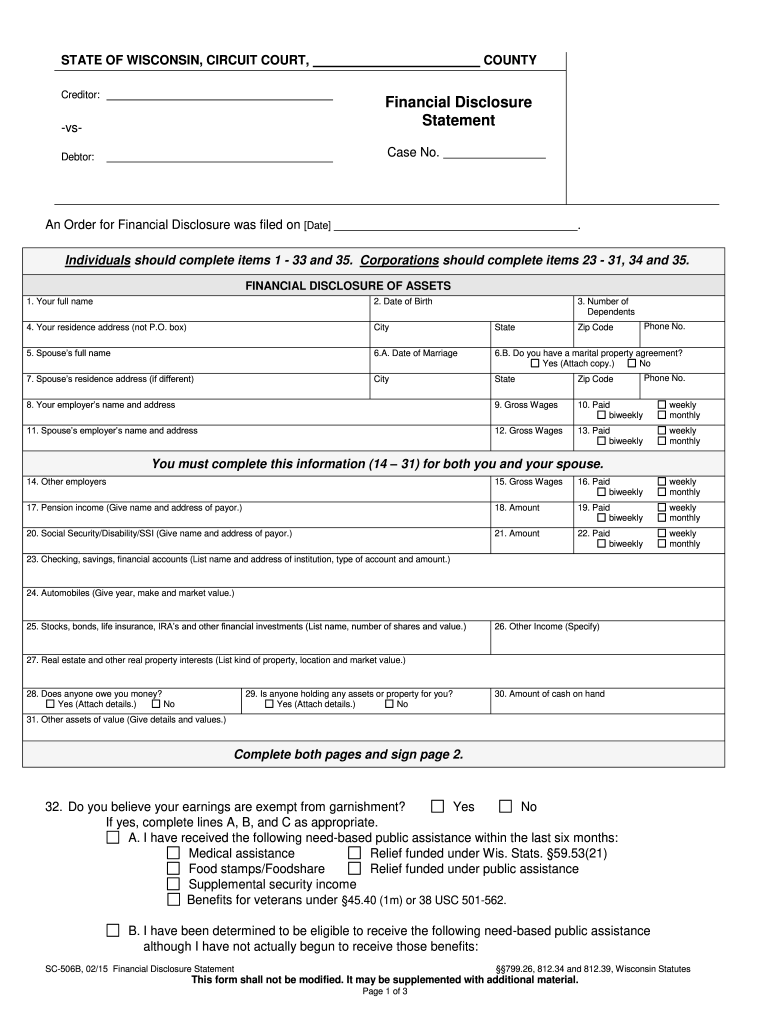
This guide provides a comprehensive overview of how to complete the WI SC-506B Financial Disclosure Statement online. By following these clear and supportive instructions, users can efficiently navigate the form and ensure that all necessary information is accurately provided.
Follow the steps to fill out the form correctly.
- Click the ‘Get Form’ button to access the WI SC-506B form and open it in your online editor.
- Begin by entering your full name in the designated field. This should be your legal name as it appears on official documents.
- Next, input your date of birth in the specified area, ensuring that the format is consistent with any instructions provided.
- Indicate the number of dependents you are responsible for by entering the appropriate number in the corresponding box.
- Provide your residence address in full, excluding P.O. boxes, and make sure to include the city and state.
- Enter your spouse's full name in the relevant field if applicable.
- Fill in the date of marriage, and indicate whether a marital property agreement exists, attaching a copy if applicable.
- Input your spouse's residence address if it differs from yours, including city, state, and zip code.
- Provide the name and address of your employer, ensuring to add your gross wages and specify your payment frequency (biweekly, weekly, monthly).
- Repeat the employer information for your spouse, including their gross wages and payment frequency.
- Complete the information required for both you and your spouse (items 14–31), detailing any additional employers and sources of income.
- List your financial accounts, vehicles, and other significant assets as per the form's request.
- Indicate whether you believe your earnings are exempt from garnishment, completing additional lines if necessary.
- Make sure all sections are completed accurately, including any necessary attachments per the instructions provided.
- Finally, review your entries, then save your changes, download, print, or share the completed form as required.
Ensure a smooth filing process by completing your documents online today.
Experience a faster way to fill out and sign forms on the web. Access the most extensive library of templates available.
Related content
SC-506B, 05/23 Financial Disclosure Statement (Small Claims). §§799.26, 812.34 and...
Jul 6, 2022 — Mounted LCD Projector, Scanner, Internet Explorer 6.0 or higher,. Printer...
Carbon or SC component is the stationary part of the seal and is installed into the shaft...
Get answers to your most pressing questions about US Legal Forms API.
What happens when you file a lawsuit against someone?
When you file a lawsuit against someone, the legal process is initiated, leading to the resolution of the dispute through the court system. You will need to serve the defendant with the lawsuit, allowing them an opportunity to respond. Utilizing forms like the WI SC-506B helps articulate your claims and supports your case as it moves through the judicial system, ensuring all parties understand the issues at hand.
What is the statute of limitations on a judgement in Wisconsin?
In Wisconsin, the statute of limitations for enforcing a judgment is generally 20 years. This timeframe allows you to take necessary actions to collect on a judgment, ensuring your rights are protected. When referencing the WI SC-506B, it's important to understand how this statute affects your ability to act on a judgment.
How long do you have to sue someone in Wisconsin?
The time you have to sue someone in Wisconsin typically mirrors the time to file a lawsuit, which is six years for most claims. Understanding this timeline is essential, especially when dealing with cases that require the WI SC-506B form. If you're considering legal action, it’s wise to consult with a legal advisor to assess your situation promptly.
How long do you have to file a lawsuit in Wisconsin?
In Wisconsin, you generally have six years to file a lawsuit for most civil claims. This timeframe is established under the state's statutes, providing a clear structure for legal actions. When considering a case involving the WI SC-506B form, it's crucial to be aware of this limitation, as waiting too long may result in losing your right to sue.
How many times can you be garnished at once?
In Wisconsin, you can be subject to multiple garnishments at the same time, but the total amount garnished cannot exceed the legal limits set by state law. Usually, each creditor must adhere to the 20% maximum based on your disposable earnings. Understanding your situation through the WI SC-506B can offer clarity on how to manage multiple garnishments and advocate for your rights.
What is the exemption for garnishment in Wisconsin?
Wisconsin law provides specific exemptions that protect a portion of your income from garnishment. These exemptions include a basic allowance for necessary living expenses and certain government benefits. To effectively utilize the WI SC-506B, familiarize yourself with these exemptions to ensure you maintain financial stability during legal proceedings.
What is the maximum garnishment in Wisconsin?
The maximum amount for garnishment in Wisconsin primarily hinges on your earnings. You could see up to 20% of your disposable income garnished, subject to certain exemptions. When navigating these limits, the WI SC-506B serves as a crucial resource that informs you of your rights and obligations concerning garnishment.
What's the maximum they can garnish from your paycheck?
The maximum that can be garnished from your paycheck in Wisconsin is 20% of your disposable earnings or the amount by which your weekly earnings exceed 30 times the federal minimum wage. This rule helps ensure you retain a fair amount of your income. Utilizing the WI SC-506B allows you to better navigate these rules and understand your garnishment limits.
What is the maximum garnishment allowed in Wisconsin?
In Wisconsin, the maximum garnishment allowed typically depends on your disposable earnings. Generally, creditors can garnish up to 20% of your disposable income. The WI SC-506B form is useful in understanding your rights and limits regarding garnishment, helping you secure your financial interests.
What is a de novo hearing Wisconsin?
A de novo hearing in Wisconsin refers to a new hearing that occurs as though no previous hearing ever took place. This means the court will reconsider the evidence and arguments from both sides. The WI SC-506B documentation is often necessary for navigating this process effectively, ensuring all relevant details are addressed during the hearing.
Use professional pre-built templates to fill in and sign documents online faster. Get access to thousands of forms.
If you believe that this page should be taken down, please follow our DMCA take down process here.
This form is available in several versions. Select the version you need from the drop-down list below.