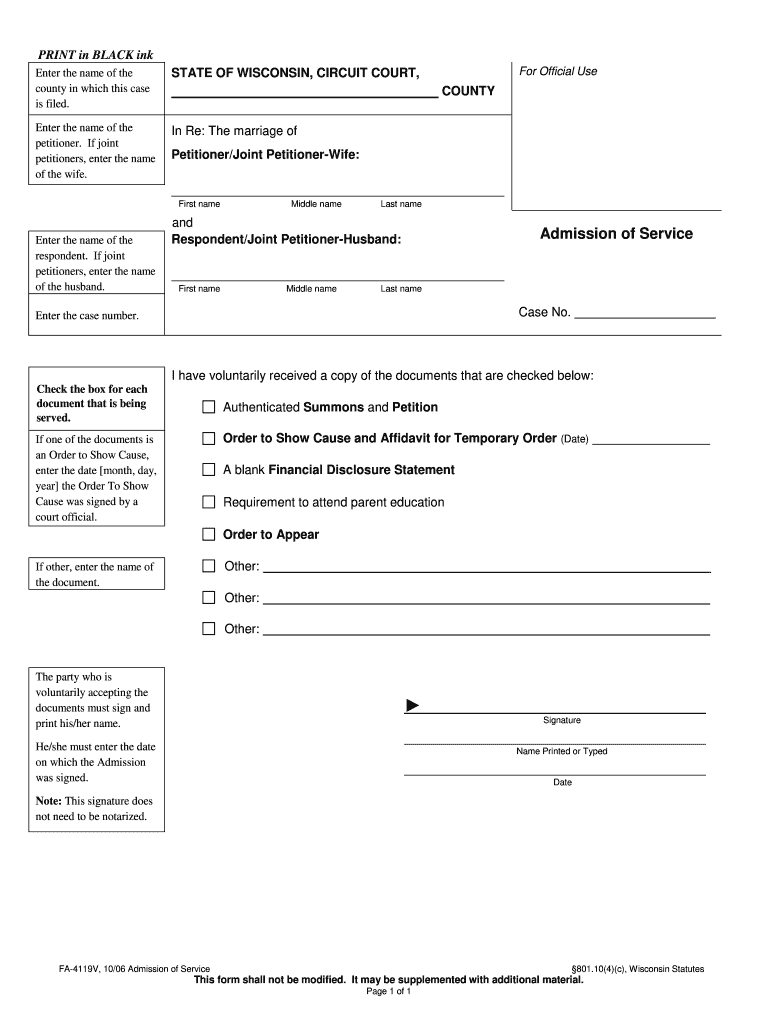
In Re: The marriage of COUNTY Petitioner/Joint Petitioner-Wife: First name Enter the name of the respondent. If joint petitioners, enter the name of the husband. For Official Use Middle name Last name and Respondent/Joint Petitioner-Husband: First name Middle name Admission of Service Last name Case No. Enter the case number. I have voluntarily received a copy of the documents that are checked below: Check the box for each document that is being served. Authenticated Summons an.
Loading

Open form follow the instructions

Easily sign the form with your finger

Send filled & signed form or save
How to fill out the WI Form FA-4119V online
Filling out the WI Form FA-4119V online can seem challenging, but this guide is designed to provide you with clear and effective instructions. By following the steps outlined below, you can complete the form accurately and efficiently.
Follow the steps to complete your WI Form FA-4119V online.
- Click the ‘Get Form’ button to obtain the form and open it in the editor.
- Begin by entering the name of the county where this case is being filed in the designated field.
- Next, provide the name of the petitioner in the 'Petitioner/Joint Petitioner-Wife' section. If there are joint petitioners, include the first name of the wife.
- In the 'Respondent/Joint Petitioner-Husband' section, enter the name of the respondent. For joint petitioners, input the first name of the husband.
- Locate the 'Case No.' field and enter the case number associated with this matter.
- In the 'I have voluntarily received a copy of the documents that are checked below' section, check the boxes next to each document that is being served. If applicable, enter the date the 'Order to Show Cause' was signed by a court official.
- If 'Other' documents are involved, specify the names in the designated fields.
- The party voluntarily accepting the documents must sign in the 'Signature' section and clearly print or type their name.
- Finally, enter the date when the Admission was signed, ensuring all information is accurate before proceeding.
- Review the completed form for any errors, and once satisfied, you can save the changes, download, print, or share the form as needed.
Complete your documents online with confidence and efficiency.
Experience a faster way to fill out and sign forms on the web. Access the most extensive library of templates available.
Related content
Enter the name of the county in which this case is filed. STATE OF WISCONSIN, CIRCUIT...
Unveiling Wisconsin's Top Universities. Form Fa 4119V Fill Out Sign Online And Download...
Get answers to your most pressing questions about US Legal Forms API.
How to get a copy of a criminal complaint in Wisconsin?
To get a copy of a criminal complaint in Wisconsin, visit the local courthouse or access the Wisconsin Circuit Court Access website. When requesting the document, you may need to fill out the WI Form FA-4119V to ensure you provide all necessary details. This will help you efficiently obtain the complaint and understand the charges involved.
Are court records public in Wisconsin?
Yes, court records in Wisconsin are generally public, meaning that anyone can access them. However, certain sensitive information may be restricted. Utilizing tools like the WI Form FA-4119V can provide guidance on what records are available and how to request them, making it easier for you to access the information you need.
How do I get a copy of a court order in Wisconsin?
To obtain a copy of a court order in Wisconsin, you can request it directly from the court that issued the order. Typically, you will need to provide basic case information and may be required to fill out the WI Form FA-4119V to formalize your request. This form helps streamline the process and ensures that you submit all necessary details accurately.
How to look up criminal complaints in Wisconsin?
To look up criminal complaints in Wisconsin, you can start by visiting the Wisconsin Circuit Court Access website. There, you can search by name or case number to find relevant documents. Additionally, using resources like the WI Form FA-4119V can assist in understanding the process and help you navigate through the various records available.
What is a confidential petition addendum in Wisconsin?
A confidential petition addendum in Wisconsin is a legal document that accompanies your divorce filing, ensuring specific information remains private. This document is especially useful for cases involving sensitive situations, such as domestic violence. Including the WI Form FA-4119V in your paperwork may be necessary as you file your case. Consulting a resource like USLegalForms can clarify its usage and help you complete your submission correctly.
How to file for divorce in Milwaukee, Wisconsin?
To file for divorce in Milwaukee, Wisconsin, begin by gathering necessary documents, including those like the WI Form FA-4119V. You must complete and file these documents at the Milwaukee County Circuit Court. Additionally, be prepared for serving papers to your spouse. For assistance, platforms like USLegalForms can help provide guidance and ensure that you have the correct forms.
What is the first step in getting a divorce in Wisconsin?
The first step in getting a divorce in Wisconsin is to establish residency requirements, ensuring you meet the state's criteria. Next, you will need to fill out essential documents, including the WI Form FA-4119V if it applies to your situation. After you have completed the forms, you can file them with the circuit court in your county. This step initiates the legal process of divorce.
Can I file for divorce without a lawyer in Wisconsin?
Yes, you can file for divorce without a lawyer in Wisconsin, but it is crucial to understand the process. Using forms such as the WI Form FA-4119V can help you navigate the paperwork. While self-representation is possible, consider seeking assistance from resources like USLegalForms, which provide guidance and necessary documents. This support can simplify the process and reduce stress.
How to file a lawsuit in Wisconsin?
To file a lawsuit in Wisconsin, start by identifying the appropriate court for your case type. You must complete the necessary paperwork, including forms like the WI Form FA-4119V if applicable. After filing your papers with the court, serve the documents to the other party. Finally, you can prepare for your court date by gathering your evidence and witnesses.
Do you need a lawyer for small claims court in Wisconsin?
You do not need a lawyer for small claims court in Wisconsin, as individuals can represent themselves. However, navigating the legal process can be complex, and it's beneficial to understand your rights and obligations. Using resources like the WI Form FA-4119V can help you prepare your case more effectively. Consider seeking legal advice if your case involves uncertain issues or significant amounts.
Use professional pre-built templates to fill in and sign documents online faster. Get access to thousands of forms.
If you believe that this page should be taken down, please follow our DMCA take down process here.