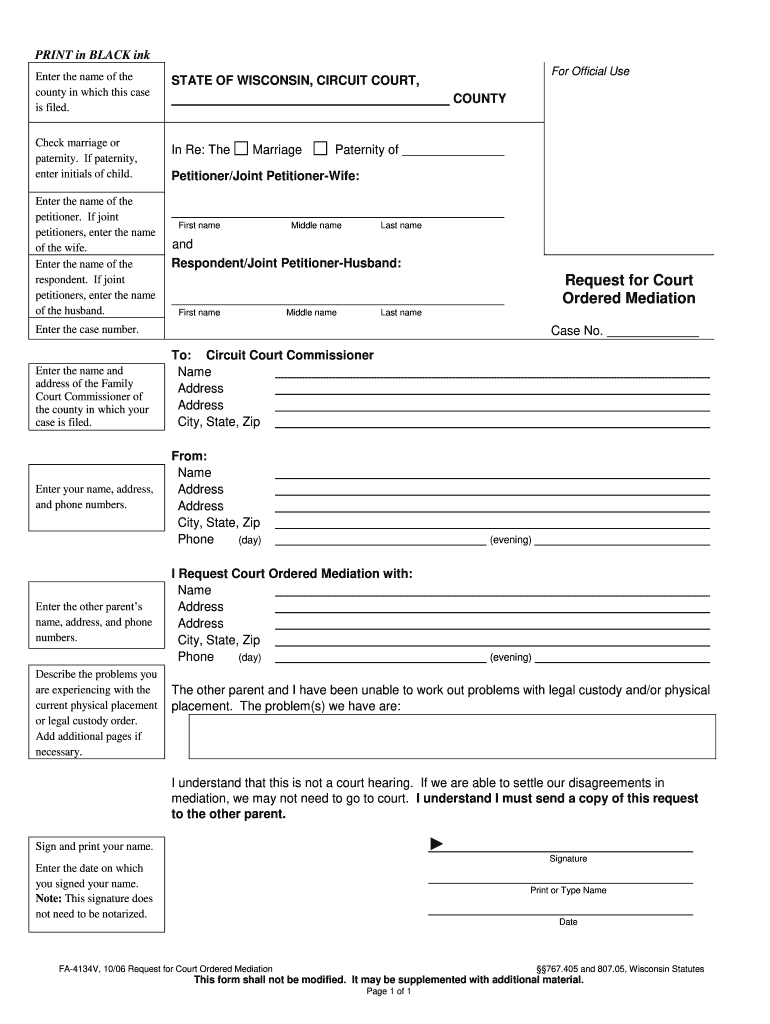
Enter the name of the wife. Enter the name of the respondent. If joint petitioners, enter the name of the husband. For Official Use STATE OF WISCONSIN, CIRCUIT COURT, COUNTY In Re: The Marriage Paternity of Petitioner/Joint Petitioner-Wife: First name Middle name Last name and Respondent/Joint Petitioner-Husband: Request for Court Ordered Mediation First name Middle name Last name Enter the case number. Enter the name and address of the Family Court Commissioner of the county in.
Loading

Open form follow the instructions

Easily sign the form with your finger

Send filled & signed form or save
How to fill out the WI FA-4134V online
The WI FA-4134V form is essential for requesting court-ordered mediation related to marriage or paternity cases. This guide aims to provide users with a clear, step-by-step approach to accurately complete the form online.
Follow the steps to easily fill out your mediation request form.
- Click the ‘Get Form’ button to obtain the form and open it in the editor.
- Enter the name of the county where your case is filed. This information is crucial for proper routing within the court system.
- Indicate whether your case pertains to marriage or paternity by checking the appropriate box. If you select paternity, include the initials of the child.
- Input your name as the petitioner. If there are joint petitioners, also provide the name of the wife.
- Fill in the name of the respondent. If there are joint petitioners, enter the name of the husband.
- Record the case number assigned to your case, ensuring it matches the documentation you have.
- List the name and address of the Family Court Commissioner from the county where your case is filed. This helps to identify the correct judicial contact.
- Provide your contact information, including your name, address, and phone numbers (both daytime and evening).
- Enter the other parent’s name, address, and phone numbers, providing the necessary details for communication.
- Describe the issues you are facing regarding the current physical placement or legal custody order. If the space provided is insufficient, feel free to add additional pages.
- Indicate your request for court-ordered mediation, detailing the name, address, and contact information of the other parent.
- Acknowledge that the mediation is not a court hearing. Confirm that you must send a copy of this request to the other parent.
- Sign and print your name in the designated area. Note that a notarization is not required for this signature.
- Enter the date on which you signed the form. Ensure this date reflects the day you are submitting the request.
- Once you have completed all sections of the form, you can save your changes, download a copy, print it, or share it as needed.
Complete your WI FA-4134V form online today for a smoother mediation process.
Experience a faster way to fill out and sign forms on the web. Access the most extensive library of templates available.
Related content
FA-4134V, 03/20 Request for Court Ordered Mediation. §§767.405 and 807.05, Wisconsin...
Search Result Categories · Recent Additions · 449,243 records found. · Advanced Search...
Get answers to your most pressing questions about US Legal Forms API.
What not to say in a mediation meeting?
In a mediation meeting, it is crucial to avoid accusations or inflammatory language that might escalate tensions. Stay focused on your goals and the issues at hand related to the WI FA-4134V. Instead of speaking in extremes, emphasize compromise and understanding. A constructive approach promotes a positive atmosphere, facilitating a smoother resolution process.
What is the placement schedule in Wisconsin?
The placement schedule in Wisconsin outlines the time a child spends with each parent. This schedule can be flexible and is typically determined during custody negotiations or mediation. Using the WI FA-4134V in your proceedings can aid in establishing a clear and fair placement schedule. Courts encourage arrangements that minimize disruption to the child’s routine whenever possible.
What is mediation for child custody in Wisconsin?
Mediation for child custody in Wisconsin is a process where parents, with the help of a neutral mediator, discuss custody and placement issues. It aims to reach an agreement that works for both parties while focusing on the child's best interests. Mediation may be required before going to court, making understanding the WI FA-4134V important. This collaborative approach can often lead to more amicable solutions.
How to get primary placement in Wisconsin?
Securing primary placement in Wisconsin often involves demonstrating that it is in the child's best interest. You'll use the WI FA-4134V to outline why you believe primary placement should be awarded to you. The court will consider factors like the child's age, temperament, and the relationship each parent has with the child. Adequate preparation of your case can significantly influence the outcome.
How to file for placement in Wisconsin?
To file for placement in Wisconsin, you will need to fill out several forms, including the WI FA-4134V. This form requires you to provide information about your relationship to the child and your proposed placement arrangements. After completing the forms, you must file them with the appropriate family court. It is wise to consult with a legal expert to ensure that all paperwork is correctly submitted.
What is the difference between custody and placement in Wisconsin?
In Wisconsin, custody refers to the legal authority to make decisions for a child, while placement defines where the child physically lives. Understanding this distinction is essential when navigating child-related legal matters, such as those involving the WI FA-4134V. Custody can be shared or sole, affecting how parents share responsibilities. Placement can vary in frequency depending on the legal agreements made by the parents.
How do I file for emergency placement in Wisconsin?
To file for emergency placement in Wisconsin, you need to complete the necessary forms, including the WI FA-4134V. This process usually requires you to demonstrate the immediate need for placement due to safety or welfare concerns. You should file these documents with the family court. Consider reaching out to legal services for guidance during this urgent process.
What is the downside of mediation?
While mediation can be effective, it may not suit all situations. One downside is that if parties cannot reach an agreement, further legal proceedings may become necessary. Additionally, mediation lacks the binding authority of a court, which can be a disadvantage when enforcing agreements related to the WI FA-4134V.
How to change custody agreement in Wisconsin?
Changing a custody agreement in Wisconsin involves filing a motion with the court. It's essential to present valid reasons for the change, as the court prioritizes the child's best interests. The WI FA-4134V form can assist you in this process, providing a clear framework for outlining your proposed changes.
How does mediation work in Wisconsin?
Mediation in Wisconsin typically involves a neutral third party who helps both parties communicate and negotiate. The process aims to find common ground regarding issues like child custody related to the WI FA-4134V form. Participants discuss their concerns and work together to reach a mutually agreeable solution, encouraging positive outcomes for both sides.
Use professional pre-built templates to fill in and sign documents online faster. Get access to thousands of forms.
If you believe that this page should be taken down, please follow our DMCA take down process here.
This form is available in several versions. Select the version you need from the drop-down list below.