Loading
Form preview
  • US Legal Forms
  • Other Templates
  • Legal Forms
  • Rhode Island Legal Forms
  • Ri Dc-67 2014

Get Ri Dc-67 2014-2026

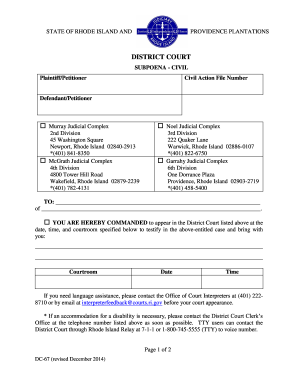
Cial Complex 2nd Division 45 Washington Square Newport, Rhode Island 02840-2913 *(401) 841-8350 McGrath Judicial Complex 4th Division 4800 Tower Hill Road Wakefield, Rhode Island 02879-2239 *(401) 782-4131 3rd Division 222 Quaker Lane Warwick, Rhode Island 02886-0107 *(401) 822-6750 Garrahy Judicial Complex 6th Division One Dorrance Plaza Providence, Rhode Island 02903-2719 *(401) 458-5400 TO: of.

How it works

  1. Open form

    Open form follow the instructions

  2. Easily sign form

    Easily sign the form with your finger

  3. Share form

    Send filled & signed form or save

How to fill out the RI DC-67 online

The RI DC-67 form is an essential legal document used in Rhode Island's district courts for issuing subpoenas. This comprehensive guide will assist users in accurately completing this form online, ensuring all necessary components are filled out correctly.

Follow the steps to complete the RI DC-67 online

  1. Press the ‘Get Form’ button to retrieve the RI DC-67 form and open it in your online editor.
  2. Enter the plaintiff or petitioner’s name in the designated field at the top of the form.
  3. Fill in the civil action file number in the corresponding field, ensuring it matches court records.
  4. Input the name of the defendant or respondent in the appropriate section.
  5. Choose the judicial complex where the subpoena will be issued by checking the appropriate box.
  6. In the section labeled 'TO', provide the complete name and address of the person being subpoenaed.
  7. Indicate whether the individual is commanded to appear in court or for a deposition by checking the respective box.
  8. Fill in the date, time, and courtroom information where the appearance is required, making sure all entries are accurate.
  9. If documents or objects need to be produced, list them in the appropriate space provided.
  10. Complete the details for the issuing clerk, notary, or issuing official, including their signature and title.
  11. Once all fields are filled out, review the form for accuracy, then save the changes. You can also download, print, or share the completed form as needed.

Complete your documents online today for a smooth and efficient process.

Get form

Experience a faster way to fill out and sign forms on the web. Access the most extensive library of templates available.
Get form

Related content

Ki-67 and CD100 immunohistochemical expression is...
by M CAMPOS · 2013 · Cited by 27 — Ki-67 is a protein marker for proliferation of...
Learn more
Neotropical Entomology
by AVL Freitas · 2011 · Cited by 37 — This paper describes a new genus and a new...
Learn more
MANUAL DO USUÁRIO
Somente um cálculo (S/D, RI ou S/D, RI,. PI) pode ser armazenado. Cálculos de pequenas...
Learn more

Related links form

MI FOC 116 2010 MI FOC 23 2016 Sfpe Michigan 2010 MI FOC 39 2017

Questions & Answers

Get answers to your most pressing questions about US Legal Forms API.

Contact support

Business class on the Amtrak Northeast Regional offers more spacious seating, complimentary Wi-Fi, and extra legroom compared to coach class. This elevated experience helps create a productive environment, especially for those needing to focus on legal matters like the RI DC-67 during their travels. The benefits of business class can enhance your journey significantly.

In some train services, business class may be located towards the back for operational efficiency or layout purposes. However, on the Amtrak Northeast Regional, business class is generally positioned towards the front. Regardless of placement, the business class experience aims to provide comfort, especially when reviewing important documents like the RI DC-67 during your journey.

On the Amtrak Northeast Regional, business class seats are typically located in the front section of the train. This arrangement allows for quick boarding and disembarking, which can be advantageous when heading to important appointments or legal consultations, such as those involving the RI DC-67. Additionally, being at the front often provides a smoother ride.

Many Amtrak trains offer business class seats, including the Acela Express and the Northeast Regional service. Riders on the Northeast Regional enjoy enhanced comfort and amenities, making travel more pleasant. For those planning a trip to review legal documents like the RI DC-67 form, business class provides a quiet space to focus on your tasks.

To file a DC personal property tax return online, you’ll need to access the appropriate government website or utilize platforms like uslegalforms that direct you to the right resources. Ensure that you have your business details ready, as they will be required for filing. Online submissions can be completed quickly and securely, so take advantage of the RI DC-67 electronic filing features. Following the steps on these platforms ensures your filing is accurate and timely.

The penalty for not complying with the individual mandate in Rhode Island can result in a fine assessed on your state tax return. The amount may vary based on your income and the number of months without coverage. Staying informed about these penalties is important, especially when filing your RI DC-67. Consider reviewing your health coverage options to avoid potential fines.

The electronic filing mandate in Rhode Island mandates that certain taxpayers file their returns electronically. This requirement generally applies to individuals with higher income levels or specific types of income, making e-filing a vital aspect of meeting your tax obligations. Utilizing resources from uslegalforms can help ensure that you comply with the electronic filing mandate efficiently. Be sure to check the RI DC-67 guidelines for more details.

The mandate in Rhode Island typically refers to the individual health insurance mandate, requiring residents to have health coverage. If you do not have coverage, you might face penalties when filing your Rhode Island tax return. Understanding this mandate is crucial for compliance, especially when reviewing your RI DC-67 tax obligations. It’s essential to stay informed about your healthcare options.

Yes, you can file your Rhode Island taxes online. Many tax preparation platforms, like uslegalforms, simplify this process by offering intuitive tools and guidance. Filing online allows for quicker processing and easier access to your tax records. Make sure to leverage the RI DC-67 features offered by these platforms for a streamlined experience.

filing is not mandatory for all taxpayers in Rhode Island, but it is highly recommended due to its convenience and speed. If you earn over a specific income level, however, efiling is required. This is where tools provided by uslegalforms can help you navigate the efiling requirements seamlessly. mbracing efiling can make your RI DC67 process smoother and more efficient.

Get This Form Now!

Use professional pre-built templates to fill in and sign documents online faster. Get access to thousands of forms.
Get form
If you believe that this page should be taken down, please follow our DMCA take down processhere.
Get RI DC-67
Get form
  • Adoption
  • Bankruptcy
  • Contractors
  • Divorce
  • Home Sales
  • Employment
  • Identity Theft
  • Incorporation
  • Landlord Tenant
  • Living Trust
  • Name Change
  • Personal Planning
  • Small Business
  • Wills & Estates
  • Packages A-Z
  • Affidavits
  • Bankruptcy
  • Bill of Sale
  • Corporate - LLC
  • Divorce
  • Employment
  • Identity Theft
  • Internet Technology
  • Landlord Tenant
  • Living Wills
  • Name Change
  • Power of Attorney
  • Real Estate
  • Small Estates
  • Wills
  • All Forms
  • Forms A-Z
  • Other Templates
  • Legal Hub
  • About Us
  • Help Portal
  • Legal Resources
  • Blog
  • Affiliates
  • Contact Us
  • Delete My Account
  • Site Map
  • Industries
  • Forms in Spanish
  • Localized Forms
  • State-specific Forms
  • Forms Kit
  • Real Estate Handbook
  • All Guides
  • Notarize
  • Incorporation services
  • For Consumers
  • For Small Business
  • For Attorneys
  • USLegal
  • FormsPass
  • pdfFiller
  • signNow
  • altaFlow
  • DocHub
  • Instapage
Form Packages
  • Adoption
  • Bankruptcy
  • Contractors
  • Divorce
  • Home Sales
  • Employment
  • Identity Theft
  • Incorporation
  • Landlord Tenant
  • Living Trust
  • Name Change
  • Personal Planning
  • Small Business
  • Wills & Estates
  • Packages A-Z
Form Categories
  • Affidavits
  • Bankruptcy
  • Bill of Sale
  • Corporate - LLC
  • Divorce
  • Employment
  • Identity Theft
  • Internet Technology
  • Landlord Tenant
  • Living Wills
  • Name Change
  • Power of Attorney
  • Real Estate
  • Small Estates
  • Wills
  • All Forms
  • Forms A-Z
  • Other Templates
Customer Service
  • Legal Hub
  • About Us
  • Help Portal
  • Legal Resources
  • Blog
  • Affiliates
  • Contact Us
  • Delete My Account
  • Site Map
  • Industries
  • Forms in Spanish
  • Localized Forms
  • State-specific Forms
  • Forms Kit
Legal Guides
  • Real Estate Handbook
  • All Guides
Prepared for you
  • Notarize
  • Incorporation services
Our Customers
  • For Consumers
  • For Small Business
  • For Attorneys
Our Sites
  • USLegal
  • FormsPass
  • pdfFiller
  • signNow
  • altaFlow
  • DocHub
  • Instapage
Social Media
Call us now toll free:
+1 833 426 79 33
As seen in:
© Copyright 1999-2026 airSlate Legal Forms, Inc. 17 Station Street, Ste. 203, Brookline, MA 02445
  • Your Privacy Choices
  • Terms of Service
  • Privacy Notice
  • Content Takedown Policy
  • Bug Bounty Program