Loading
Get Pa Form 13
How it works
-

Open form follow the instructions
-

Easily sign the form with your finger
-

Send filled & signed form or save
How to fill out the PA Form 13 online
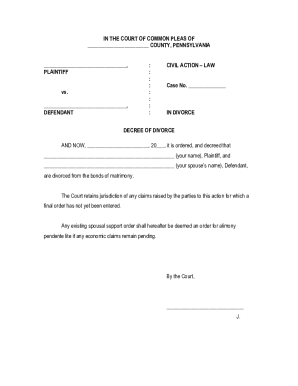
Filling out the PA Form 13 online is a straightforward process that allows users to submit a divorce decree efficiently. This guide will walk you through each section of the form, ensuring you understand the requirements and instructions clearly.
Follow the steps to complete the PA Form 13 effectively.
- Click ‘Get Form’ button to access the form and open it in your editor.
- In arrowbox 1, write the name of the county in which you are filing. Make sure it matches exactly with what you entered on Form 1.
- In arrowbox 2, enter the name of the Plaintiff as it appears on Form 1. This must be an exact match.
- In arrowbox 3, write the name of the Defendant, ensuring it is the same as shown on Form 1.
- For arrowbox 4, input the docket number that was assigned by the Prothonotary’s Office when you filed Form 1.
- In arrowbox 5, write your full name.
- In arrowbox 6, provide your spouse's full name.
- Finalize your process by filing this form with the Prothonotary. The court will complete the date at the top and provide a signature at the bottom.
Complete your documents online today to streamline your filing process.
Related links form
The new school law in Pennsylvania includes updates aimed at enhancing educational standards and student safety. It reflects a commitment to improving education quality across the state. This law may also touch on how environmental education is woven into school curriculums, particularly concerning energy resources. Understanding PA Form 13 can provide context for discussions about environmental issues affecting education.