Loading
Form preview
  • US Legal Forms
  • Other Templates
  • Legal Forms
  • Oregon Legal Forms
  • Or Courts Form 2.130.1 2010

Get Or Courts Form 2.130.1 2010-2026

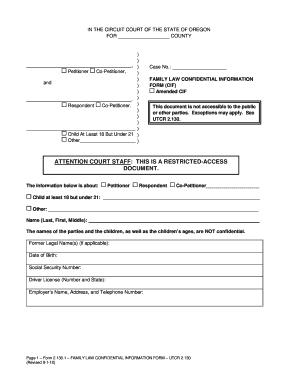
130. 1 FAMILY LAW CONFIDENTIAL INFORMATION FORM UTCR 2. 130 Revised 9-1-10 Children s Names Last First Middle Please attach an additional sheet if there are more than five children involved in the proceeding. Exceptions may apply. See UTCR 2. 130. ATTENTION COURT STAFF THIS IS A RESTRICTED-ACCESS DOCUMENT. The information below is about Co-Petitioner Child at least 18 but under 21 Name Last First Middle The names of the parties and the children as well as the children s ages are NOT confidential.

How it works

  1. Open form

    Open form follow the instructions

  2. Easily sign form

    Easily sign the form with your finger

  3. Share form

    Send filled & signed form or save

How to fill out the OR Courts Form 2.130.1 online

Filling out the OR Courts Form 2.130.1 online can seem daunting, but this guide will walk you through each section step-by-step. Designed for family law matters, this form collects vital confidential information that is important for your case.

Follow the steps to successfully complete the OR Courts Form 2.130.1 online

  1. Click the ‘Get Form’ button to retrieve the OR Courts Form 2.130.1 and open it in your preferred online document editor.
  2. Begin filling out the form by entering the county in which you are filing in the designated space at the top. Ensure that all information is accurate.
  3. Next, provide the names of the petitioner and co-petitioner. Include any additional petitioner details such as their relationship to the case.
  4. Identify the respondent. Similar to the previous step, clearly state his or her name along with relevant details regarding their involvement.
  5. Complete the section for the child who is at least 18 but under 21. Fill in the child's name and any other identified details relevant to your case.
  6. If there are additional children involved, list their information, including names, dates of birth, and social security numbers in the provided fields. Use an additional sheet if necessary.
  7. Fill in the former legal names if applicable, along with the date of birth and social security number of all relevant parties as requested in the form.
  8. Provide the driver's license number and the state of issuance, followed by the employer's name, address, and contact number.
  9. At the end of the form, declare that the information provided is true to the best of your knowledge. Date and sign where indicated.
  10. Finally, review all entries for accuracy. You can save your changes, download a copy of the form, print it, or share it as needed.

Complete your OR Courts Form 2.130.1 online today to ensure your information is submitted correctly and efficiently.

Get form

Experience a faster way to fill out and sign forms on the web. Access the most extensive library of templates available.
Get form

Related content

Confidential Information Form
IN THE CIRCUIT COURT OF THE STATE OF OREGON. FOR THE COUNTY OF. Case No: Petitioner and...
Learn more
sichere pipeda- 'hinschaffen
Iter. and reduplicated verbs share the feature of repeated action or action prolonged or...
Learn more

Related links form

Consent for Minor Children to Travel Consent to Search Electronic Media Content26 Mutual Confidentiality and Non-Disclosure Agreement Contractor's Final Release & Waiver of Lien

Questions & Answers

Get answers to your most pressing questions about US Legal Forms API.

Contact support

Looking up someone's charges in Oregon requires checking the relevant court records, which can typically be accessed online. You can search by the individual's name through the Oregon Judicial Department’s case information system. If you encounter difficulties or need official documentation, the OR Courts Form 2.130.1 will provide vital assistance in acquiring the necessary information. This form simplifies the process, offering a step-by-step guide to ensure you obtain what you need.

To look up court cases in Oregon, you can utilize the Oregon Judicial Department's online case information systems. This statewide system allows you to search for cases by name, case number, or even type of case. If you need specific forms for documentation, the OR Courts Form 2.130.1 will assist you in navigating the process. This resource streamlines your efforts to find the precise case details you are looking for.

Yes, court records in Oregon are generally considered public information. This means you can access many types of court documents unless they are sealed for specific legal reasons. The Oregon Judicial Department aims to maintain transparency, so you can confidently explore available resources. To facilitate your research, refer to the OR Courts Form 2.130.1 for clear instructions on accessing court records.

Finding public records in Oregon can be a straightforward process. You can start by visiting the Oregon Secretary of State's website, which provides access to various public records, including court records. Additionally, you may want to check county-specific court websites if you're looking for something more localized. For forms and detailed procedures, the OR Courts Form 2.130.1 can guide you through obtaining the information you need.

To file SEC Form 3, first access the SEC's EDGAR filing system and create an account if you do not have one. Complete the form by entering the required information accurately. Once you've ensured all details are correct, submit your filing electronically. Leveraging OR Courts Form 2.130.1 can simplify the steps and provide additional clarity.

Form 3 is filed electronically via the SEC's EDGAR system. To ensure your filing is successful, familiarize yourself with the platform beforehand. If you need more structured guidance, consult OR Courts Form 2.130.1 for assistance in navigating the process.

You must file Form 3 within 10 days of your reporting obligation. This timeframe begins once you become subject to the reporting requirements. Timely filing is crucial to avoid penalties, so utilizing resources like OR Courts Form 2.130.1 can help you stay organized and compliant.

Filing Form S-3 requires that you meet specific criteria set by the SEC, including being a reporting company for at least 12 months. Additionally, you must have a public float of at least $75 million. Government bodies and certain subsidiaries have different rules, so refer to OR Courts Form 2.130.1 for tailored instructions.

To file Form 3 SEC, you need to complete the form online through the SEC's EDGAR system. After filling in the required information, submit it electronically. Make sure to keep a copy for your records. If you're uncertain, consider using OR Courts Form 2.130.1 for guidance.

An example of a motion could be a request to change a court date or ask for a summary judgment. When using OR Courts Form 2.130.1, ensure your example motion outlines the issue, provides supporting evidence, and clarifies the desired outcome. This clarity helps the court understand your request and facilitates a more efficient process.

Get This Form Now!

Use professional pre-built templates to fill in and sign documents online faster. Get access to thousands of forms.
Get form
If you believe that this page should be taken down, please follow our DMCA take down processhere.
Get OR Courts Form 2.130.1
Get form
  • Adoption
  • Bankruptcy
  • Contractors
  • Divorce
  • Home Sales
  • Employment
  • Identity Theft
  • Incorporation
  • Landlord Tenant
  • Living Trust
  • Name Change
  • Personal Planning
  • Small Business
  • Wills & Estates
  • Packages A-Z
  • Affidavits
  • Bankruptcy
  • Bill of Sale
  • Corporate - LLC
  • Divorce
  • Employment
  • Identity Theft
  • Internet Technology
  • Landlord Tenant
  • Living Wills
  • Name Change
  • Power of Attorney
  • Real Estate
  • Small Estates
  • Wills
  • All Forms
  • Forms A-Z
  • Other Templates
  • Legal Hub
  • About Us
  • Help Portal
  • Legal Resources
  • Blog
  • Affiliates
  • Contact Us
  • Delete My Account
  • Site Map
  • Industries
  • Forms in Spanish
  • Localized Forms
  • State-specific Forms
  • Forms Kit
  • Real Estate Handbook
  • All Guides
  • Notarize
  • Incorporation services
  • For Consumers
  • For Small Business
  • For Attorneys
  • USLegal
  • FormsPass
  • pdfFiller
  • signNow
  • altaFlow
  • DocHub
  • Instapage
Form Packages
  • Adoption
  • Bankruptcy
  • Contractors
  • Divorce
  • Home Sales
  • Employment
  • Identity Theft
  • Incorporation
  • Landlord Tenant
  • Living Trust
  • Name Change
  • Personal Planning
  • Small Business
  • Wills & Estates
  • Packages A-Z
Form Categories
  • Affidavits
  • Bankruptcy
  • Bill of Sale
  • Corporate - LLC
  • Divorce
  • Employment
  • Identity Theft
  • Internet Technology
  • Landlord Tenant
  • Living Wills
  • Name Change
  • Power of Attorney
  • Real Estate
  • Small Estates
  • Wills
  • All Forms
  • Forms A-Z
  • Other Templates
Customer Service
  • Legal Hub
  • About Us
  • Help Portal
  • Legal Resources
  • Blog
  • Affiliates
  • Contact Us
  • Delete My Account
  • Site Map
  • Industries
  • Forms in Spanish
  • Localized Forms
  • State-specific Forms
  • Forms Kit
Legal Guides
  • Real Estate Handbook
  • All Guides
Prepared for you
  • Notarize
  • Incorporation services
Our Customers
  • For Consumers
  • For Small Business
  • For Attorneys
Our Sites
  • USLegal
  • FormsPass
  • pdfFiller
  • signNow
  • altaFlow
  • DocHub
  • Instapage
Social Media
Call us now toll free:
+1 833 426 79 33
As seen in:
© Copyright 1999-2026 airSlate Legal Forms, Inc. 17 Station Street, Ste. 203, Brookline, MA 02445
  • Your Privacy Choices
  • Terms of Service
  • Privacy Notice
  • Content Takedown Policy
  • Bug Bounty Program