Loading
Form preview
  • US Legal Forms
  • Other Templates
  • Legal Forms
  • Oklahoma Legal Forms
  • Ok Uf-67 2006

Get Ok Uf-67 2006-2026

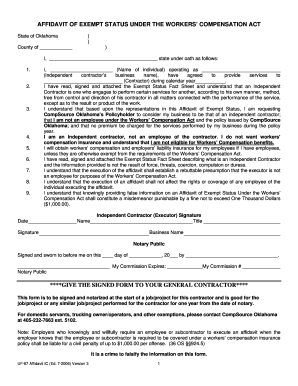
Urce Oklahoma at 405-232-7663 ext. 5102. Note: Employers who knowingly and willfully require an employee or subcontractor to execute an affidavit when the employer knows that the employee or subcontractor is required to be covered under a workers compensation insurance policy shall be liable for a civil penalty of up to $1,000.00 per offense. (36 OS 924.5) It is a crime to falsify the information on this form. UF-67 Affidavit IC (Ed. 7-2006) Version 3 1 EXEMPT STATUS FACT SHEET An inde.

How it works

  1. Open form

    Open form follow the instructions

  2. Easily sign form

    Easily sign the form with your finger

  3. Share form

    Send filled & signed form or save

How to fill out the OK UF-67 online

The OK UF-67 form, known as the Affidavit of Exempt Status Under the Workers' Compensation Act, is essential for individuals seeking to declare their status as independent contractors in Oklahoma. This guide provides clear and supportive instructions on how to complete the form accurately online.

Follow the steps to fill out the OK UF-67 online

  1. Click 'Get Form' button to obtain the form and open it in the editor.
  2. Begin by filling in your county in the designated space at the top of the form. This identifies the jurisdiction relevant to your affidavit.
  3. In the first empty space, write your full name. This should be the name of the individual filling out the affidavit.
  4. In the subsequent lines, list the services you will provide to the contractor. Detail each service briefly and clearly.
  5. Specify the calendar year during which you will provide services to the contractor. This ensures clarity on the validity period of the affidavit.
  6. Review and acknowledge that you have read, signed, and attached the Exempt Status Fact Sheet. This confirms your understanding of the independent contractor definition.
  7. Sign the form in the section marked 'Independent Contractor (Executor) Signature.' Your signature is a declaration of your status and acceptance of the terms.
  8. Have the form notarized by a registered Notary Public. Complete the notary section with the date of signing and the notary's commission expiry.
  9. Finally, submit the completed form, making sure to provide the signed document to your general contractor. The affidavit is valid for one year from the notarization date.

Take the next step towards securing your independent contractor status by filling out the OK UF-67 online today.

Get form

Experience a faster way to fill out and sign forms on the web. Access the most extensive library of templates available.
Get form

Related content

Streptomyces parvulus genome assembly ASM4068010v1
Assembly statistics ; Genome size, 7.6 Mb, 7.6 Mb ; Total ungapped length, 7.6 Mb, 7.6 Mb...
Learn more
University of Florida: Home
A top five public land-grant research university, the University of Florida creates a...
Learn more
e-SUS Atenção Básica MANUAL DE USO DO SISTEMA...
O e-SUS AB é uma estratégia do Departamento de Atenção Básica (DAB) para reestruturar...
Learn more

Related links form

B1 2010 B104 2007 B1040 2015 B2030 2015

Questions & Answers

Get answers to your most pressing questions about US Legal Forms API.

Contact support

For extra withholding on the OK UF-67 form, you should determine how much additional tax you want deducted from your paycheck. Generally, you can specify an extra dollar amount in the appropriate section. This decision may depend on factors like your anticipated tax liability or any additional income that won’t have taxes withheld. The uslegalforms platform can assist you in calculating the right amount for your needs.

When deciding what to put for your withholding allowance on the OK UF-67, consider your dependents, marital status, and overall tax situation. Your allowance number can significantly impact your paycheck amount and tax refund, so it’s essential to evaluate your financial needs. If unsure, the uslegalforms platform offers guidance and tools to help you determine the appropriate number of allowances.

On the W-4 form, you indicate your allowances in the designated section, typically found on the top half of the document. If you are using the OK UF-67 form, you'll follow similar instructions for entering your allowances. Place a '0' if you prefer maximum withholding or a '1' for fewer withholdings. Ensuring you enter this correctly is essential for accurate tax deductions.

Filling out a withholding allowance form like the OK UF-67 is straightforward. Begin by entering your personal information, including your name and Social Security number. Next, decide your allowances based on your tax situation and the IRS guidelines, and complete any additional sections regarding extra withholding if desired. You can complete the form directly through the uslegalforms platform for simplicity and accuracy.

Workers' compensation payments are not considered wages; they serve as benefits to cover medical expenses and lost wages due to a work-related injury. Therefore, these payments do not influence your earning history or social security calculations. For a better understanding of these nuances, reference materials like OK UF-67 can be helpful.

In Oklahoma, workers' compensation benefits are generally not taxable under state or federal law. Therefore, while you receive these benefits, you do not need to report them as income. Utilizing forms such as OK UF-67 can assist you in keeping accurate records related to your workers' comp claims and benefits.

The IRS does not tax workers' compensation payments, including temporary or permanent disability payments. However, other types of income you receive during or after a workers' comp claim might be taxable. Understanding the distinction is essential, and forms like OK UF-67 can help clarify these tax rules.

Employers in Oklahoma are generally not required to provide workers' compensation coverage for 1099 employees, also known as independent contractors. However, this can depend on the nature of the work and the specific agreements in place. It's wise to consult resources like OK UF-67 for detailed guidelines on workers' comp requirements.

In Oklahoma, workers' compensation settlements are typically not subject to federal taxation. However, the tax implications may vary based on how the settlement is structured. To navigate this issue effectively, using OK UF-67 can help clarify your understanding of tax obligations related to workers' comp settlements.

In the context of employee compensation, any payment you receive for your work is generally taxable. This includes wages, salaries, bonuses, and other forms of compensation. It is important to report all taxable income on your tax returns, especially when using legal forms like OK UF-67 to ensure compliance with IRS regulations.

Get This Form Now!

Use professional pre-built templates to fill in and sign documents online faster. Get access to thousands of forms.
Get form
If you believe that this page should be taken down, please follow our DMCA take down processhere.
Get OK UF-67
Get form
  • Adoption
  • Bankruptcy
  • Contractors
  • Divorce
  • Home Sales
  • Employment
  • Identity Theft
  • Incorporation
  • Landlord Tenant
  • Living Trust
  • Name Change
  • Personal Planning
  • Small Business
  • Wills & Estates
  • Packages A-Z
  • Affidavits
  • Bankruptcy
  • Bill of Sale
  • Corporate - LLC
  • Divorce
  • Employment
  • Identity Theft
  • Internet Technology
  • Landlord Tenant
  • Living Wills
  • Name Change
  • Power of Attorney
  • Real Estate
  • Small Estates
  • Wills
  • All Forms
  • Forms A-Z
  • Other Templates
  • Legal Hub
  • About Us
  • Help Portal
  • Legal Resources
  • Blog
  • Affiliates
  • Contact Us
  • Delete My Account
  • Site Map
  • Industries
  • Forms in Spanish
  • Localized Forms
  • State-specific Forms
  • Forms Kit
  • Real Estate Handbook
  • All Guides
  • Notarize
  • Incorporation services
  • For Consumers
  • For Small Business
  • For Attorneys
  • USLegal
  • FormsPass
  • pdfFiller
  • signNow
  • altaFlow
  • DocHub
  • Instapage
Form Packages
  • Adoption
  • Bankruptcy
  • Contractors
  • Divorce
  • Home Sales
  • Employment
  • Identity Theft
  • Incorporation
  • Landlord Tenant
  • Living Trust
  • Name Change
  • Personal Planning
  • Small Business
  • Wills & Estates
  • Packages A-Z
Form Categories
  • Affidavits
  • Bankruptcy
  • Bill of Sale
  • Corporate - LLC
  • Divorce
  • Employment
  • Identity Theft
  • Internet Technology
  • Landlord Tenant
  • Living Wills
  • Name Change
  • Power of Attorney
  • Real Estate
  • Small Estates
  • Wills
  • All Forms
  • Forms A-Z
  • Other Templates
Customer Service
  • Legal Hub
  • About Us
  • Help Portal
  • Legal Resources
  • Blog
  • Affiliates
  • Contact Us
  • Delete My Account
  • Site Map
  • Industries
  • Forms in Spanish
  • Localized Forms
  • State-specific Forms
  • Forms Kit
Legal Guides
  • Real Estate Handbook
  • All Guides
Prepared for you
  • Notarize
  • Incorporation services
Our Customers
  • For Consumers
  • For Small Business
  • For Attorneys
Our Sites
  • USLegal
  • FormsPass
  • pdfFiller
  • signNow
  • altaFlow
  • DocHub
  • Instapage
Social Media
Call us now toll free:
+1 833 426 79 33
As seen in:
© Copyright 1999-2026 airSlate Legal Forms, Inc. 17 Station Street, Ste. 203, Brookline, MA 02445
  • Your Privacy Choices
  • Terms of Service
  • Privacy Notice
  • Content Takedown Policy
  • Bug Bounty Program