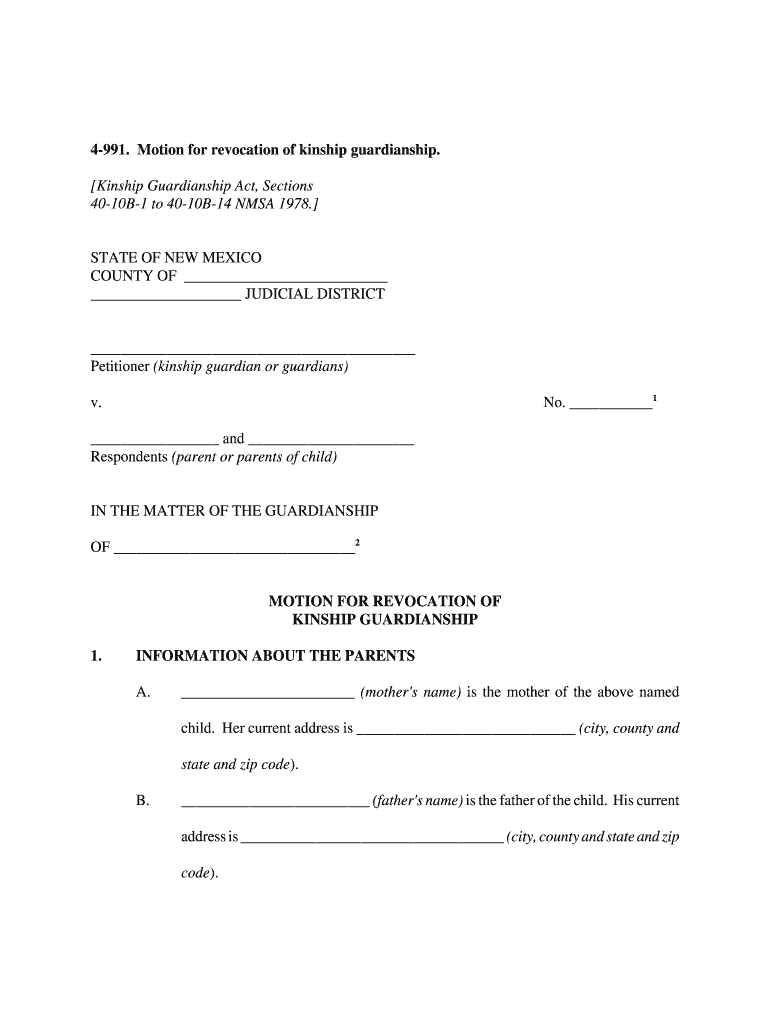
JUDICIAL DISTRICT Petitioner (kinship guardian or guardians) No. 1 v. and Respondents (parent or parents of child) IN THE MATTER OF THE GUARDIANSHIP OF 2 MOTION FOR REVOCATION OF KINSHIP GUARDIANSHIP 1. INFORMATION ABOUT THE PARENTS A. (mother's name) is the mother of the above named child. Her current address is.
Loading

Open form follow the instructions

Easily sign the form with your finger

Send filled & signed form or save
How to fill out the NM 4-991 online
The NM 4-991 form is a motion for the revocation of kinship guardianship, crucial for those seeking to return custody of a child to their parent or parents. This guide provides a comprehensive walkthrough for completing the form online, ensuring clarity and accuracy in the process.
Follow the steps to fill out the NM 4-991 form correctly
- Press the ‘Get Form’ button to access the NM 4-991 form and open it in your web browser for editing.
- Fill in the top section with your information, including the county and judicial district where the case is being filed.
- In the ‘Respondents’ section, list the names of the parents involved in this guardianship, ensuring accurate spelling and addresses are included.
- Detail the reason for the requested revocation of kinship guardianship in the section provided.
- In the information relating to the child, clearly state what is being requested regarding the return of the child. Include any names associated with this request.
- Attach the transition plan as required by the court. This plan should include comprehensive details about the child’s needs and how they will be addressed following the termination of guardianship.
- Complete the signature section, ensuring that all required signatures are provided, along with the date of signing.
- After filling out the form, you can save your changes, download the form for your records, print it for submission, or share it as needed.
Begin the process of completing your NM 4-991 form online today!
Experience a faster way to fill out and sign forms on the web. Access the most extensive library of templates available.
Related content
Civil Forms 4-981 to 4-992 NMRA may be used in the district courts of this State by...
Publications · Acute Care · Cardiothoracic · ENT · General Surgery · HPB · Peds ·...
(1) 6Y6G, (1) 884, (4) 991. REFERENCE DATA AND LITERATURE: AN 16-35TS148-5 ... This...
Get answers to your most pressing questions about US Legal Forms API.
How to give guardianship without going to court?
In certain situations, you can establish guardianship without going to court by creating a written agreement. This agreement should be signed by all parties involved and may need notarization. Utilizing resources like NM 4-991 can guide you through these informal processes, ensuring legal recognition of the guardianship arrangement.
How to get guardianship of a child in New Mexico?
To obtain guardianship of a child in New Mexico, you must file a petition in the appropriate court and provide your reasons for seeking guardianship. The court will review your case and consider the best interests of the child. Resources like USLegalForms can simplify your journey through NM 4-991 by providing necessary forms and guidance.
Does guardianship override parental rights in New Mexico?
Yes, in New Mexico, guardianship can override parental rights under certain circumstances. When a guardian is appointed, they gain legal authority to make decisions for the child, which may limit the parent's involvement. If you've questions about the implications of NM 4-991 in relation to parental rights, it's wise to consult a legal professional.
What is the kinship guardianship Act in New Mexico?
The Kinship Guardianship Act allows relatives to become legal guardians of children when parents are unable to care for them. This Act aims to preserve family connections while providing stability and security for the child. If you find yourself in this situation, understanding NM 4-991 can help streamline the process of securing guardianship.
What are the different types of guardianship in New Mexico?
In New Mexico, there are several types of guardianship, including general guardianship and limited guardianship. General guardianship grants the guardian full decision-making authority over the ward. Limited guardianship, on the other hand, provides specific powers tailored to the ward's needs. If you're considering guardianship under NM 4-991, it's important to understand these options.
What is the kinship guardianship statute in New Mexico?
The kinship guardianship statute in New Mexico provides a legal pathway for relatives to become guardians of a child when necessary. This statute helps ensure that children placed with family members have stable and supportive environments. It also outlines the rights and responsibilities of guardians. For detailed guidance, NM 4-991 is an invaluable resource.
What is the statute 66 03 0013 in New Mexico?
Statute 66 03 0013 in New Mexico relates to the legal framework surrounding kinship care and guardianships. It establishes specific guidelines for relatives seeking to care for children under the state’s supervision. Understanding this statute is essential for any family involved in such cases. NM 4-991 offers resources to help navigate these regulations easily.
What is the kinship pledge in New Mexico?
The kinship pledge in New Mexico is a commitment that relatives make to care for a child when the child cannot remain with their parents. This pledge involves a variety of responsibilities, including ensuring the child's emotional and physical well-being. It fosters family unity and prioritizes the child’s best interests. NM 4-991 outlines the legal recognition of such arrangements.
How do I change my legal guardian?
To change the guardianship of a child, you will need to file a petition with the court in the city or county where the child resides currently. Along with the petition, you should file evidence to back up your reasons for changing guardianship and provide written consents from the child's current guardians.
How do I terminate parental rights in Michigan?
Determine the proper jurisdiction. ... Draft a document requesting termination of parental rights. ... Return this petition to the clerk of court and pay the filing fee. Serve the child's other parent as well as any guardians appointed for the child with the appropriate paperwork. ... Attend the hearing.
Use professional pre-built templates to fill in and sign documents online faster. Get access to thousands of forms.
If you believe that this page should be taken down, please follow our DMCA take down process here.