Loading
Form preview
  • US Legal Forms
  • Other Templates
  • Legal Forms
  • Missouri Legal Forms
  • Mo Identity Theft Incident Report

Get Mo Identity Theft Incident Report

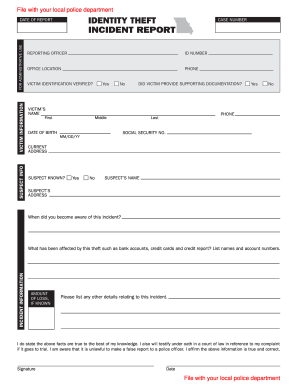
MM/DD/YY CURRENT ADDRESS SUSPECT KNOWN SUSPECT S NAME SUSPECT S When did you become aware of this incident INCIDENT INFORMATION What has been affected by this theft such as bank accounts credit cards and credit report List names and account numbers. File with your local police department SUSPECT INFO VICTIM INFORMATION FOR ADMINISTRATIVE USE DATE OF REPORT CASE NUMBER REPORTING OFFICER ID NUMBER OFFICE LOCATION PHONE VICTIM IDENTIFICATION VERIFIED Yes No DID VICTIM PROVIDE SUPPORTING DOCUMENTATI.

How it works

  1. Open form

    Open form follow the instructions

  2. Easily sign form

    Easily sign the form with your finger

  3. Share form

    Send filled & signed form or save

How to fill out the MO Identity Theft Incident Report online

The MO Identity Theft Incident Report is an essential document for reporting incidents of identity theft to help protect your financial identity. This guide will provide you with clear steps to fill out the form effectively and accurately.

Follow the steps to complete your report online

  1. Click ‘Get Form’ button to access the report and view it in your browser.
  2. Fill in the date of the report at the top of the form to indicate when the incident was reported.
  3. Provide the case number assigned by law enforcement, if known, for tracking.
  4. List the name of the reporting officer along with their ID number for identification purposes.
  5. Fill in the office location where the report is being filed and provide a contact phone number.
  6. Indicate if the victim’s identification has been verified by selecting 'Yes' or 'No'.
  7. State if the victim has provided any supporting documentation regarding their identity theft. Select 'Yes' or 'No'.
  8. Enter the victim's full name in the designated fields, including first, middle, and last name.
  9. Provide the victim’s date of birth in the format MM/DD/YY.
  10. Include the victim’s phone number for any necessary follow-up.
  11. Input the victim’s social security number for identification purposes.
  12. Fill out the current address of the victim fully.
  13. Indicate if the suspect is known by selecting 'Yes' or 'No'.
  14. If known, provide the suspect's name and address.
  15. Specify when the victim became aware of the incident.
  16. Detail what has been affected by the theft, such as bank accounts and credit cards, including any applicable account numbers.
  17. If known, enter the amount of loss due to the incident.
  18. Provide any additional details relating to the incident for clarification.
  19. Affirm the truthfulness of the information by signing the form and dating it.
  20. Once all sections are completed, save changes, and download or print the form for your records. Share it with the appropriate local police department.

Complete your MO Identity Theft Incident Report online today to help protect your identity.

Get form

Experience a faster way to fill out and sign forms on the web. Access the most extensive library of templates available.
Get form

Related content

Identity Theft | Attorney General Office of...
Identity Theft Complaint Form (file with Attorney General's Office); Identity Theft...
Learn more
Identity Theft Prevention Program
This document implements an Identity Theft Prevention Program (ITPP) as required by the...
Learn more
International AI safety report
Incidents range from high-profile fraud cases where bank ... be used for identity theft...
Learn more

Related links form

CO JDF 1103 2009 CO JDF 1103I 2013 CO JDF 1104 2016 CO JDF 1104 2006

Questions & Answers

Get answers to your most pressing questions about US Legal Forms API.

Contact support

You can view accounts associated with your SSN by obtaining your credit report from the three major credit bureaus. Each report provides a detailed summary of your credit accounts. Regularly monitoring your credit is essential to spot errors or fraudulent accounts. If you suspect identity theft, file a MO Identity Theft Incident Report for additional support.

To check if someone is using your SSN, review your credit reports and look for accounts you did not open. You can also check your bank statements for unfamiliar transactions. If you find discrepancies, it’s crucial to address them immediately. Filing a MO Identity Theft Incident Report can provide you with the necessary legal framework to resolve the situation.

You can receive identity theft alerts by using monitoring services that track your personal information. Many services offer real-time alerts for suspicious activity related to your SSN. It’s also wise to set up alerts on your bank and credit accounts. When you receive an alert, take immediate action and consider preparing a MO Identity Theft Incident Report.

To get notified about unauthorized use of your SSN, consider subscribing to an identity theft protection service. These services can alert you promptly to any unusual activity related to your credit profile. Furthermore, you can place a fraud alert on your credit report through the major credit bureaus. Following up with a MO Identity Theft Incident Report is a key step in addressing any incidents.

Yes, someone can use your SSN without your knowledge. They can apply for credit cards, loans, or even open bank accounts in your name. This is why monitoring your financial accounts and credit history is vital. If you discover any suspicious activity, act quickly to file a MO Identity Theft Incident Report to begin the recovery process.

Missouri offers various protections for identity theft victims, including the ability to request a security freeze on their credit report. This freeze restricts access to your credit report, making it difficult for fraudsters to open accounts in your name. Additionally, Missouri law requires that victims be informed of their rights and provides resources for creating a MO Identity Theft Incident Report to help them navigate the recovery process.

If someone steals your identity, step 3 often involves placing a fraud alert on your credit report. This alert notifies creditors to take extra steps to verify your identity before opening new accounts. It is crucial to follow up by filing a formal report with the issuing authorities, including a completed MO Identity Theft Incident Report. This step helps safeguard your financial interests and demonstrates the seriousness of the situation.

Yes, having your driver's license gives someone access to personal information that can be used for identity theft. They can impersonate you to open accounts or make transactions without your knowledge. To protect yourself, it is essential to monitor your accounts regularly and report any unauthorized use immediately. In cases of identity theft, you can create a MO Identity Theft Incident Report to document your experience.

To report identity theft effectively, you should first gather all necessary information, such as financial statements and notices of suspicious activity. Next, file a complaint with the Federal Trade Commission (FTC) at IdentityTheft to create an Identity Theft Report. After that, make sure to report the incident to your local law enforcement agency and, if applicable, notify your bank or credit companies. This process is essential for completing a MO Identity Theft Incident Report.

To report identity theft in Missouri, begin by collecting all documentation about the theft. You should then file an MO Identity Theft Incident Report to formally record the event. Additionally, report the theft to local law enforcement and the Federal Trade Commission for further action. This thorough approach will help safeguard your rights and financial security.

Get This Form Now!

Use professional pre-built templates to fill in and sign documents online faster. Get access to thousands of forms.
Get form
If you believe that this page should be taken down, please follow our DMCA take down processhere.
Get MO Identity Theft Incident Report
Get form
  • Adoption
  • Bankruptcy
  • Contractors
  • Divorce
  • Home Sales
  • Employment
  • Identity Theft
  • Incorporation
  • Landlord Tenant
  • Living Trust
  • Name Change
  • Personal Planning
  • Small Business
  • Wills & Estates
  • Packages A-Z
  • Affidavits
  • Bankruptcy
  • Bill of Sale
  • Corporate - LLC
  • Divorce
  • Employment
  • Identity Theft
  • Internet Technology
  • Landlord Tenant
  • Living Wills
  • Name Change
  • Power of Attorney
  • Real Estate
  • Small Estates
  • Wills
  • All Forms
  • Forms A-Z
  • Other Templates
  • Legal Hub
  • About Us
  • Help Portal
  • Legal Resources
  • Blog
  • Affiliates
  • Contact Us
  • Delete My Account
  • Site Map
  • Industries
  • Forms in Spanish
  • Localized Forms
  • State-specific Forms
  • Forms Kit
  • Real Estate Handbook
  • All Guides
  • Notarize
  • Incorporation services
  • For Consumers
  • For Small Business
  • For Attorneys
  • USLegal
  • FormsPass
  • pdfFiller
  • signNow
  • altaFlow
  • DocHub
  • Instapage
Form Packages
  • Adoption
  • Bankruptcy
  • Contractors
  • Divorce
  • Home Sales
  • Employment
  • Identity Theft
  • Incorporation
  • Landlord Tenant
  • Living Trust
  • Name Change
  • Personal Planning
  • Small Business
  • Wills & Estates
  • Packages A-Z
Form Categories
  • Affidavits
  • Bankruptcy
  • Bill of Sale
  • Corporate - LLC
  • Divorce
  • Employment
  • Identity Theft
  • Internet Technology
  • Landlord Tenant
  • Living Wills
  • Name Change
  • Power of Attorney
  • Real Estate
  • Small Estates
  • Wills
  • All Forms
  • Forms A-Z
  • Other Templates
Customer Service
  • Legal Hub
  • About Us
  • Help Portal
  • Legal Resources
  • Blog
  • Affiliates
  • Contact Us
  • Delete My Account
  • Site Map
  • Industries
  • Forms in Spanish
  • Localized Forms
  • State-specific Forms
  • Forms Kit
Legal Guides
  • Real Estate Handbook
  • All Guides
Prepared for you
  • Notarize
  • Incorporation services
Our Customers
  • For Consumers
  • For Small Business
  • For Attorneys
Our Sites
  • USLegal
  • FormsPass
  • pdfFiller
  • signNow
  • altaFlow
  • DocHub
  • Instapage
Social Media
Call us now toll free:
+1 833 426 79 33
As seen in:
© Copyright 1999-2026 airSlate Legal Forms, Inc. 17 Station Street, Ste. 203, Brookline, MA 02445
  • Your Privacy Choices
  • Terms of Service
  • Privacy Notice
  • Content Takedown Policy
  • Bug Bounty Program