Loading
Form preview
  • US Legal Forms
  • Other Templates
  • Legal Forms
  • Minnesota Legal Forms
  • Mn Ucb 10.3.1 2018

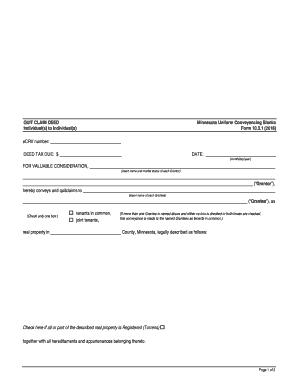
Get Mn Ucb 10.3.1 2018-2026

And marital status of each Grantor) ( Grantor ), hereby conveys and quitclaims to (Check only one box.) real property in tenants in common, joint tenants, (insert name of each Grantee) ( Grantee ), as (If more than one Grantee is named above and either no box is checked or both boxes are checked, this conveyance is made to the named Grantees as tenants in common.) County, Minnesota, legally described as follows: Check here if all or part of the described real property.

How it works

  1. Open form

    Open form follow the instructions

  2. Easily sign form

    Easily sign the form with your finger

  3. Share form

    Send filled & signed form or save

How to fill out the MN UCB 10.3.1 online

The MN UCB 10.3.1 form is essential for individuals wishing to execute a quit claim deed in Minnesota. This guide will provide step-by-step instructions to help you complete the form accurately and effectively online.

Follow the steps to fill out your MN UCB 10.3.1 form with ease.

  1. Click ‘Get Form’ button to obtain the form and open it in the editor.
  2. Enter the eCRV number at the top of the form. This number is required to track the property transfer.
  3. Fill in the deed tax due amount in the designated field, ensuring you have calculated this accurately.
  4. Input the current date in the specified format (month/day/year). This date signifies when the deed is being executed.
  5. List the name and marital status of each Grantor in the appropriate section. This is the individual or individuals selling or transferring the property.
  6. Designate how the Grantees will hold the property by checking the appropriate box for either tenants in common or joint tenants.
  7. Enter the names of each Grantee who will receive the property following the Grantors' conveyance.
  8. Fill in the County in Minnesota where the property is located, followed by a detailed legal description of the property being conveyed.
  9. Indicate whether all or part of the property is Registered (Torrens) by checking the corresponding box.
  10. Complete the section for the Grantor’s certification regarding the presence of wells on the property by checking the applicable box. If a well disclosure certificate accompanies the deed, provide the WDC number.
  11. Each Grantor should then sign in the designated areas, ensuring clear signatures with all necessary titles and marital statuses included.
  12. Complete the acknowledgment section, including the county and date the instrument was acknowledged, as well as the notarial officer's signature and commission expiration date.
  13. At the bottom, provide the name and address of the individual or entity drafting the instrument, along with the date of preparation.
  14. Lastly, enter the legal name and address of the Grantee to whom tax statements should be sent. Once finished, save your changes, download the document, and consider printing or sharing it as necessary.

Begin filling out your MN UCB 10.3.1 form online today to ensure a smooth property transfer process.

Get form

Experience a faster way to fill out and sign forms on the web. Access the most extensive library of templates available.
Get form

Related content

QUIT CLAIM DEED Individual(s) to Individual(s)...
Minnesota Uniform Conveyancing Blanks. Form 10.3.1 (2018). eCRV number: DEED TAX DUE: $...
Learn more
Reversible Markov Chains and Random Walks on...
by D Aldous · Cited by 1537 — This monograph covers reversible Markov chains and random...
Learn more

Related links form

CA TR-205 1999 CA TR-210 1999 CA TR-215 1999 CA TR-220 1999

Questions & Answers

Get answers to your most pressing questions about US Legal Forms API.

Contact support

Filing a quitclaim deed online in Minnesota is very accessible and can be done through the county's official website. Make sure to provide the information as required by MN UCB 10.3.1, including necessary property details. After completing the application, you can submit it electronically, simplifying the process significantly. For easier access to forms and filing instructions, US Legal Forms can be a helpful tool.

To file a quitclaim deed in Minnesota, start by preparing the deed form according to the requirements set out in MN UCB 10.3.1. Then, sign the document in front of a notary public, and ensure it is registered with the county recorder's office where the property is located. This step is crucial for the deed to be enforceable. If you prefer guidance throughout this process, US Legal Forms offers comprehensive resources.

Yes, you can file a quit claim deed yourself in Minnesota, which is often a straightforward process. However, it is essential to ensure that the deed meets all the requirements under MN UCB 10.3.1 for it to be legally binding. If you decide to proceed on your own, be sure to follow the correct steps for completion and submission. If you need assistance or templates, consider using a platform like US Legal Forms.

You can indeed complete a quit claim deed yourself using resources available through platforms like USLegalForms. They provide user-friendly templates that comply with MN UCB 10.3.1, guiding you through each step to prepare your document accurately. Just ensure you follow the filing and notarization requirements to avoid any issues.

Yes, under Minnesota law, a quit claim deed must be notarized to be valid. Notarization confirms the identities of the parties involved and verifies that the grantor willingly signed the document. This step is essential when following MN UCB 10.3.1 guidelines to ensure legal effectiveness.

A key disadvantage of a quitclaim deed is that it offers no warranty on the property title. This means the grantor could transfer a property with hidden liens or encumbrances, and the grantee has no legal recourse. Therefore, it is crucial to understand the implications of using a quitclaim deed before proceeding with MN UCB 10.3.1.

When completing a Minnesota quit claim deed, start by downloading the form compliant with MN UCB 10.3.1. Input all required information, such as the names of the grantor and grantee, along with the property's legal description. Once filled, ensure the deed is properly signed and notarized to finalize the transaction.

Filling out the quitclaim deed form involves entering accurate information about both parties involved. Make sure to carefully detail the property description, including any parcel numbers and legal identifiers. Lastly, remember that the form needs to be witnessed or notarized for it to hold legal weight in Minnesota according to MN UCB 10.3.1.

To correctly fill out a quit claim deed using MN UCB 10.3.1, start by including the grantor's and grantee's details. Clearly describe the property being transferred, detailing the address and legal description. Ensure the document is signed and dated by the grantor before moving forward with the submission process.

Individuals benefiting most from a quitclaim deed are often family members or parties in trust transactions. These individuals usually seek a quick and straightforward transfer without the need for extensive title checks. Under the MN UCB 10.3.1, this type of deed offers a practical solution in specific circumstances. The uslegalforms platform can guide you in making informed decisions tailored to your situation.

Get This Form Now!

Use professional pre-built templates to fill in and sign documents online faster. Get access to thousands of forms.
Get form
If you believe that this page should be taken down, please follow our DMCA take down processhere.
Get MN UCB 10.3.1
Get form
  • Adoption
  • Bankruptcy
  • Contractors
  • Divorce
  • Home Sales
  • Employment
  • Identity Theft
  • Incorporation
  • Landlord Tenant
  • Living Trust
  • Name Change
  • Personal Planning
  • Small Business
  • Wills & Estates
  • Packages A-Z
  • Affidavits
  • Bankruptcy
  • Bill of Sale
  • Corporate - LLC
  • Divorce
  • Employment
  • Identity Theft
  • Internet Technology
  • Landlord Tenant
  • Living Wills
  • Name Change
  • Power of Attorney
  • Real Estate
  • Small Estates
  • Wills
  • All Forms
  • Forms A-Z
  • Other Templates
  • Legal Hub
  • About Us
  • Help Portal
  • Legal Resources
  • Blog
  • Affiliates
  • Contact Us
  • Delete My Account
  • Site Map
  • Industries
  • Forms in Spanish
  • Localized Forms
  • State-specific Forms
  • Forms Kit
  • Real Estate Handbook
  • All Guides
  • Notarize
  • Incorporation services
  • For Consumers
  • For Small Business
  • For Attorneys
  • USLegal
  • FormsPass
  • pdfFiller
  • signNow
  • altaFlow
  • DocHub
  • Instapage
Form Packages
  • Adoption
  • Bankruptcy
  • Contractors
  • Divorce
  • Home Sales
  • Employment
  • Identity Theft
  • Incorporation
  • Landlord Tenant
  • Living Trust
  • Name Change
  • Personal Planning
  • Small Business
  • Wills & Estates
  • Packages A-Z
Form Categories
  • Affidavits
  • Bankruptcy
  • Bill of Sale
  • Corporate - LLC
  • Divorce
  • Employment
  • Identity Theft
  • Internet Technology
  • Landlord Tenant
  • Living Wills
  • Name Change
  • Power of Attorney
  • Real Estate
  • Small Estates
  • Wills
  • All Forms
  • Forms A-Z
  • Other Templates
Customer Service
  • Legal Hub
  • About Us
  • Help Portal
  • Legal Resources
  • Blog
  • Affiliates
  • Contact Us
  • Delete My Account
  • Site Map
  • Industries
  • Forms in Spanish
  • Localized Forms
  • State-specific Forms
  • Forms Kit
Legal Guides
  • Real Estate Handbook
  • All Guides
Prepared for you
  • Notarize
  • Incorporation services
Our Customers
  • For Consumers
  • For Small Business
  • For Attorneys
Our Sites
  • USLegal
  • FormsPass
  • pdfFiller
  • signNow
  • altaFlow
  • DocHub
  • Instapage
Social Media
Call us now toll free:
+1 833 426 79 33
As seen in:
© Copyright 1999-2026 airSlate Legal Forms, Inc. 17 Station Street, Ste. 203, Brookline, MA 02445
  • Your Privacy Choices
  • Terms of Service
  • Privacy Notice
  • Content Takedown Policy
  • Bug Bounty Program