Loading
Form preview
  • US Legal Forms
  • Other Templates
  • Legal Forms
  • Michigan Legal Forms
  • Mi Sworn Statement

Get Mi Sworn Statement

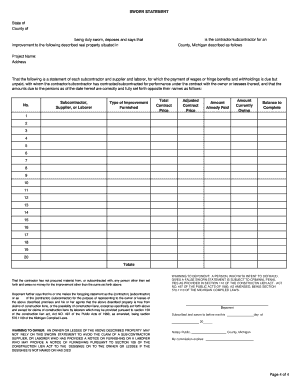
MAY PROVIDE A NOTICE OF FURNISHING PURSUANT TO SECTION 109 OF THE CONSTRUCTION LIEN ACT TO THE DESIGNEE OR TO THE OWNER OR LESSEE IF THE DESIGNEE IS NOT NAMED OR HAS DIED Notary Public, County, Michigan My commission expires: Page 4 of 4.

How it works

  1. Open form

    Open form follow the instructions

  2. Easily sign form

    Easily sign the form with your finger

  3. Share form

    Send filled & signed form or save

How to fill out the MI sworn statement online

The MI sworn statement is an important document used by contractors and subcontractors in Michigan to declare their payment status regarding subcontractors and suppliers involved in a construction project. This guide will help you navigate filling out the form online accurately and efficiently.

Follow the steps to complete the MI sworn statement online.

  1. Click the ‘Get Form’ button to obtain the MI sworn statement and open it in your document editor.
  2. Begin by identifying the state and county at the top of the form. Ensure this information is accurate and corresponds to the location of your project.
  3. Fill in the name of the contractor or subcontractor responsible for the project in the designated field.
  4. Provide the specific project name and address where the improvement is taking place. This should reflect the official records.
  5. List each subcontractor, supplier, or laborer in the table provided. For each entry, fill in the following details: - Type of improvement furnished - Total contract price - Adjusted contract price - Amount already paid - Amount currently owing - Balance to complete.
  6. Ensure all amounts due to subcontractors, suppliers, and laborers are accurately reported as of the date of completing the statement.
  7. Read the section regarding procurement of materials and subcontracting, and confirm that you have not engaged with any entities outside of those listed.
  8. Indicate your role within the contracting entity as either the contractor or subcontractor by selecting the appropriate term.
  9. At the bottom, ensure the statement indicates that the property is free from claims of construction liens, except as specified.
  10. Finalize the form by signing it and dating it accurately, ensuring you include your printed name in the deponent section.
  11. After completing the form, save your changes. You can then download, print, or share the document as needed.

Complete your MI sworn statement online today to ensure a smooth documentation process.

Get form

Experience a faster way to fill out and sign forms on the web. Access the most extensive library of templates available.
Get form

Related content

Public Works Sworn Statement
WARNING TO DEPONENT: A PERSON, WHO WITH INTENT TO DEFRAUD, GIVES A. FALSE SWORN STATEMENT...
Learn more
UM Sworn Statement
WARNING TO DEPONENT: A PERSON WHO, WITH INTENT TO DEFRAUD, GIVES A FALSE SWORN STATEMENT...
Learn more
Chapter 6 Judicial Actions - Regulatory Procedures...
(in court and by sworn declaration). The Center lead coordinator should upload the...
Learn more

Related links form

CA JV-100 S 2008 CA JV-101(A) S 2016 CA JV-110 2016 CA JV-110 2008

Questions & Answers

Get answers to your most pressing questions about US Legal Forms API.

Contact support

The term for a sworn written statement is typically 'affidavit.' An affidavit is a legal document in which a person declares facts they swear to be true, often used in legal proceedings. In the context of Michigan law, an MI sworn statement serves a similar function and can act as an affidavit in certain scenarios. If you need assistance creating one, consider using US Legal Forms, which provides templates specifically for sworn statements.

The oath for a sworn statement is a formal affirmation that the information provided is true to the best of your knowledge. This can include a phrase such as 'I swear under penalty of perjury that the foregoing is true and correct.' This oath emphasizes the seriousness of making a sworn statement and assures the parties involved of your honesty. When drafting an MI sworn statement, it is vital to include this oath to maintain legal credibility.

The format of a sworn statement typically includes a heading, an introductory clause, the factual statement, and a closing statement. Start with your title, such as 'Sworn Statement,' followed by your name and address. Clearly list the statements you are swearing to, and conclude with a signature line, along with a notary public section. For assistance, US Legal Forms offers templates to ensure your MI sworn statement is professionally formatted.

Filling out a sworn statement requires attention to detail and a clear understanding of the information needed. Begin by clearly stating your name, address, and the purpose of the statement. Next, present the facts you want to support with your sworn statement in a logical format. Make sure to review the final document for accuracy, and consider using tools from US Legal Forms to guide you in drafting a proper MI sworn statement.

An example of a sworn statement is a document in which an individual declares facts under oath, thereby confirming their truthfulness. In Michigan, a common instance involves an individual swearing they reside at a specific address for legal purposes. This sworn statement carries significant weight in court and can be used in various legal matters, such as disputes over residency or property. Utilizing platforms like US Legal Forms can help you easily create an MI sworn statement tailored to your needs.

Administering a sworn statement typically requires a notary public, who will confirm the identity of the signer. The individual must provide their full name and facts to be sworn, allowing the notary to oversee the signing process. By properly administering the sworn statement, you create a legally binding document, ensuring your MI sworn statement stands firm in legal settings.

To write a sworn statement for USCIS, introduce the document by stating its purpose and including your information. Present the facts related to your application in a clear manner, ensuring they support your case. Conclude the statement by signing in front of a notary, as this authentication is crucial for your MI sworn statement to be accepted.

When writing a sworn statement, start by declaring that it's a sworn statement, followed by your full name, address, and a brief introduction. Provide a clear and concise account of the facts or events you are affirming, organized logically. Always sign and date the document in front of a notary public, as this enhances the reliability of your MI sworn statement.

Writing a personal statement for USCIS involves sharing your story and circumstances clearly and truthfully. Begin by outlining your background, including relevant dates and significant events leading to your application. Focus on your intentions and hopes for the future in the U.S. A well-crafted personal statement complements your MI sworn statement, providing context that can help your case.

Yes, when submitting sworn affidavits to USCIS, it is important that they are notarized. The notary public will certify that the person signing the document did so in their presence, enhancing the credibility of your statement. Additionally, this adds a layer of legal protection, making your MI sworn statement more powerful during immigration processes.

Get This Form Now!

Use professional pre-built templates to fill in and sign documents online faster. Get access to thousands of forms.
Get form
If you believe that this page should be taken down, please follow our DMCA take down processhere.
Get MI Sworn Statement
Get form
  • Adoption
  • Bankruptcy
  • Contractors
  • Divorce
  • Home Sales
  • Employment
  • Identity Theft
  • Incorporation
  • Landlord Tenant
  • Living Trust
  • Name Change
  • Personal Planning
  • Small Business
  • Wills & Estates
  • Packages A-Z
  • Affidavits
  • Bankruptcy
  • Bill of Sale
  • Corporate - LLC
  • Divorce
  • Employment
  • Identity Theft
  • Internet Technology
  • Landlord Tenant
  • Living Wills
  • Name Change
  • Power of Attorney
  • Real Estate
  • Small Estates
  • Wills
  • All Forms
  • Forms A-Z
  • Other Templates
  • Legal Hub
  • About Us
  • Help Portal
  • Legal Resources
  • Blog
  • Affiliates
  • Contact Us
  • Delete My Account
  • Site Map
  • Industries
  • Forms in Spanish
  • Localized Forms
  • State-specific Forms
  • Forms Kit
  • Real Estate Handbook
  • All Guides
  • Notarize
  • Incorporation services
  • For Consumers
  • For Small Business
  • For Attorneys
  • USLegal
  • FormsPass
  • pdfFiller
  • signNow
  • altaFlow
  • DocHub
  • Instapage
Form Packages
  • Adoption
  • Bankruptcy
  • Contractors
  • Divorce
  • Home Sales
  • Employment
  • Identity Theft
  • Incorporation
  • Landlord Tenant
  • Living Trust
  • Name Change
  • Personal Planning
  • Small Business
  • Wills & Estates
  • Packages A-Z
Form Categories
  • Affidavits
  • Bankruptcy
  • Bill of Sale
  • Corporate - LLC
  • Divorce
  • Employment
  • Identity Theft
  • Internet Technology
  • Landlord Tenant
  • Living Wills
  • Name Change
  • Power of Attorney
  • Real Estate
  • Small Estates
  • Wills
  • All Forms
  • Forms A-Z
  • Other Templates
Customer Service
  • Legal Hub
  • About Us
  • Help Portal
  • Legal Resources
  • Blog
  • Affiliates
  • Contact Us
  • Delete My Account
  • Site Map
  • Industries
  • Forms in Spanish
  • Localized Forms
  • State-specific Forms
  • Forms Kit
Legal Guides
  • Real Estate Handbook
  • All Guides
Prepared for you
  • Notarize
  • Incorporation services
Our Customers
  • For Consumers
  • For Small Business
  • For Attorneys
Our Sites
  • USLegal
  • FormsPass
  • pdfFiller
  • signNow
  • altaFlow
  • DocHub
  • Instapage
Social Media
Call us now toll free:
+1 833 426 79 33
As seen in:
© Copyright 1999-2026 airSlate Legal Forms, Inc. 17 Station Street, Ste. 203, Brookline, MA 02445
  • Your Privacy Choices
  • Terms of Service
  • Privacy Notice
  • Content Takedown Policy
  • Bug Bounty Program