Loading
Form preview
  • US Legal Forms
  • Form Library
  • Legal Forms
  • Maryland Legal Forms
  • Md Dc-cv-001 2016

Get Md Dc-cv-001 2016-2026

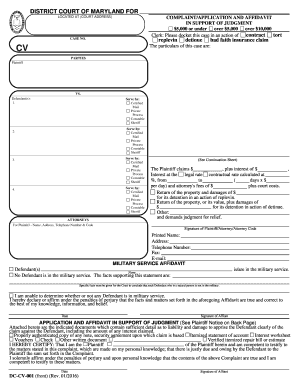
Is case in an action of CASE NO. replevin detinue bad faith insurance claim The particulars of this case are: CV PARTIES Plaintiff VS. Defendant(s): 1. Serve by: Certified Mail Private Process Constable Sheriff Serve by: Certified Mail Private Process Constable Sheriff 2. Serve by: Certified Mail Private Process Constable Sheriff 3. Serve by: Certified Mail Private Process Constable Sheriff 4. ATTORNEYS (See Continuation Sheet) The Plaintiff claims $ , plus interest of $ , Intere.

How it works

  1. Open form

    Open form follow the instructions

  2. Easily sign form

    Easily sign the form with your finger

  3. Share form

    Send filled & signed form or save

How to fill out the MD DC-CV-001 online

Filling out the MD DC-CV-001 is a crucial step for those seeking a judgment by affidavit or default in the District Court of Maryland. This guide will walk you through the process of completing the form online, ensuring all necessary information is provided accurately.

Follow the steps to successfully complete the MD DC-CV-001 form.

  1. Click ‘Get Form’ button to obtain the MD DC-CV-001 form and open it in the editor.
  2. Begin by filling in the court address where your case will be filed along with the assigned case number. Specify the action type, such as replevin or detinue, in the provided field.
  3. In the 'Parties' section, fill in your information as the Plaintiff and the details of the Defendant(s). Include their names and specify the method of service selected, such as Certified Mail or Private Process.
  4. Clearly state the claim amount by filling in the space provided for the monetary amount, along with any additional claims for interest and attorney's fees.
  5. Complete the Military Service Affidavit section. Indicate whether any Defendant is in military service, providing supporting facts if applicable.
  6. Affirm your declaration by signing and dating the form, certifying your claims are truthful and made on personal knowledge.
  7. Attach any required documents that substantiate your claims. Indicate these attachments in the specified area of the form.
  8. Once all fields are filled and documents attached, save your changes, then download, print, or share the completed form as needed.

Start completing your MD DC-CV-001 form online today to initiate your legal process.

Get form

Experience a faster way to fill out and sign forms on the web. Access the most extensive library of templates available.
Get form

Related content

Public Notices -DC-CV-001 & DC-CV-106 Forms
Feb 23, 2023 — PUBLIC NOTICE - DC-CV-001 COMPLAINT/APPLICATION IN SUPPORT OF JUDGMENT...
Learn more
Housing Cases
File the Complaint form (DC-CV-001). Include any documents you intend to present as...
Learn more
MDS-DM2 Series Instruction Manual
This manual describes handling and safety for the AC servo/spindle. Read before use. Turn...
Learn more

Related links form

CA FW-012 2015 CA FW-012 S 2015 CA FW-012-GC 2015 CA G-01 Order 2014

Questions & Answers

Get answers to your most pressing questions about US Legal Forms API.

Contact support

Filling out a statement of claim form involves providing detailed information about your case. Begin by gathering all relevant evidence, then clearly describe the nature of your claim, the amount claimed, and any supporting documentation. Make sure to fill out the MD DC-CV-001 form accurately, as this is vital for the court's understanding of your situation. US Legal Forms offers templates that can simplify this process.

Representing yourself in small claims court can be straightforward. Begin by understanding the rules and procedures of your local court, as these may vary. Prepare all necessary documents related to your claim, including evidence and witness statements. Utilizing resources like US Legal Forms can simplify this process and help you navigate the MD DC-CV-001 form requirements.

While small claims court offers accessibility, there are some disadvantages to consider. The process may limit your ability to appeal a decision, and legal representation is often not permitted, which could challenge your case’s effectiveness. Additionally, small claims courts have strict procedural rules that you must follow. Resources like uslegalforms can help you navigate these challenges in your MD DC-CV-001 case.

The lowest amount you can sue for in small claims court typically falls between $1 and $10,000, depending on the state's regulations. Knowing the specific limits in Maryland is crucial for your MD DC-CV-001 case. If your claim amount is lower than the court's threshold, you may need to explore other legal options. For detailed guidance, consider visiting uslegalforms to understand your rights.

Winning in small claims court can vary widely, but studies suggest that about 50% of cases result in a favorable outcome for the claimant. Your chances can increase significantly if you prepare thoroughly and present your evidence effectively during the MD DC-CV-001 hearing. Factors like the strength of your case and how well you articulate your claims play essential roles. Utilizing platforms like uslegalforms can boost your confidence and preparation.

Determining if you should pursue small claims court for $500 depends on your individual situation. Generally, if you believe you have a strong case and can present clear evidence, it can be worth your time. The process is designed to be straightforward, allowing you to represent yourself without an attorney. Additionally, using resources like uslegalforms can help you navigate the MD DC-CV-001 process more easily.

To file a breach of contract claim in Maryland, you'll need to start by completing the MD DC-CV-001 form. You must present evidence demonstrating the existence of a contract, as well as the breach itself. By filing your claim with the appropriate court, you initiate the legal process to seek resolution and potential damages related to the breach.

Filing a civil lawsuit without a lawyer is possible by following specific steps. You can fill out forms, such as the MD DC-CV-001, which provide the necessary information to the court. Once completed, you must file the form with your local court, ensuring that you understand the relevant rules and procedures that apply to your case.

The intent to defend, commonly filed using the MD DC-CV-001 form, is a legal document that notifies the court of your intention to contest a lawsuit. By filing this document, you are asserting your right to defend yourself against the claims made. This is an important step, as it allows you to present your side of the case in court.

Filing a small claim in the District Court of Maryland involves several steps, starting with filling out the required MD DC-CV-001 form. You then need to file this form along with any necessary fees at your local district court. It's a good idea to gather any supporting documents, such as receipts or contracts, to strengthen your case.

Get This Form Now!

Use professional pre-built templates to fill in and sign documents online faster. Get access to thousands of forms.
Get form
If you believe that this page should be taken down, please follow our DMCA take down processhere.

Industry-leading security and compliance

US Legal Forms protects your data by complying with industry-specific security standards.
  • In businnes since 1997
    25+ years providing professional legal documents.
  • Accredited business
    Guarantees that a business meets BBB accreditation standards in the US and Canada.
  • Secured by Braintree
    Validated Level 1 PCI DSS compliant payment gateway that accepts most major credit and debit card brands from across the globe.
Get MD DC-CV-001
Get form
  • Adoption
  • Bankruptcy
  • Contractors
  • Divorce
  • Home Sales
  • Employment
  • Identity Theft
  • Incorporation
  • Landlord Tenant
  • Living Trust
  • Name Change
  • Personal Planning
  • Small Business
  • Wills & Estates
  • Packages A-Z
  • Affidavits
  • Bankruptcy
  • Bill of Sale
  • Corporate - LLC
  • Divorce
  • Employment
  • Identity Theft
  • Internet Technology
  • Landlord Tenant
  • Living Wills
  • Name Change
  • Power of Attorney
  • Real Estate
  • Small Estates
  • Wills
  • All Forms
  • Forms A-Z
  • Form Library
  • Legal Hub
  • About Us
  • Help Portal
  • Legal Resources
  • Blog
  • Affiliates
  • Contact Us
  • Delete My Account
  • Site Map
  • Industries
  • Forms in Spanish
  • Localized Forms
  • State-specific Forms
  • Forms Kit
  • Real Estate Handbook
  • All Guides
  • Notarize
  • Incorporation services
  • For Consumers
  • For Small Business
  • For Attorneys
  • USLegal
  • FormsPass
  • pdfFiller
  • signNow
  • altaFlow
  • DocHub
  • Instapage
Form Packages
  • Adoption
  • Bankruptcy
  • Contractors
  • Divorce
  • Home Sales
  • Employment
  • Identity Theft
  • Incorporation
  • Landlord Tenant
  • Living Trust
  • Name Change
  • Personal Planning
  • Small Business
  • Wills & Estates
  • Packages A-Z
Form Categories
  • Affidavits
  • Bankruptcy
  • Bill of Sale
  • Corporate - LLC
  • Divorce
  • Employment
  • Identity Theft
  • Internet Technology
  • Landlord Tenant
  • Living Wills
  • Name Change
  • Power of Attorney
  • Real Estate
  • Small Estates
  • Wills
  • All Forms
  • Forms A-Z
  • Form Library
Customer Service
  • Legal Hub
  • About Us
  • Help Portal
  • Legal Resources
  • Blog
  • Affiliates
  • Contact Us
  • Delete My Account
  • Site Map
  • Industries
  • Forms in Spanish
  • Localized Forms
  • State-specific Forms
  • Forms Kit
Legal Guides
  • Real Estate Handbook
  • All Guides
Prepared for you
  • Notarize
  • Incorporation services
Our Customers
  • For Consumers
  • For Small Business
  • For Attorneys
Our Sites
  • USLegal
  • FormsPass
  • pdfFiller
  • signNow
  • altaFlow
  • DocHub
  • Instapage
Social Media
Call us now toll free:
+1 833 426 79 33
As seen in:
© Copyright 1999-2026 airSlate Legal Forms, Inc. 3720 Flowood Dr, Flowood, Mississippi 39232
  • Your Privacy Choices
  • Terms of Service
  • Privacy Notice
  • Content Takedown Policy
  • Bug Bounty Program